---
title: "Ecommerce Revenue Analytics in HitKeep | HitKeep"
description: "Track revenue, orders, products, audience location, network context, and attributable purchase sources in HitKeep with a GA4-inspired ecommerce event model."
canonical: "https://hitkeep.com/guides/analytics/ecommerce/"
---

# Ecommerce Revenue Analytics in HitKeep

HitKeep’s ecommerce analytics page is designed to feel familiar to teams coming from GA4 without importing GA4’s complexity wholesale. You track a small canonical set of ecommerce events, HitKeep stores them in the same tenant-isolated analytics database as the rest of your traffic data, and the dashboard turns them into revenue, order, product, source, city, provider, and ASN reporting.
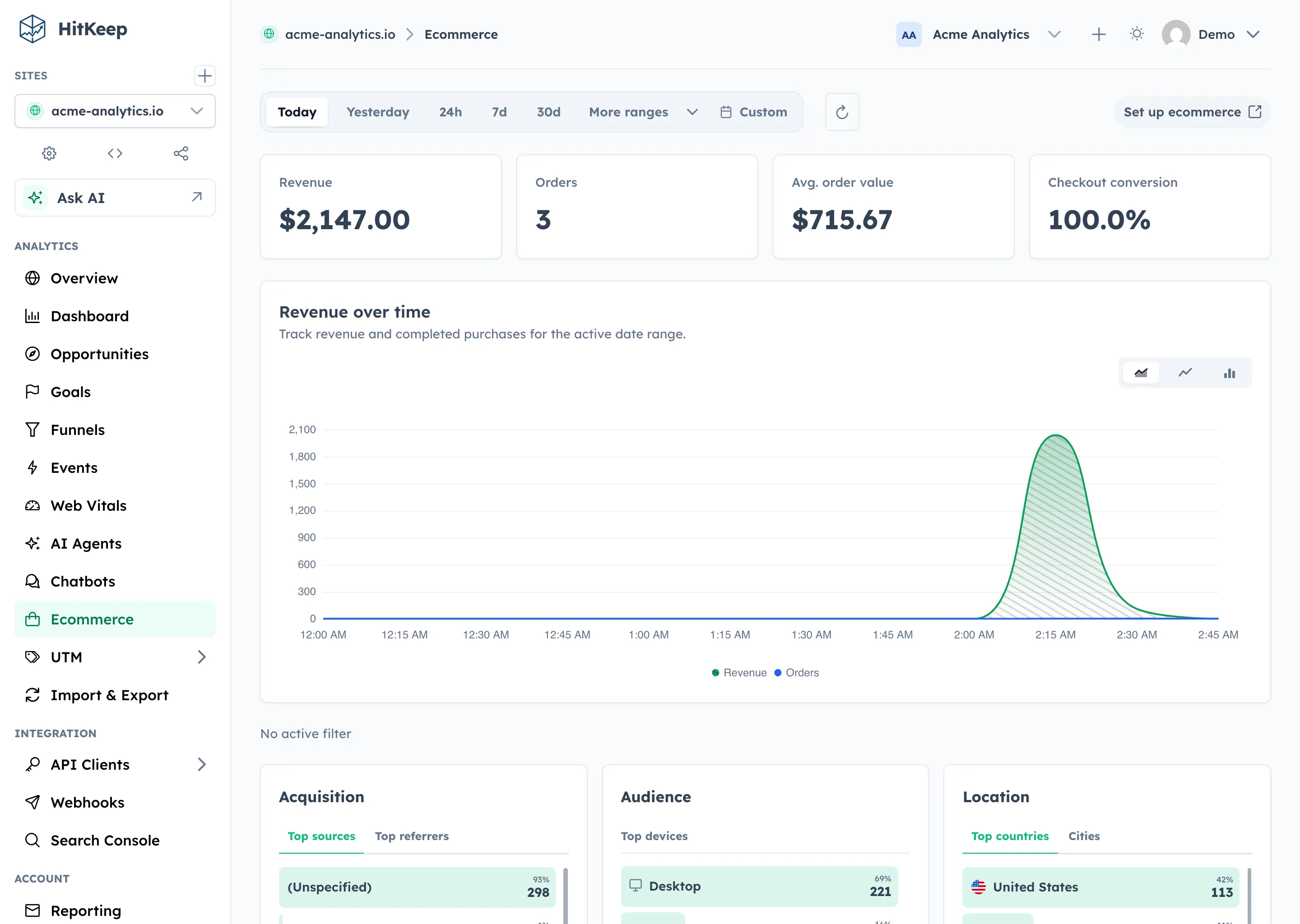
![HitKeep ecommerce analytics with revenue KPIs, chart, top products, attributed revenue sources, and checkout audience context](https://hitkeep.com/_astro/analytics-ecommerce.Bzrj2IdO_ZXU2ml.webp)

Revenue KPIs, revenue-over-time, top products, attributed sources, and checkout audience context on the Ecommerce page.

## What HitKeep Ecommerce Tracking Is

HitKeep ecommerce is:

- **GA4-inspired**: the canonical event names are `view_item`, `add_to_cart`, `begin_checkout`, and `purchase`
- **event-based**: no separate orders table or catalog service is required
- **self-hosted**: ecommerce data lives in the same per-team analytics storage as the rest of your site analytics
- **filterable**: the Ecommerce page respects the same date range and audience filters you already use across HitKeep

HitKeep ecommerce is **not**:

- a shopping cart
- an inventory backend
- a payment processor
- full GA4 ecommerce parity

The current ecommerce surface focuses on clean reporting for web revenue events: revenue, orders, average order value, checkout conversion, top products, revenue by source or campaign, and checkout audience aggregates for city, provider, and ASN.

## Canonical Event Model

Use these event names going forward:

- `view_item`
- `add_to_cart`
- `begin_checkout`
- `purchase`

### view_item

Use this when a visitor views a product detail page, pricing modal, or other product-specific surface.

```
window.hk?.event?.('view_item', {
  item_id: 'pro-plan',
  item_name: 'Pro Plan',
  category: 'subscription',
  price: 79,
  currency: 'USD',
});
```

### add_to_cart

Use this when a visitor explicitly adds an item, plan, or add-on to a cart or draft order.

```
window.hk?.event?.('add_to_cart', {
  item_id: 'team-seat-pack',
  item_name: 'Team Seat Pack',
  category: 'add-on',
  quantity: 2,
  price: 49,
  currency: 'USD',
});
```

### begin_checkout

Use this when the checkout step actually begins, not when a visitor merely lands on a pricing page.

```
window.hk?.event?.('begin_checkout', {
  checkout_id: 'chk_01js8c9z4m',
  value: 177,
  currency: 'USD',
  items_count: 3,
  coupon: 'SPRING25',
  items: [
    { item_id: 'pro-plan', item_name: 'Pro Plan', quantity: 1, price: 79 },
    { item_id: 'team-seat-pack', item_name: 'Team Seat Pack', quantity: 2, price: 49 },
  ],
});
```

### purchase

This is the event that powers revenue reporting.

Required fields:

| Field | Type | Required | Notes |
| --- | --- | --- | --- |
| transaction_id | string | Yes | Unique order or invoice identifier |
| value | number | Yes | Gross order value in the selected currency |
| currency | string | Yes | ISO currency code such as USD, EUR, GBP |

Recommended fields:

| Field | Type | Why it matters |
| --- | --- | --- |
| items | array | powers top-products reporting |
| items_count | number | improves summary reporting |
| coupon | string | allows coupon analysis later |
| tax | number | helpful for finance sanity checks |
| shipping | number | useful if you sell physical goods |

Example:

```
window.hk?.event?.('purchase', {
  transaction_id: 'ord_01js8ca7j4',
  value: 177,
  currency: 'USD',
  items_count: 3,
  coupon: 'SPRING25',
  tax: 0,
  shipping: 0,
  items: [
    { item_id: 'pro-plan', item_name: 'Pro Plan', quantity: 1, price: 79 },
    { item_id: 'team-seat-pack', item_name: 'Team Seat Pack', quantity: 2, price: 49 },
  ],
});
```

## Recommended items Shape

Each entry in `items` should use this shape:

```
{
  "item_id": "pro-plan",
  "item_name": "Pro Plan",
  "quantity": 1,
  "price": 79
}
```

Supported optional item fields:

- `item_category`
- `category`

HitKeep uses the `items` array for product aggregation. If `items` is missing, HitKeep falls back to top-level item fields such as `item_id` and `item_name`, but `items` is the format that preserves one or more products per order.

## Migration Compatibility

HitKeep accepts a small compatibility layer during ingestion and reporting so migrations are less brittle.

Accepted event aliases:

- `product_viewed` → `view_item`
- `checkout_started` → `begin_checkout`
- `order_completed` → `purchase`

Accepted property aliases:

- `order_id` → `transaction_id`
- `amount` → `value`
- `product_id` → `item_id`
- `product_name` → `item_name`

These aliases are supported to make migrations easier. The canonical contract remains the four GA4-inspired event names above.

## Browser Tracking Example

```
<script async src="https://analytics.example.com/hk.js"></script>
<script>
  function trackCheckoutStart(cart) {
    window.hk?.event?.('begin_checkout', {
      checkout_id: cart.id,
      value: cart.total,
      currency: cart.currency,
      items_count: cart.items.reduce((sum, item) => sum + item.quantity, 0),
      coupon: cart.coupon ?? undefined,
      items: cart.items.map((item) => ({
        item_id: item.id,
        item_name: item.name,
        quantity: item.quantity,
        price: item.price,
      })),
    });
  }
<\/script>
```

## Server-Side Tracking Example

Use the ingest API if you only trust confirmed orders from the server:

```
curl -X POST https://analytics.example.com/api/ingest/server/event \
  -H "Authorization: Bearer $HITKEEP_API_TOKEN" \
  -H "Content-Type: application/json" \
  -d '{
    "name": "purchase",
    "url": "https://shop.example.com/checkout/success",
    "timestamp": "2026-04-03T12:34:10Z",
    "visitor_ip": "203.0.113.42",
    "user_agent": "Mozilla/5.0",
    "properties": {
      "transaction_id": "ord_01js8ca7j4",
      "value": 177,
      "currency": "USD",
      "items_count": 3,
      "items": [
        { "item_id": "pro-plan", "item_name": "Pro Plan", "quantity": 1, "price": 79 },
        { "item_id": "team-seat-pack", "item_name": "Team Seat Pack", "quantity": 2, "price": 49 }
      ]
    }
  }'
```

The `url` field should reflect the page where the event logically happened. HitKeep uses the surrounding session and hit data for attribution and filters.

Use [Server-Side Tracking](https://hitkeep.com/guides/tracking/server-side-tracking/) for the full authenticated ingest contract. If the order came from an AI-referred visit, the same session attribution can make that source visible in ecommerce reporting. AI crawler fetches are tracked separately in [AI Visibility Analytics](https://hitkeep.com/guides/analytics/ai-visibility/).

## What the Ecommerce Page Shows

For the selected site and time range, HitKeep currently reports:

- **Revenue**
- **Orders**
- **Average order value**
- **Checkout conversion**
- **Revenue over time**
- **Top products**
- **Revenue sources**
- **Checkout city, provider, and ASN**

The page is intentionally opinionated. It is meant to answer practical operational questions quickly:

- Which products are driving revenue?
- Which sources and campaigns are producing orders?
- Which city, provider, and ASN contexts show up most often at checkout?
- How many checkouts become purchases?
- Is revenue growing or falling over time?

## Filters

The Ecommerce page respects the same site-level filters you already use elsewhere:

- date range
- UTM source
- UTM medium
- UTM campaign
- country
- city
- provider
- ASN
- device
- referrer

It also adds a product-level filter:

- `item_id`
- `item_name`

This lets you answer questions like:

- revenue from `google / cpc`
- purchases from Germany
- checkout starts from Berlin or one provider network
- checkout conversion on mobile
- revenue for one specific product

## Multi-Tenant Behavior

No special setup is required for teams.

Ecommerce events are stored in the same tenant-local analytics store as the rest of your team analytics:

- shared control-plane metadata stays in `hitkeep.db`
- ecommerce events, purchases, and rollups live in the tenant analytics database

That means team isolation, transfer rules, and backup behavior match the rest of the analytics system automatically.

## Common Mistakes

### Missing currency

`purchase` requires `currency`. Without it, the event cannot be interpreted as valid revenue.

### Missing transaction_id

If you do not send a real order identifier, purchase deduplication and debugging become much harder.

### Sending a string instead of a number for value

Use a numeric JSON value, not `"177"` as a string.

### Forgetting items

Revenue summary still works without `items`, but your product reporting becomes much weaker.

### Double-firing purchase

Do not send `purchase` on both client-side confirmation and server-side webhook completion unless you explicitly deduplicate upstream.

## API

All ecommerce endpoints are site-scoped and require Site Viewer access or stronger.

```
# Summary KPIs
GET /api/sites/{id}/ecommerce?from=2026-03-01T00:00:00Z&to=2026-03-31T23:59:59Z

# Revenue and orders over time
GET /api/sites/{id}/ecommerce/timeseries?from=...&to=...

# Top products
GET /api/sites/{id}/ecommerce/products?from=...&to=...&limit=10

# Revenue sources
GET /api/sites/{id}/ecommerce/sources?from=...&to=...&limit=10
```

All endpoints also support:

- repeated `filter=type:value` query parameters
- `item_id`
- `item_name`

Example:

```
GET /api/sites/{id}/ecommerce?from=...&to=...&filter=utm_source:google&filter=device:desktop
GET /api/sites/{id}/ecommerce/products?from=...&to=...&item_id=pro-plan
```

See the [REST API reference](https://hitkeep.com/api/) for the full schema.

## Seed Data

`./hitkeep seed` now generates a realistic ecommerce funnel automatically:

- `view_item`
- `add_to_cart`
- `begin_checkout`
- `purchase`

plus a compatibility `purchase_completed` event so Goals, Funnels, and Events views remain fully demoable out of the box.

## FAQ

### Is this fully compatible with GA4 ecommerce?

No. It is intentionally **GA4-inspired**, not a full GA4 clone. The event names are familiar, but the reporting surface is intentionally smaller and easier to operate.

### Does HitKeep support refunds yet?

Not currently.

### Does HitKeep support subscriptions, MRR, or churn reporting?

Not currently.

### Do I need a separate ecommerce database?

No. Ecommerce analytics uses the existing HitKeep analytics storage.

## Related

- [Custom Events](https://hitkeep.com/guides/tracking/custom-events/)
- [Goals](https://hitkeep.com/guides/analytics/goals/)
- [Funnels](https://hitkeep.com/guides/analytics/funnels/)
- [Opportunity Recommendations](https://hitkeep.com/guides/analytics/opportunities/)
- [UTM Parameters](https://hitkeep.com/guides/tracking/utm-parameters/)
- [HitKeep Agent Skills](https://hitkeep.com/guides/integrations/hitkeep-agent-skills/)
- [AI Visibility Analytics](https://hitkeep.com/guides/analytics/ai-visibility/)
- [AI Chatbot Analytics](https://hitkeep.com/guides/analytics/ai-chatbot-analytics/)
- [REST API Reference](https://hitkeep.com/api/)

[Previous Funnels](https://hitkeep.com/guides/analytics/funnels/)[Next Web Vitals analytics](https://hitkeep.com/guides/analytics/web-vitals/)
