
The HitKeep AI Agents dashboard brings three related but separate signals together. Browser tracking captures AI-referred human visits, server-side ingest captures AI crawler fetches, and assistant instrumentation captures on-site AI activity.
- What AI crawlers fetch from your site
- Which of those fetched pages later attract AI-referred human visits
- What visitors do with an instrumented assistant
Use the activity provenance to distinguish tracked requests from forwarded fetch records. A crawler fetch is not a human referral or a unique visitor.
For the broader measurement model across rendered sessions, agent navigation, remote retrieval, and backend outcomes, read AI Browser Tracking in 2026.
What the dashboard shows
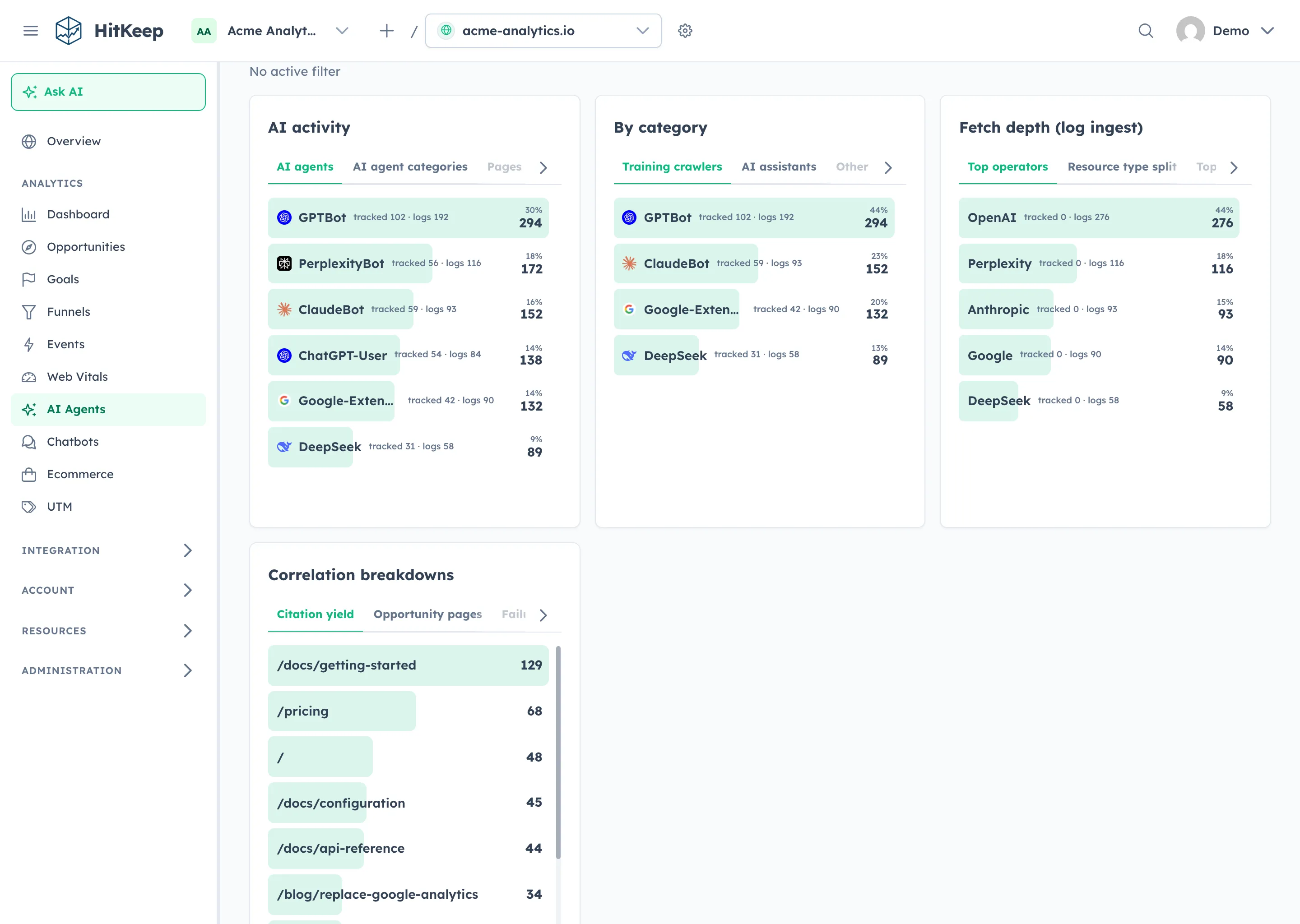
Section titled “What the dashboard shows”The AI Agents page combines these reporting views:
- Unified AI activity with combined request counts and breakdowns by agent, bot category, path, and referral source
- Fetch depth with unique paths, unique assistants, 4xx and 5xx rates, response time, and bytes served from forwarded logs
- Correlation analytics with summary KPIs plus full-width tabbed views for citation yield, opportunity pages, and failure hotspots
- Assistant activity with request, referral, crawl, and pageview context plus filterable assistant events
The unified report’s activity count and each ranked row’s value equal tracked_hits + fetch_count. Each row retains both provenance fields. Operator families and resource types exist only in fetch records; referral sources exist only in tracked hits, so the other side contributes zero for those breakdowns. Error rates, response time, and transferred bytes describe fetch records only.
The page supports filtering by assistant, operator family, and resource type so you can answer questions like:
- What is OpenAI fetching most often?
- Which document fetches later attract AI-referred visits?
- Where are Anthropic or Perplexity fetches hitting 404s?
What the correlation report shows
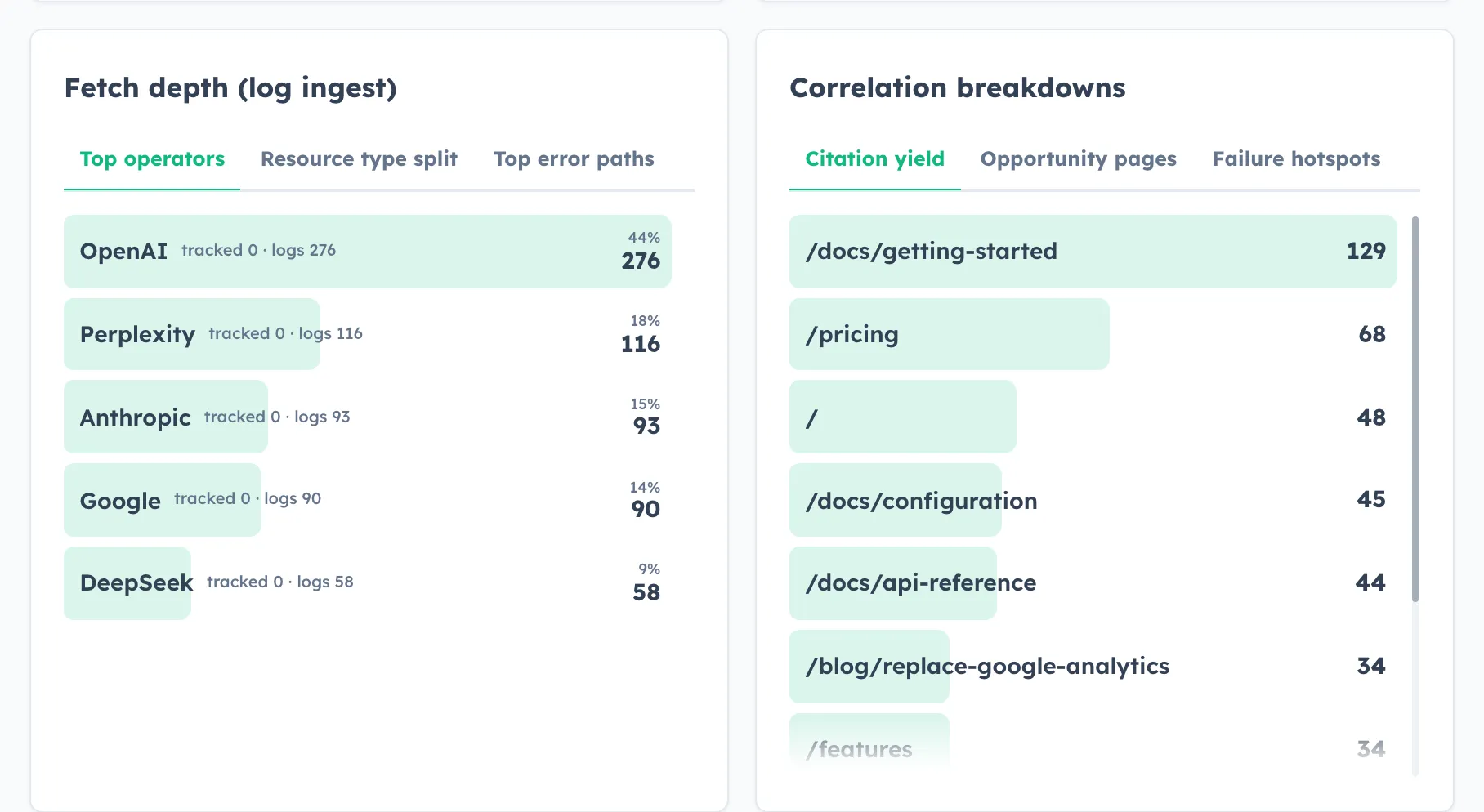
Section titled “What the correlation report shows”The AI fetch correlation report is a directional report.
- The fetch side comes from server-side AI fetch records collected through
POST /api/sites/{id}/ingest/ai-fetch. - The visit side comes from normal human pageviews where the referrer matches a known AI assistant such as ChatGPT or Perplexity.
- Correlation happens when a fetched path later receives an AI-referred visit within the selected window.
This is intentionally not strict attribution. It is meant to answer:
“When these AI bots fetch a page, does that page later generate AI-origin traffic?”
It does not claim:
“This exact GPTBot fetch caused this exact ChatGPT referral.”
What Google says about AI Search
Section titled “What Google says about AI Search”Google says generative AI features in Search are rooted in the same core Search ranking and quality systems as regular Search. That makes AI Visibility a reporting workflow, not a separate “AI Search optimization” track.
Use HitKeep to find pages that deserve normal, people-first SEO work:
- Make the page’s main answer clear for human readers.
- Keep important content crawlable, visible, and easy to navigate.
- Improve titles, headings, internal links, page experience, freshness, and reliability.
- Use structured data only when it accurately matches visible page content.
- Fix 4xx, 5xx, redirect, and blocked-path issues where AI crawlers are already interested.
Google does not require llms.txt, content chunking, special AI schema, or AI-only rewrites for AI Overviews or AI Mode. HitKeep can show crawler interest and later AI-referred visits, but it cannot prove ranking position, citation, or referral causality.
For the baseline guidance, read Google’s generative AI features guide, AI features and your website, and helpful, reliable, people-first content guidance.
Filter semantics
Section titled “Filter semantics”For the unified activity report at GET /api/sites/{id}/ai-activity, filters apply according to the data each source carries:
| Filter | Tracked hits | Fetch records |
|---|---|---|
path, ai_bot, ai_bot_category | Filtered | Filtered by path, assistant name, or category |
ai_source | Filtered by referral source | Excluded because fetch records have no referrer |
| Hit-only dimensions such as country, device, or browser | Filtered | Remain visible without that filter |
Goal and funnel session cohorts narrow tracked hits and the pageview denominator, including series and comparison windows; they never filter fetch records. The pageview denominator uses non-AI filters only, so drilling into an AI dimension does not redefine the segment’s pageview total.
In the separate correlation report, assistant filters such as assistant_name and assistant_family apply to the fetch side only.
That means:
- filtering to
OpenAIlimits the fetched rows to OpenAI bots - correlated visit counts still include any later AI-referred human visits on the same path
This is the intended product behavior. It keeps the report focused on downstream visibility rather than implying deterministic bot-to-referrer attribution.
Metrics in the report
Section titled “Metrics in the report”GET /api/sites/{id}/ai-fetch/correlation returns four sections:
summary: total fetches, fetched paths, correlated paths, later AI-referred visits, and uncorrelated fetchescitation_yield: paths with the strongest fetch-to-visit payoffopportunity_pages: heavily fetched pages with weak downstream AI traffic and/or elevated errorsfailure_hotspots: assistant and path-prefix combinations with concentrated 4xx/5xx issues
Send AI fetch data into HitKeep
Section titled “Send AI fetch data into HitKeep”The browser tracker records AI-referred human visits, but it cannot reliably record AI crawler fetches. Most crawlers do not execute hk.js.
To populate the fetch side of this report, forward edge, proxy, CDN, or origin log records to POST /api/sites/{id}/ingest/ai-fetch. The provider-neutral setup guide is AI Fetch Ingest. The AWS guide is one implementation for CloudFront logs.
Example request
Section titled “Example request”curl "https://your-hitkeep.example/api/sites/{id}/ai-fetch/correlation?\from=2026-03-01T00:00:00Z&to=2026-03-31T23:59:59Z&\assistant_family=OpenAI&window_days=30" \ -H "Authorization: Bearer YOUR_API_TOKEN"Example response
Section titled “Example response”{ "summary": { "total_fetches": 124, "fetched_paths": 38, "correlated_paths": 11, "ai_referred_visits": 27, "uncorrelated_fetches": 73 }, "citation_yield": [ { "path": "/guides/ai-visibility", "assistant_name": "GPTBot", "fetch_count": 8, "ai_referred_visits": 5, "citation_yield_pct": 62.5 } ], "opportunity_pages": [ { "path": "/pricing", "fetch_count": 12, "ai_referred_visits": 1, "error_requests": 3, "error_rate_pct": 25 } ], "failure_hotspots": [ { "assistant_name": "ClaudeBot", "path_prefix": "/docs", "total_requests": 9, "error_requests": 4, "error_rate_pct": 44.44 } ]}Recommended interpretation
Section titled “Recommended interpretation”Use the report like this:
- High fetches + high AI-referred visits: pages where crawler interest and downstream AI-referred demand overlap
- High fetches + low visits: pages worth reviewing for helpful content, titles, structure, freshness, and reliability
- High error hotspots: technical issues that may reduce AI visibility even when crawlers are interested
The safest mental model is:
fetches show AI discovery, referrals show downstream human demand, and correlation shows where those two signals overlap.
Demo data
Section titled “Demo data”If you seed a local demo instance, the AI Visibility page is designed to open with realistic assistant mixes, resource-type filters, and populated correlation tabs right away instead of an empty shell.
Related
Section titled “Related”- How AI browsers affect web analytics
- AI Fetch Ingest
- AI Fetch on AWS
- CloudFront AI crawler tracking
- AI visibility reporting for SEO agencies
- AI visibility agency pilot kit
- AI visibility reporting template
- AI performance landing page
- Read-only MCP Server for Web Analytics
- HitKeep Agent Skills
- Opportunity Recommendations
- API Clients