
AI Chatbot Analytics Reporting in HitKeep
Este conteúdo não está disponível em sua língua ainda.
AI Chatbot Analytics shipped in HitKeep 2.2.0. The dashboard is built on top of structured custom events, so teams can instrument support bots, docs bots, shopping assistants, and AI search experiences without deploying a separate analytics pipeline.
The report is built on top of normal custom events, which keeps the instrumentation model simple and portable.
This page is not about inbound AI traffic. It measures your own on-site conversational assistant — the widget you shipped — from assistant.* events your code sends. AI agents crawling your site and humans arriving from ChatGPT or Perplexity are the opposite direction of traffic and are reported on the AI Agents page instead. See AI Visibility Analytics for that side.
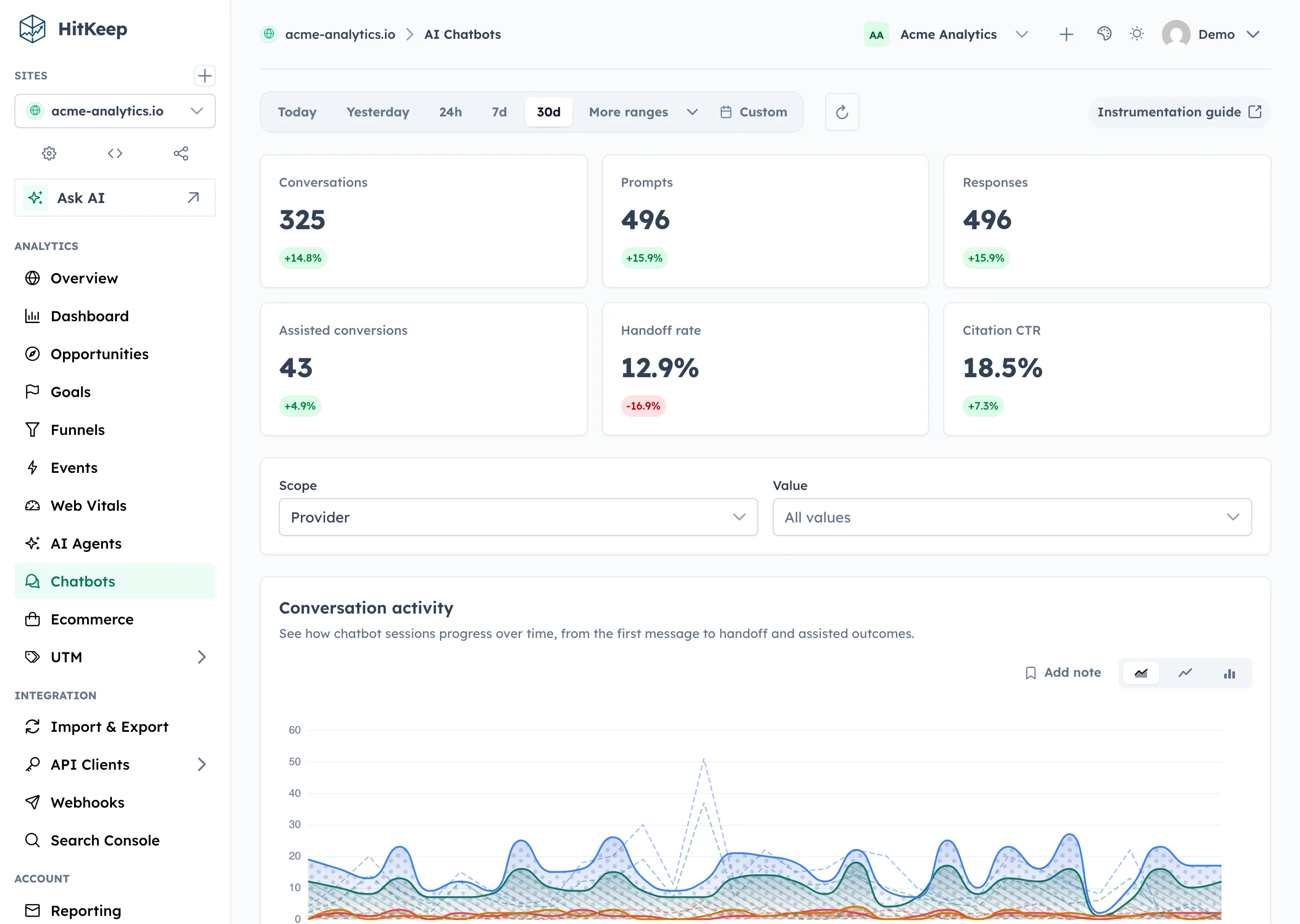
What this report measures
Section titled “What this report measures”The Chatbots page (labeled Chatbots in the sidebar, route /ai-chatbots) focuses on on-site chatbot usage and outcomes:
- conversation starts
- prompts sent
- responses rendered
- citation clicks
- handoff requests
- assisted conversions
Because this is event-based analytics, the report supports the same time ranges, audience context, and share links as the rest of the dashboard.
Recommended event schema
Section titled “Recommended event schema”Use these event names consistently:
| Event name | When to send it | Recommended properties |
|---|---|---|
assistant.chat_started | User opens or starts a chatbot session | bot_id, provider, model, surface |
assistant.message_sent | User submits a prompt | conversation_id, message_index, intent |
assistant.response_rendered | A model response is shown to the user | conversation_id, message_index, response_ms, tool_count, citation_count |
assistant.citation_clicked | User clicks a cited source or linked answer | conversation_id, citation_url, citation_index |
assistant.handoff_requested | User asks for a human or the bot escalates | conversation_id, message_index, reason |
assistant.goal_assisted | A conversion happens during or after the chatbot flow | conversation_id, goal_name, goal_value |
Property guidance
Section titled “Property guidance”Keep the payload metadata-focused.
- Use stable identifiers such as
bot_idandconversation_id. - Prefer short categorical values like
provider=openaiorsurface=support-widget. - Store performance and usage metrics like
response_ms,tool_count, andcitation_count. - Do not send raw prompt or response bodies by default. Structured metadata is usually enough and is much safer from a privacy perspective.
Browser example
Section titled “Browser example”<script> const conversationId = crypto.randomUUID();
window.hk?.event?.('assistant.chat_started', { bot_id: 'support-bot', provider: 'openai', model: 'gpt-4.1-mini', surface: 'help-center' });
window.hk?.event?.('assistant.message_sent', { conversation_id: conversationId, message_index: 1, intent: 'billing' });
window.hk?.event?.('assistant.response_rendered', { conversation_id: conversationId, message_index: 1, response_ms: 842, tool_count: 1, citation_count: 2 });<\/script>What the dashboard shows
Section titled “What the dashboard shows”The Chatbots page groups these events into a dedicated workflow:
- KPI cards for conversation volume, prompts, responses, assisted conversions, handoff rate, and citation CTR
- timeseries chart for conversation starts, responses, handoffs, and assisted conversions
- breakdown panels for intents, providers, and surfaces
- audience context such as top pages, sources, devices, countries, city, provider, and ASN
You can also scope the report by provider, bot_id, surface, or model.
Recommended implementation pattern
Section titled “Recommended implementation pattern”- Start by sending
assistant.chat_startedandassistant.message_sent. - Add
assistant.response_renderedonce you can measure latency and citations. - Add
assistant.handoff_requestedandassistant.goal_assistedto connect usage with support and conversion outcomes. - Keep property names stable so dashboard filters remain useful over time.