
HitKeep vs Umami: Self-Hosted Analytics Alternative
Este conteúdo não está disponível em sua língua ainda.
HitKeep is the better Umami alternative when your main requirement is analytics you can run as one binary, with managed EU or US cloud available, open exports, and newer reporting for Search Console, AI visibility, ecommerce, QR campaigns, Web Vitals, Opportunities, and governed MCP access. Umami is stronger when you need behavior analytics such as journeys, retention, session replays, heatmaps, and its mature hosted cloud product.
That is the practical split. Choose the tool based on the reports you need every week and the stack you are willing to operate.
Best Fit
Section titled “Best Fit”Choose HitKeep if you want:
- a self-hosted Umami alternative without an external SQL database
- one Linux binary with embedded DuckDB and NSQ
- managed analytics cloud with an explicit EU or US region choice
- automatic outbound click, file download, and form submit events
- goals, funnels, ecommerce, UTM reporting, Web Vitals, and QR campaign analytics
- Google Search Console aggregate imports, AI visibility, and saved Opportunities
- read-only MCP reporting through scoped API client tokens
- JSON, CSV, Parquet, NDJSON, and XLSX takeout where supported
Choose Umami if you want:
- journeys and retention reports
- session replays and heatmaps
- revenue and attribution reports inside Umami’s model
- a broader behavior analytics surface today
- a hosted product with more time in market
Fast validation path: start in HitKeep Cloud, run HitKeep beside Umami for one site, and compare the reports your team actually uses. Operator path: use the self-hosted installation guide when the deciding factor is reducing runtime dependencies.
What Changed Since Older Umami Comparisons
Section titled “What Changed Since Older Umami Comparisons”Older comparison pages often describe Umami as a lightweight pageview dashboard. That is no longer accurate.
Current Umami docs cover sessions, events, compare, breakdowns, goals, funnels, journeys, retention, UTM analytics, revenue, attribution, replays, heatmaps, performance, share URLs, teams, and cloud email reports.
That makes the current question more specific:
- Do you want a broader analytics product on a Node.js application and supported SQL database?
- Do you want a smaller operator-controlled analytics product with stronger self-hosting, exports, Search Console reporting, AI visibility, and assistant-safe access?
HitKeep is not trying to match every Umami behavior report. It is trying to make web analytics, conversion reporting, privacy-aware operations, and governed access easier to run and easier to export.
When HitKeep Belongs On The Shortlist
Section titled “When HitKeep Belongs On The Shortlist”HitKeep belongs on the shortlist when the search is narrower than “Umami alternative”:
- self-hosted Umami alternative without PostgreSQL, MySQL, ClickHouse, Redis, or Kafka
- single-binary web analytics for a small VPS
- privacy-conscious analytics with Google Search Console import
- AI visibility analytics for ChatGPT, Perplexity, Claude, and other assistant referrals
- ecommerce analytics with purchase, checkout, add-to-cart, and product-view events
- QR campaign analytics for offline-to-web attribution
- open-source analytics with MCP access for internal AI assistants
- WordPress analytics with automatic outbound click, file download, and form tracking
- managed EU or US cloud analytics with a self-hosting path later
Those are the searches where HitKeep’s current product shape matters.
Quick-Scan Feature Matrix
Section titled “Quick-Scan Feature Matrix”| Feature | HitKeep | Umami v3 |
|---|---|---|
| Self-hosted runtime | One Go binary, about 100 MB for current Linux release builds | Node.js application plus a supported SQL database |
| Core external services | None for core analytics. DuckDB and NSQ are embedded. | External database required |
| Managed cloud | EU or US HitKeep Cloud | Umami Cloud |
| Cookie-less analytics | Yes. The tracker sets no analytics cookies. | Yes |
| Browser session continuity | sessionStorage opaque tuple |
See Umami privacy docs for current behavior |
| Automatic events | outbound_click, file_download, and form_submit |
Event tracking is supported |
| Custom events and goals | Yes | Yes |
| Funnels | Yes | Yes |
| Journeys | No | Yes |
| Retention reports | No | Yes |
| Session replays | No | Yes |
| Heatmaps | No | Yes |
| Performance reporting | Opt-in Web Vitals p75 for LCP, INP, CLS, FCP, and TTFB | Performance reports |
| Ecommerce and revenue | GA4-inspired view_item, add_to_cart, begin_checkout, and purchase events |
Revenue reports |
| Attribution | Focused source, UTM, campaign, QR, and session attribution | Attribution reports |
| Google Search Console | Imports finalized aggregate Search Analytics rows | Not documented in reviewed sources |
| AI visibility analytics | AI crawler fetches, AI-referred visits, and correlation reports | Not documented in reviewed sources |
| AI chatbot analytics | Structured on-site assistant events and assisted conversions | Not documented in reviewed sources |
| Opportunity recommendations | Saved detector-backed recommendations, optional AI enrichment | Not documented in reviewed sources |
| QR campaigns | Dynamic redirects, UTM fields, QR opens, artwork exports, QR-only shares, and takeout | Not documented in reviewed sources |
| Built-in spam filtering | Matomo and Spamhaus DROP / DROPv6 filtering for pageviews and events | Not documented in reviewed sources |
| Scheduled email reports | Yes | Umami Cloud |
| Shareable dashboards or URLs | Yes | Yes |
| Team access | Roles, site permissions, teams, and transfers | Teams and share URLs |
| API clients | Personal and team-owned scoped API clients | API access |
| MCP reporting | Optional read-only MCP route over scoped API client tokens | Not documented in reviewed sources |
| Data takeout | JSON, CSV, Parquet, NDJSON, and XLSX where supported | API export |
| Clustering and HA | Leader/follower with HashiCorp Memberlist | Depends on deployment and database operations |
Quick Answer
Section titled “Quick Answer”HitKeep is the better Umami alternative if your requirements sound like this:
- “We want self-hosted analytics, but we do not want to manage a database service.”
- “We need goals, funnels, ecommerce, UTM reports, Search Console, Web Vitals, and exports more than journeys or replay.”
- “We want AI visibility reporting without sending analytics rows to a separate SaaS by default.”
- “We want Claude, Cursor, or an internal assistant to read aggregate analytics through a scoped MCP token.”
- “We want to start managed, then keep the option to self-host the same product later.”
Umami is stronger if your requirements sound like this:
- “We need journeys, retention, session replay, and heatmaps now.”
- “We are comfortable running a Node.js application with a supported SQL database.”
- “We want a broad hosted analytics product and do not mind that the self-hosted stack has more moving parts.”
Where HitKeep Is Better
Section titled “Where HitKeep Is Better”1. Self-hosting is simpler
Section titled “1. Self-hosting is simpler”Umami self-hosting is a real application stack. You operate the Node.js app and a supported SQL database. That is reasonable for many teams, but it changes backups, upgrades, monitoring, and failure modes.
HitKeep keeps core analytics inside one process:
- one Linux binary
- embedded DuckDB for analytics storage
- embedded NSQ for ingest buffering
- no PostgreSQL, MySQL, Redis, Kafka, ClickHouse, or external queue required for core analytics
- local or S3-compatible backup and archive paths
See Facts and Limits for the current binary size, memory observations, storage paths, and caveats.
This matters when the team searching for an Umami alternative is really searching for “analytics we can run without turning it into a platform project.”
2. HitKeep has stronger operator control
Section titled “2. HitKeep has stronger operator control”HitKeep is built around visible operator controls:
- retention and Parquet archiving
- backups and restore
- open exports and takeout
- S3-compatible backup and archive paths
- team data isolation
- permissions and roles
- system status and audit views
For a self-hosted install, those controls are not decorative. They are the difference between a dashboard you installed and a system you can operate.
3. Search Console, AI visibility, and Opportunities live beside normal analytics
Section titled “3. Search Console, AI visibility, and Opportunities live beside normal analytics”HitKeep is useful when SEO reporting means more than counting referrers.
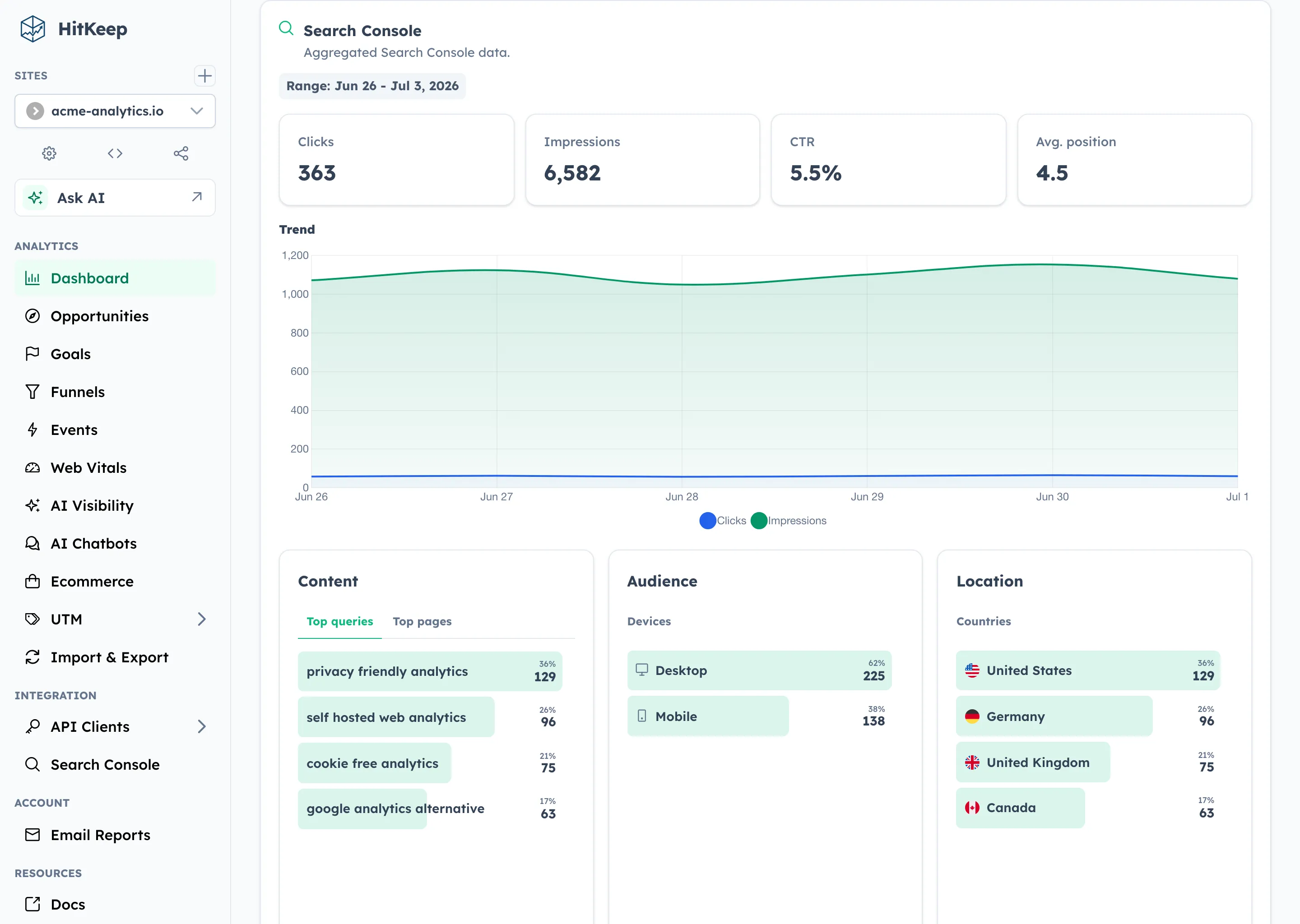
The Google Search Console integration imports finalized aggregate Search Analytics rows: clicks, impressions, CTR, average position, query, page, country, and device. It does not turn Search Console rows into HitKeep sessions, and it does not expose Search Console data in public share links.
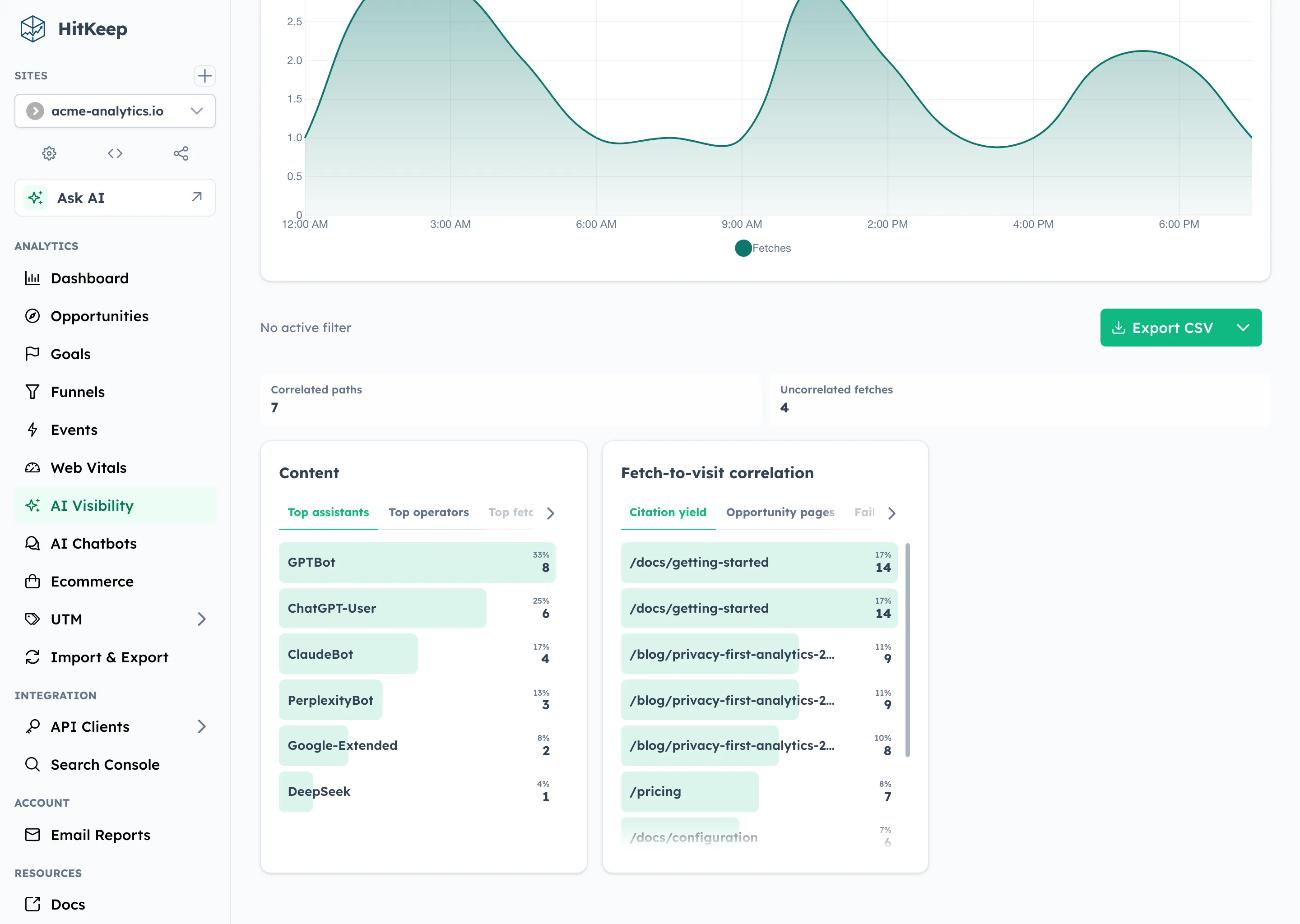
The AI Visibility dashboard keeps two signals separate:
- AI crawler fetches from server-side log forwarding
- AI-referred human visits from normal browser tracking
The correlation report shows where fetched pages later receive AI-referred visits. It is directional reporting, not strict attribution.
The Opportunities page turns existing analytics into saved recommendations. Current detector families cover ecommerce conversion, AI visibility, traffic quality, performance, search visibility, conversion-signal setup, goal suggestions, and funnel suggestions. Optional AI enrichment can help choose approved localized copy, but deterministic detectors decide what evidence exists.
4. Conversion tracking is first-class enough for small teams
Section titled “4. Conversion tracking is first-class enough for small teams”HitKeep covers the common conversion workflow without becoming a full product analytics suite:
- goals with flexible matching
- funnels for multi-step conversion paths
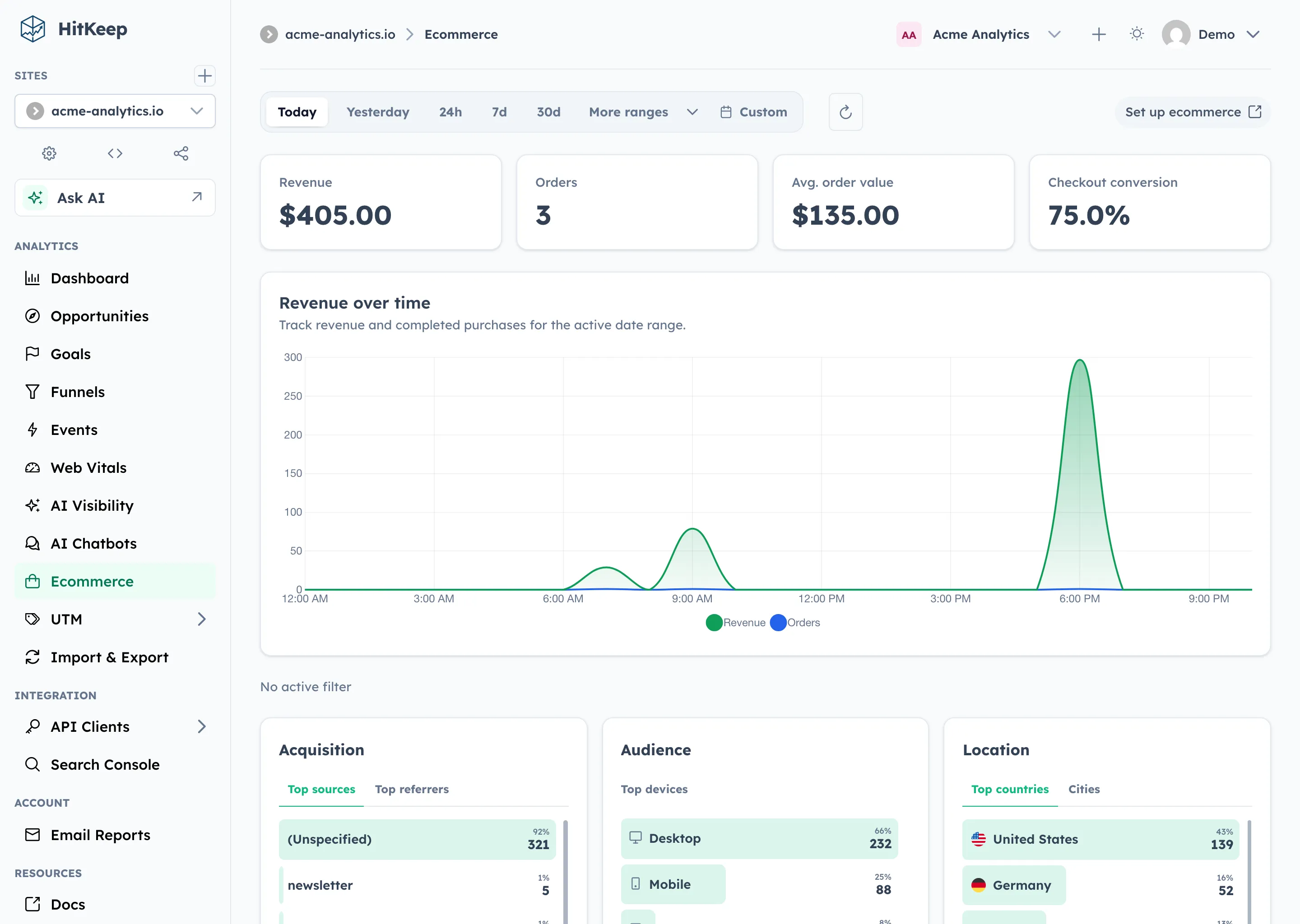
- ecommerce analytics for revenue, orders, average order value, checkout conversion, products, and source reporting
- period-over-period comparison with deltas
- UTM reporting
- landing and exit page analysis
The ecommerce event model is intentionally small: view_item, add_to_cart, begin_checkout, and purchase. That makes it easier to instrument than a warehouse-backed product analytics setup, while still covering the reports many site owners and agencies need.
5. Web Vitals sit in the same reporting workspace
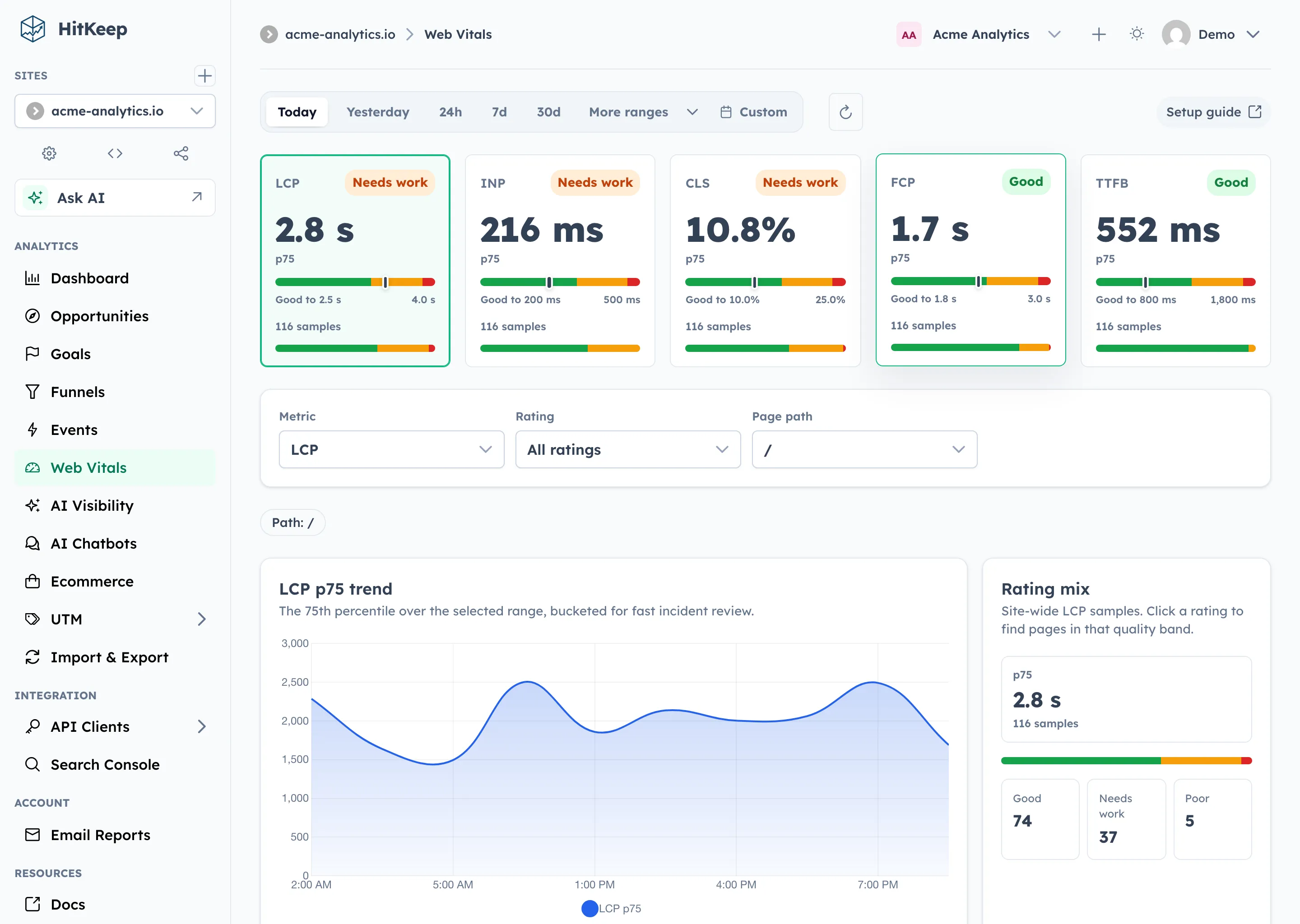
Section titled “5. Web Vitals sit in the same reporting workspace”HitKeep’s Web Vitals analytics are opt-in per site. The default tracker stays lean. When enabled, HitKeep loads a same-origin hk-vitals.js bundle and records LCP, INP, CLS, FCP, and TTFB samples with p75 reporting.
The report includes:
- p75 cards for each metric
- rating distributions
- page-level breakdowns
- browser, country, language, device, city, provider, and ASN context
- detector-backed performance Opportunities when enough evidence exists
This is useful when the decision is not just “how much traffic came in?” but “which pages should we fix first?”
6. QR campaigns cover offline-to-web analytics
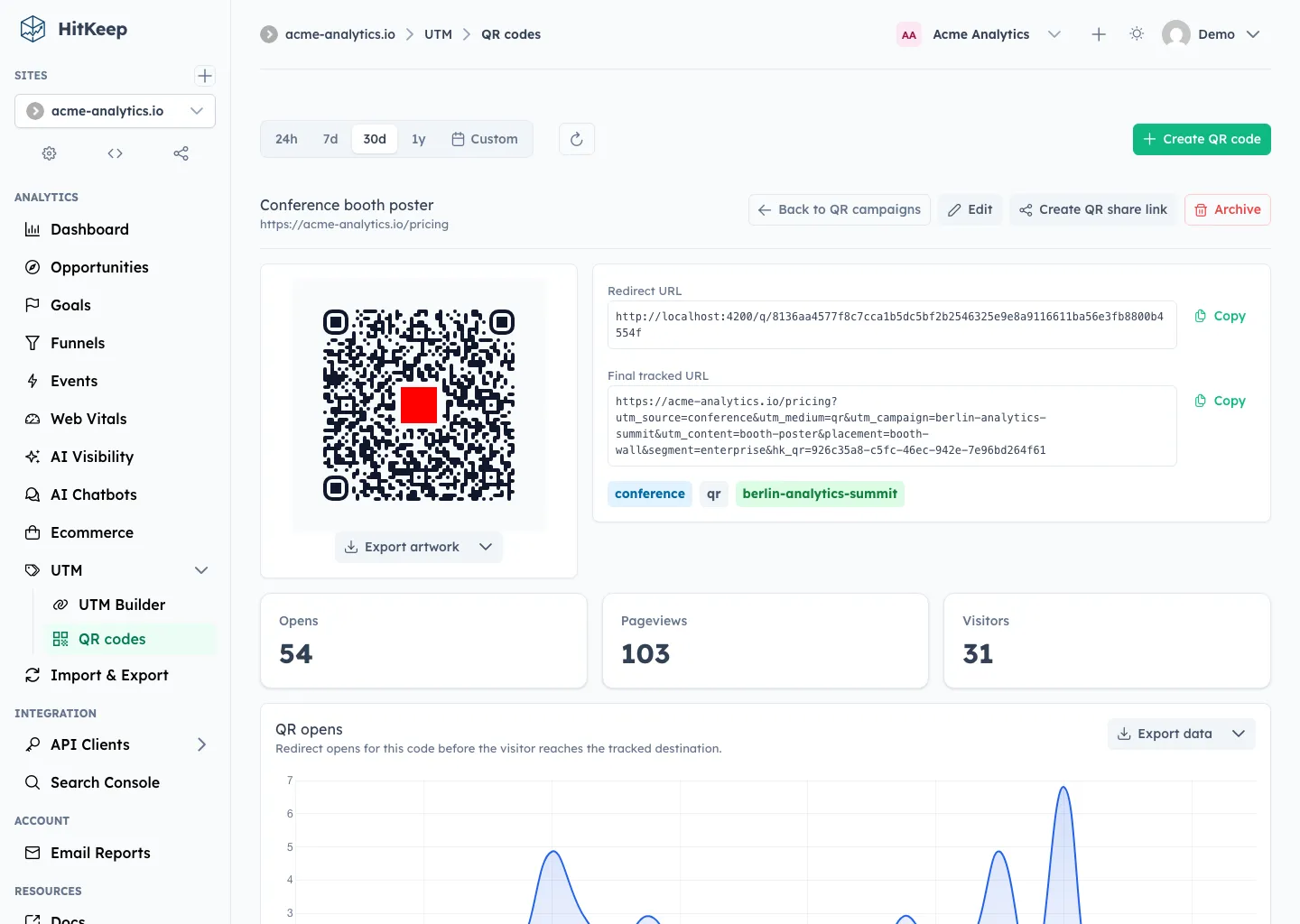
Section titled “6. QR campaigns cover offline-to-web analytics”HitKeep 2.8 added QR campaigns. The dashboard creates a dynamic /q/{token} redirect, adds UTM and custom query parameters, records QR opens, and separates QR opens from tracked pageviews.
That distinction is useful. A scan is not the same as a pageview. HitKeep shows both, then lets you export QR definitions, QR opens, and QR-filtered analytics rows where supported.
Use this when you need analytics for:
- flyers
- conference booth signs
- packaging
- menus
- catalog pages
- direct mail
- in-store campaigns
Umami may still capture the landing-page visit if its script runs on the destination page, but HitKeep gives the QR redirect, artwork export, QR-only share link, and QR-scoped takeout as product features.
7. MCP and API clients make assistant access explicit
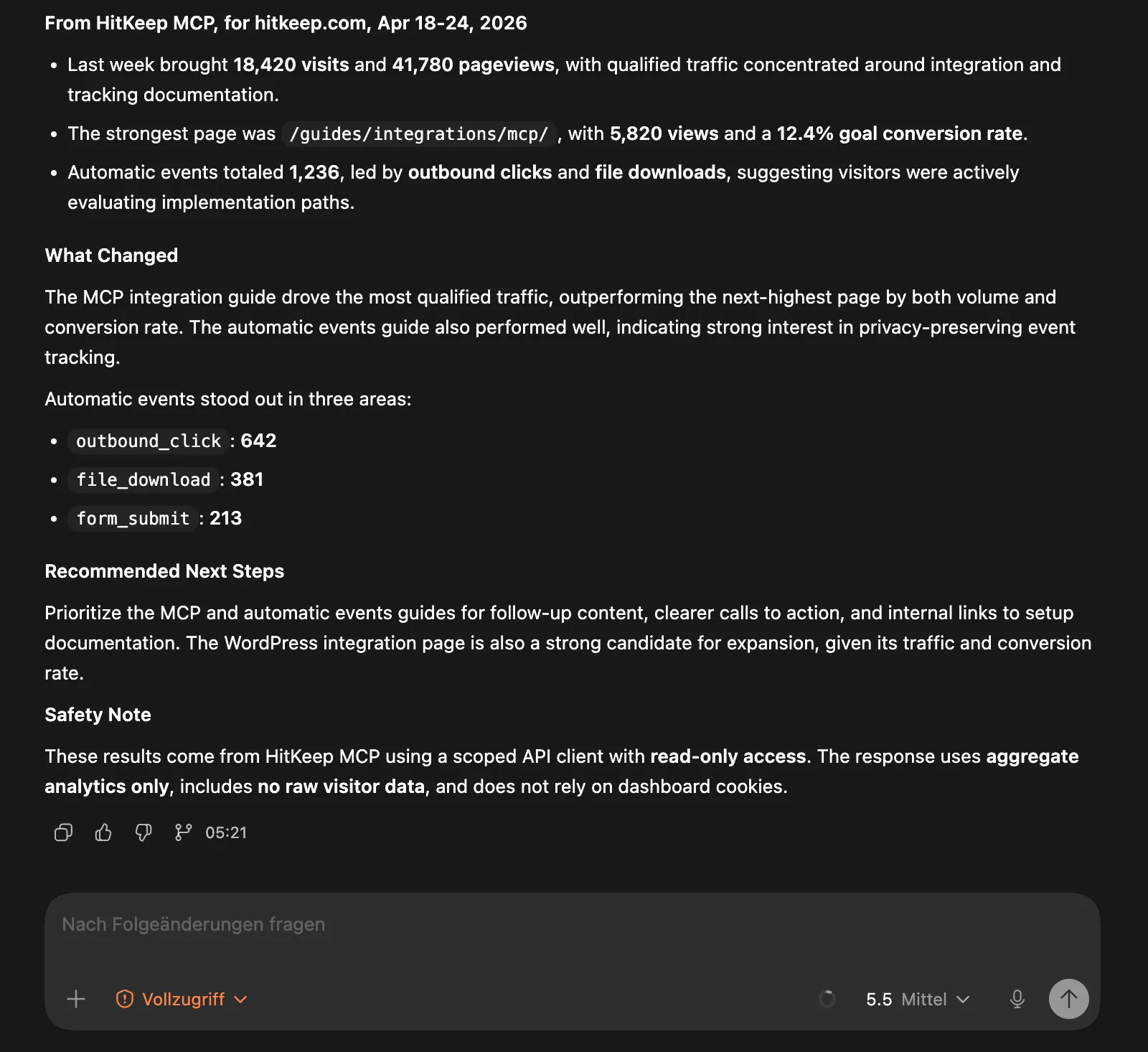
Section titled “7. MCP and API clients make assistant access explicit”HitKeep’s optional MCP server is read-only and aggregate-only. It authenticates with API client bearer tokens, not dashboard cookies.
MCP can return:
- visible sites
- overview analytics
- events and event properties
- ecommerce reports
- Web Vitals aggregates
- AI visibility reports
- saved Opportunities
- imported Search Console rows
- official HitKeep docs
It does not create goals, mutate sites, expose raw hit exports, manage billing, or perform admin actions.
This is a concrete difference if your team wants governed AI-assisted reporting. You can give an assistant a scoped token for one site instead of handing it a browser session or a pile of exported raw data.
8. Cloud and self-hosted use the same product shape
Section titled “8. Cloud and self-hosted use the same product shape”HitKeep can run as:
- self-hosted open source
- managed cloud in EU Frankfurt
- managed cloud in US Virginia
That makes the evaluation less binary. You can start with HitKeep Cloud, confirm that the reports work, then self-host later if ownership, procurement, or residency requirements change.
Where Umami Is Better
Section titled “Where Umami Is Better”1. Umami has broader behavior analytics
Section titled “1. Umami has broader behavior analytics”Umami is ahead when you need:
- journeys
- retention
- replays
- heatmaps
- richer attribution reports
- Umami’s broader hosted analytics workflow
HitKeep does not currently replace those reports. If your team depends on them, Umami is the better fit.
2. Umami Cloud is more mature
Section titled “2. Umami Cloud is more mature”Umami Cloud has a longer track record as a hosted analytics product. Its docs cover cloud teams, email reports, share URLs, and broader hosted workflows.
HitKeep Cloud is better when explicit EU or US region choice, open exports, self-hosting continuity, Search Console imports, AI visibility, and operator controls matter more than hosted-product maturity.
3. Umami fits product behavior analysis better
Section titled “3. Umami fits product behavior analysis better”HitKeep is web analytics with conversion, ecommerce, performance, SEO, AI visibility, exports, and governed MCP access. It is not a full product analytics suite.
If you need to understand retained users across complex product journeys, replay individual sessions, inspect heatmaps, or analyze post-acquisition product behavior, choose Umami or a dedicated product analytics tool.
Decision By Use Case
Section titled “Decision By Use Case”| Use case | Better fit | Why |
|---|---|---|
| Self-hosted analytics on a small VPS | HitKeep | One binary and no external database for core analytics |
| Hosted privacy analytics with broad behavior reports | Umami | Mature cloud product with journeys, retention, replay, and heatmaps |
| Search Console plus analytics reporting | HitKeep | Native aggregate Search Console import beside traffic and conversion reports |
| AI visibility reporting | HitKeep | AI crawler fetches, AI-referred visits, and correlation reports |
| Ecommerce conversion reporting | HitKeep | GA4-inspired event model, revenue KPIs, products, source attribution, and checkout context |
| Product journey analysis | Umami | Journeys and retention are documented Umami features |
| Offline QR campaign attribution | HitKeep | Dynamic QR redirects, artwork exports, QR opens, QR-only shares, and QR takeout |
| Assistant-safe analytics access | HitKeep | Optional read-only MCP with scoped API client tokens |
| Session replay or heatmaps | Umami | HitKeep does not provide these reports |
| Open export and vendor-exit workflows | HitKeep | JSON, CSV, Parquet, NDJSON, and XLSX takeout where supported |
Migration Notes
Section titled “Migration Notes”HitKeep does not currently import historical Umami data. Treat migration as a validation project, not a file conversion.
Recommended path:
- Add HitKeep to one representative site while keeping Umami in place.
- Recreate the goals, funnels, ecommerce events, and UTM conventions you actually use.
- Enable Web Vitals only if performance reporting belongs in the same dashboard.
- Connect Search Console if SEO reporting is part of the weekly workflow.
- Forward AI crawler logs if AI visibility matters.
- Compare one or two reporting cycles before removing Umami.
Do not switch only because a feature matrix looks favorable. Switch when HitKeep covers the decisions your team needs to make from the data.
Privacy And Compliance Notes
Section titled “Privacy And Compliance Notes”Both products are privacy-oriented, but privacy claims are not a substitute for legal review.
HitKeep’s current tracker sets no analytics cookies by default and respects Do Not Track unless configured otherwise. It uses sessionStorage for session continuity. Visitor IPs are processed transiently after trusted-proxy resolution, and HitKeep stores derived country, region, city, provider, and ASN metadata on hits, not raw visitor IP addresses.
For compliance work, read:
Your deployment, notices, processor contracts, retention settings, and local law still matter.
What HitKeep Still Does Not Replace
Section titled “What HitKeep Still Does Not Replace”Be explicit before switching from Umami:
- no session replay
- no heatmaps
- no journeys report
- no retention report
- no full product analytics suite
- no ad platform attribution replacement
- no consent management platform
- no data warehouse replacement
HitKeep is strongest when you want a self-hostable web analytics system with conversion, ecommerce, SEO, AI visibility, Web Vitals, open exports, and governed access. It is weaker when the job is deep behavior analytics after acquisition.
Frequently Asked Questions
Section titled “Frequently Asked Questions”Is HitKeep a good Umami alternative for self-hosting?
Section titled “Is HitKeep a good Umami alternative for self-hosting?”Yes, if your main reason for leaving Umami is operational simplicity. HitKeep runs as one Go binary with embedded DuckDB and NSQ, while Umami self-hosting requires a Node.js application and a supported external SQL database.
If you want the broadest behavior analytics surface, Umami is stronger. If you want a smaller analytics system that is easier to own, back up, export, and move, HitKeep is the stronger fit.
Does HitKeep replace Umami journeys, retention, replays, or heatmaps?
Section titled “Does HitKeep replace Umami journeys, retention, replays, or heatmaps?”No. HitKeep has goals, funnels, ecommerce, Web Vitals, AI visibility, QR campaigns, Search Console imports, Opportunities, and MCP reporting, but it does not replace Umami’s journeys, retention reports, session replays, or heatmaps.
Use HitKeep when you want focused web analytics and operator control. Use Umami when those behavior analytics reports are required.
Can I migrate historical Umami data into HitKeep?
Section titled “Can I migrate historical Umami data into HitKeep?”HitKeep does not currently import historical Umami exports. The safest migration path is to run both products in parallel, recreate key goals and events, compare weekly reports, and switch only after the new reporting covers the decisions you need to make.
Which is better for SEO reporting, HitKeep or Umami?
Section titled “Which is better for SEO reporting, HitKeep or Umami?”HitKeep is the better fit when SEO reporting means combining normal web analytics with Google Search Console aggregates, AI crawler fetches, AI-referred visits, Web Vitals, and saved Opportunities.
Umami is stronger when your SEO workflow depends on broader behavior analytics such as journeys, replays, heatmaps, and retention.
Which is better for privacy and GDPR work?
Section titled “Which is better for privacy and GDPR work?”Both products are privacy-oriented. HitKeep gives operators a single-binary self-hosted model, EU or US managed cloud, no analytics cookies by default, open takeout, and tenant-aware storage.
Legal compliance still depends on your deployment, notices, contracts, retention settings, and local law. Start with the Compliance Overview before publishing privacy claims.
Sources
Section titled “Sources”- Umami insights overview
- Umami self-hosted installation
- Umami events
- Umami goals
- Umami funnel
- Umami journey
- Umami retention
- Umami revenue
- Umami attribution
- Umami replays
- Umami heatmaps
- Umami performance
- Umami share URLs
- Umami Cloud email reports
- Umami Cloud teams