
HitKeep System Status and Admin Settings
HitKeep separates operational monitoring from configuration work in the administration sidebar.
- System Status (
/admin/status) is the operator view for health, runtime data, maintenance actions, and instance audit logs. - System Settings (
/admin/system) is the configuration view for users, sites, teams, and global filters.
These pages are not shown in the user dropdown. They appear only for users with the matching instance-level permissions.
Access Model
Section titled “Access Model”| Role | Administration access |
|---|---|
owner | Full instance administration, including system settings, status, maintenance actions, audit viewing, and audit export. |
admin | Instance-wide operational access, including system status, maintenance actions, audit viewing, and exclusion-rule workflows. Admins do not receive owner-only settings actions, audit export, or broad site data mutation rights. |
user | No instance administration pages unless the user has team or site-specific admin access elsewhere. |
On HitKeep Cloud, this surface is intended for the managed instance operator or product owner role. On self-hosted installations, it is intended for the people who own and operate the instance.
System Status
Section titled “System Status”System Status is split into Runtime, Operations, and Audit tabs.
Runtime
Section titled “Runtime”The Runtime tab is read-only. It shows:
- instance health, database status, worker status, and leader state
- version, build identifier, runtime mode, uptime, and public URL
- enabled features and selected instance counters
- AI status when configured: enabled/configured state, provider/model label, self-hosted or cloud-managed mode, last safe error category, and request/token budget usage
- shared database path and size
- data path, backup path, spam cache path, and tenant database paths
- disk capacity for the configured data path when the host exposes it
- recent hit volume, custom event volume, rejected requests, and spam-filtered requests across the instance, including tenant databases
- LRU-backed runtime cache status for permissions, API clients, and API rate limiting
Refresh controls on Runtime cards reload the card data only. They do not mutate instance state.
Operations
Section titled “Operations”The Operations tab combines read-only status with explicit maintenance actions.
| Area | Readable data | Actions |
|---|---|---|
| Database resilience | Automatic index-recovery configuration, automatic WAL-bypass configuration, checkpoint interval, the last checkpoint in the current process, retained recovery history, removed unsafe-index count, and whether a recovery bundle exists. Paths and raw DuckDB errors are not exposed. | Checkpoint now runs an immediate serialized control-plane checkpoint. Tenant catalogs receive their own periodic, pre-backup, and shutdown checkpoints. |
| Backups | Enabled state, configured path, interval, retention, last backup, next backup, recent failures, and last error. | None from this screen. |
| Spam filter | Local database path, rule count, auto-update state, last refresh time, and last error. | Refresh spam database downloads and rebuilds the spam database from the configured feeds. |
| Import staging cleanup | Retention policy, stale import/file counts, byte total, last cleanup run, and recent cleanup failures. | Clean staged files removes stale staged import uploads without deleting import history or imported analytics rows. |
| Driver, host, port, encryption, sender identity, masked username, password presence, and last test result. | Send test email sends a real email to the specified recipient using the configured mail transport. |
Maintenance actions require the instance maintenance permission and write an instance audit log entry with the actor, action, outcome, target, and details. Live recovery phases are not loaded through this database-backed dashboard route. During recovery, the readiness endpoint and affected API requests return 503 with a stable reason and short retry interval; the liveness endpoint remains available.
AI status
Section titled “AI status”AI provider configuration is status-only in the dashboard. Operators configure the HitKeep provider/model route, gateway base URL when needed, timeout, and local budget caps through environment variables or managed cloud secrets. Provider credentials use the selected goAI provider’s own environment variables, such as OPENAI_API_KEY, ANTHROPIC_API_KEY, or AWS credentials.
For setup examples and token-budget sizing, see AI Model Configuration.
The status response is non-secret. It can show whether AI is enabled and configured, the provider/model label, self_hosted or cloud_managed configuration mode, current request usage, current token usage, cap state, and the last safe success or error category. It never returns the provider key. It also avoids raw prompts, raw provider responses, and raw external error bodies. Failed provider calls are summarized with stable error categories so operators can see whether the issue is configuration, budget exhaustion, timeout, provider failure, validation, or another safe category.
HitKeep enforces request and token budgets locally before provider calls. Provider or gateway limits are still useful, but the local cap protects the single-binary runtime even when an upstream limit is missing or misconfigured.
The first customer-facing AI feature is Opportunity Recommendations. Opportunities still run deterministic detectors when AI is disabled. AI enrichment only writes validated, localization-safe recommendation output from cited evidence.
Instance Audit Logs
Section titled “Instance Audit Logs”The Audit tab is the instance-level audit log for system operations. It is separate from team audit logs.
Audit entries include:
- timestamp
- actor ID, email snapshot, and role snapshot
- action name, such as
spam_filter.refreshormail.test - target type, target label, and outcome
- IP address, user agent, request ID, and operation details when available
The table can be filtered by action, target type, outcome, actor, date range, and free-text query. Malformed actor, date, limit, or offset filters return 400 Bad Request instead of silently widening the result set.
Owners can export matching rows as JSON or CSV. Exports are bounded: the default export limit is 10,000 rows, and the maximum accepted limit is 50,000 rows.
System Settings
Section titled “System Settings”System Settings keeps the existing instance configuration workflows in one page. Owner-only actions stay guarded by owner-level permissions inside the page.
- Users: list users, change instance roles, disable MFA for account recovery, and delete users when allowed.
- Sites: inspect all sites and remove sites through the instance-level admin surface.
- Teams: inspect all teams, archive non-default teams, and delete archived teams when their sites have already been transferred or removed.
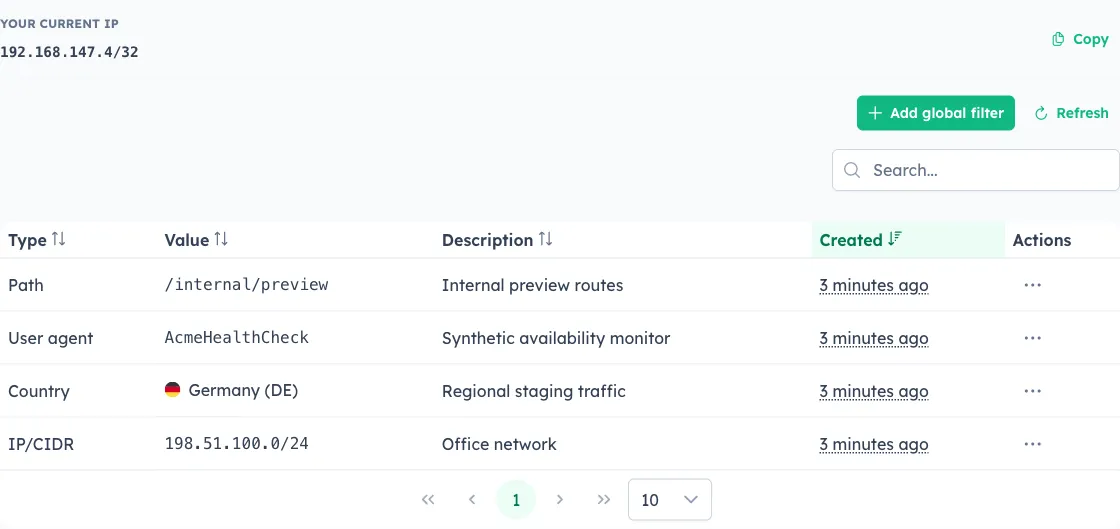
- Global Filters: manage instance-wide IP/CIDR and country traffic exclusions. Country exclusions apply to new incoming traffic only.
Deleting a user is blocked if the user is the last owner of any team. This protects teams from becoming orphaned.