
Scheduled Email Reports in HitKeep
HitKeep can send analytics reports by email when SMTP is configured. Each report records who owns it, which sites and recipients it covers, its IANA timezone, local delivery time, next run, and recent delivery outcome. Team owners and admins can include confirmed external recipients for agency and client reporting without creating HitKeep accounts for them.
On HitKeep Cloud, external scheduled-report recipients are included with Pro and Business. Free continues to support reports sent to HitKeep members, while self-hosted HitKeep does not apply a plan gate to external recipients.
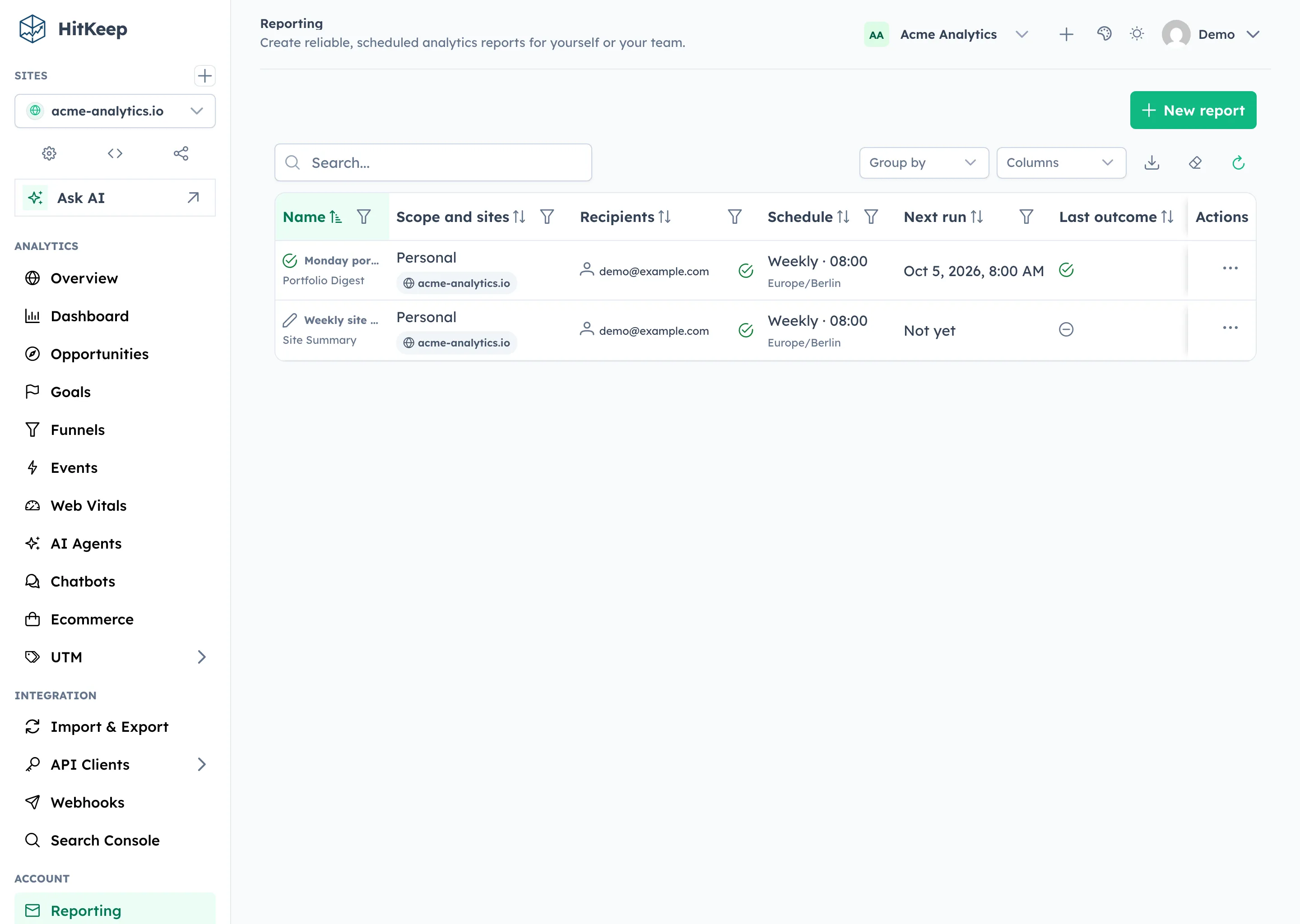
Report presets
Section titled “Report presets”| Preset | Cadence | Includes |
|---|---|---|
| Site Summary | Daily, weekly, or monthly | Visitors, pageviews, bounce rate, session duration, goals, comparison, trend, top pages, and referrers for one site |
| Portfolio Digest | Daily, weekly, or monthly | Pageviews, visitors, goals, deltas, and direct links across selected sites—or every accessible site in a personal report |
| Opportunity Brief | Daily or weekly | Saved, validated Opportunity Recommendations with cited evidence |
Opportunity Brief does not start an AI run. If no saved opportunity meets the deterministic quality rules, HitKeep suppresses the empty email.
Setup via Dashboard
Section titled “Setup via Dashboard”- Open Settings → Reporting.
- Select New report and choose a preset.
- Choose the sites and recipients. Team reports can combine HitKeep members with external email addresses.
- Choose daily, weekly, or monthly delivery and set the local time and timezone.
- Generate a preview, then save a draft or activate the report.
New reports default to 08:00 in the browser-detected timezone. Delivery times use 15-minute increments. Weekly reports default to Monday; monthly reports default to the first and allow days 1–28. HitKeep recalculates the UTC next run after schedule changes and after each run so daylight-saving transitions follow the report timezone.
If SMTP is unavailable, you can still create and edit drafts. Activating a report, sending a test, or retrying a failed delivery remains unavailable until mail delivery is configured.
During upgrade, HitKeep converts existing enabled scheduled-email settings into reports at 08:00 UTC, preserving their previous delivery behavior exactly. Disabled settings remain disabled and are not materialized as reports. You can edit a converted report to choose a different timezone or local time.
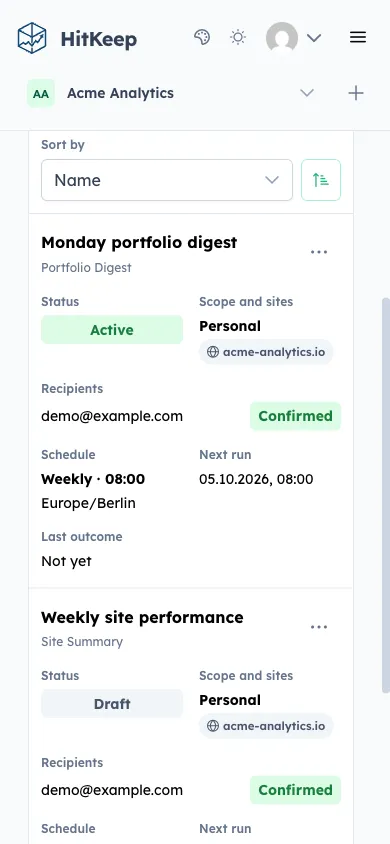
The Reporting hub also supports search, sorting, pagination, edit, duplicate, pause or resume, test send, delete, and delivery history. On desktop and tablet widths, reports use a sortable table. On narrower screens, the same search state and report details move into a divided summary list with mobile sorting and the same row actions. Preview and test send build the same localized preset content as scheduled delivery; test send always goes only to the current user. An empty Opportunity Brief is shown as suppressed instead of sending a placeholder. “Accepted” means the configured SMTP server accepted the message; SMTP does not prove that it reached an inbox.
Ownership and recipients
Section titled “Ownership and recipients”- A personal report belongs to one user and sends only to that user.
- A team report belongs to the team. Owners and admins with team settings permission can select HitKeep members and add up to 25 external email addresses. Team reports always use explicitly selected sites.
- Each new external address receives a seven-day, single-use confirmation invitation describing the team, report cadence, and selected domains. Opening the link only shows the consent details; accepting or declining requires an explicit action. Confirmation does not create an account or grant dashboard, team, or site access.
- HitKeep stores only a SHA-256 hash of each 256-bit confirmation token. Resending rotates the token and has a 15-minute cooldown.
- Pending external recipients do not block an active report: confirmed recipients continue to receive it, and no missed reports are sent after a pending recipient confirms.
- Changing the preset, selected sites, or frequency requires external recipients to confirm the new scope. Renaming a report or changing its delivery time does not.
- HitKeep members must retain access to every included site. HitKeep checks member access again before each delivery. For an external delivery, HitKeep checks that the team remains active and every selected site still belongs to it.
- External emails contain the complete KPI, comparison, trend, goal, and cited-opportunity content, but no dashboard, report-settings, opportunity, share, or per-site links.
- A recipient can unsubscribe from one report using the visible or one-click unsubscribe link. Only that recipient can resubscribe.
- An external recipient who opts out can resume only by accepting a fresh confirmation; a manager cannot silently restore delivery.
- If a Cloud team loses the external-recipient entitlement, existing external addresses remain visible so a manager can pause, rename, reschedule, or remove them, but deliveries to those addresses are skipped until the entitlement returns. Adding an address or changing its consent scope still requires Pro or Business.
- Team reports remain manageable if the original creator leaves. Team report changes, test sends, and retry requests appear in the team audit log.
REST API Reference
Section titled “REST API Reference”- List and create reports
- Get, update, or delete a report
- Preview a report
- Test report delivery
- List delivery history
- Retry failed deliveries from a report run
- Resubscribe the current HitKeep member
- Report unsubscribe endpoints
- Inspect and decide external-recipient confirmation
- Resend an external-recipient confirmation
After the upgrade migration completes, the dashboard and REST API use reports exclusively; the former report-subscription endpoints and storage are removed.
SMTP Configuration
Section titled “SMTP Configuration”Reports are sent via your configured SMTP server. The minimum required settings:
hitkeep \ -mail-host="smtp.postmarkapp.com" \ -mail-port=587 \ -mail-username="YOUR_API_TOKEN" \ -mail-password="YOUR_API_TOKEN" \ -mail-from-address="analytics@your-domain.com" \ -mail-from-name="HitKeep"Or via environment variables:
HITKEEP_MAIL_HOST=smtp.postmarkapp.comHITKEEP_MAIL_PORT=587HITKEEP_MAIL_USERNAME=YOUR_API_TOKENHITKEEP_MAIL_PASSWORD=YOUR_API_TOKENHITKEEP_MAIL_FROM_ADDRESS=analytics@your-domain.comHITKEEP_MAIL_FROM_NAME=HitKeepFull reference: Email (SMTP).
After configuring SMTP, instance operators can use Administration → System Status → Operations → Mail to send a real test email to a specified recipient. The mail test uses the configured mail transport and records the result in the instance audit log.
Report Delivery
Section titled “Report Delivery”The background report worker scans due schedules and creates durable run and recipient-delivery records. Concurrent workers cannot create the same scheduled occurrence twice. SMTP failures retry after 5 minutes, 30 minutes, and 2 hours while preserving the same Message-ID.
After a restart, HitKeep processes at most one missed occurrence. Daily reports catch up within 48 hours, weekly reports within 7 days, and monthly reports within 14 days. Reports do not use open pixels, remote tracking images, click tracking, or stored rendered email bodies. Delivery records keep only stable report, run, and recipient IDs, statuses, attempt counts, accepted timestamps, and safe error codes; they do not snapshot an external address.
Related
Section titled “Related”- Configuration Reference
- Opportunity Recommendations
- System Status and Settings
- Permissions & Roles
- REST API Reference
Don’t want to manage SMTP configuration, deliverability, or email templates? HitKeep Cloud → includes managed email delivery out of the box.