
Core Web Vitals Analytics in HitKeep
HitKeep Web Vitals adds product-quality performance reporting to the same site analytics workspace as traffic, events, ecommerce, goals, funnels, AI visibility, and Opportunities.
The feature is opt-in per site. The default hk.js tracker stays lean; when Web Vitals are enabled, hk.js loads a separate same-origin hk-vitals.js bundle and sends compact metric samples to HitKeep.
What HitKeep Measures
Section titled “What HitKeep Measures”The Web Vitals report covers:
| Metric | What it tells you | Good | Needs improvement | Poor |
|---|---|---|---|---|
| LCP | Largest contentful paint | <= 2500 ms | <= 4000 ms | > 4000 ms |
| INP | Interaction to next paint | <= 200 ms | <= 500 ms | > 500 ms |
| CLS | Cumulative layout shift | <= 0.1 | <= 0.25 | > 0.25 |
| FCP | First contentful paint | <= 1800 ms | <= 3000 ms | > 3000 ms |
| TTFB | Time to first byte | <= 800 ms | <= 1800 ms | > 1800 ms |
HitKeep stores server-derived ratings, sample counts, p75 values, normalized paths, navigation type, the Web Vitals metric ID, session ID, page ID, tracker source, tracker version, and server receipt time. Query strings and hashes are stripped before storage.
Enable Web Vitals
Section titled “Enable Web Vitals”Open Site Settings -> Tracking and enable Web Vitals. The generated snippet adds one attribute:
<script async src="https://your-hitkeep.example/hk.js" data-enable-web-vitals="true"></script>That attribute is the only required change. HitKeep loads hk-vitals.js from the same origin as hk.js, so self-hosted and cloud deployments do not need a third-party performance vendor or external script host.
Leave the toggle off when you want only the default pageview and event tracker.
Dashboard Report
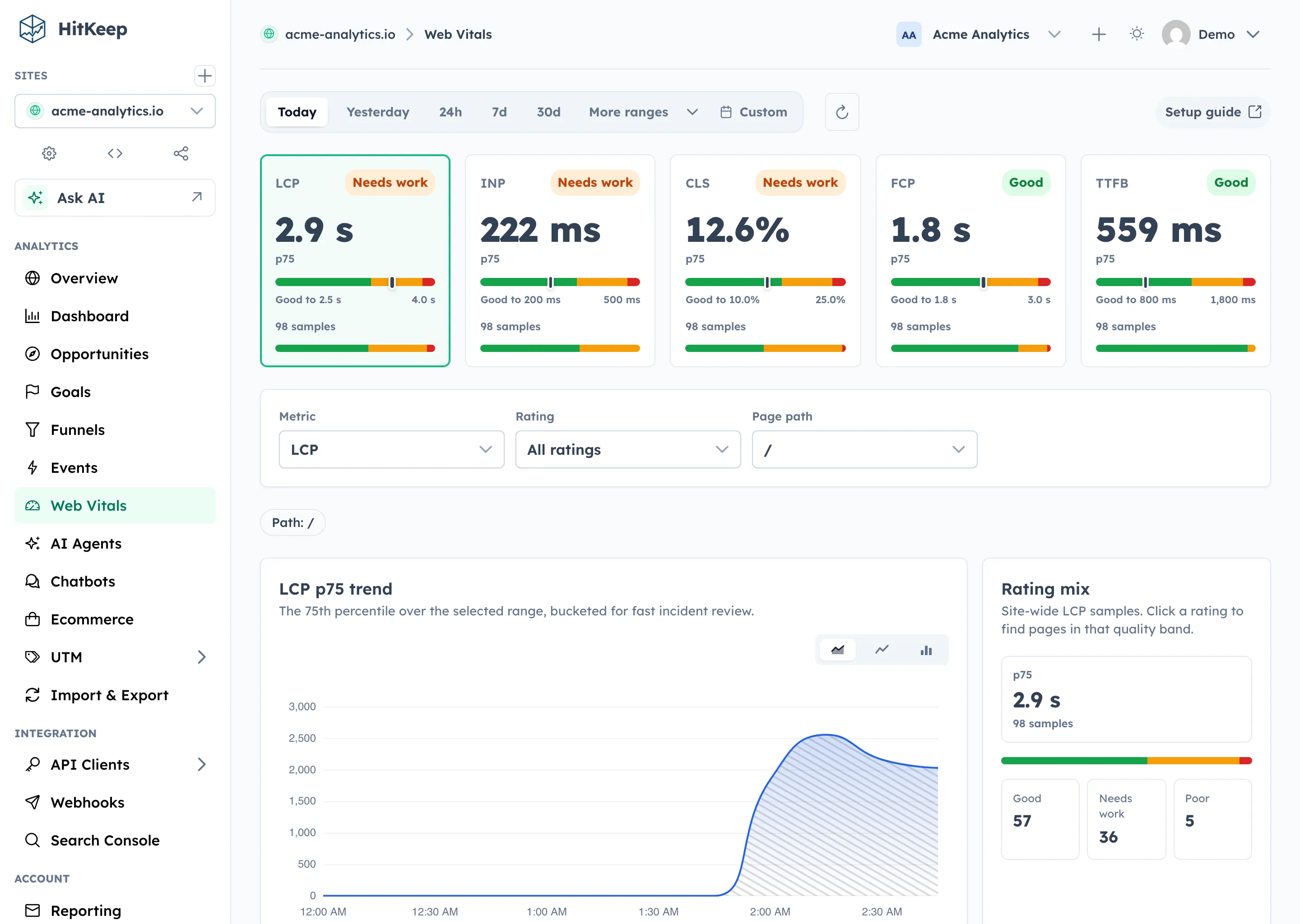
Section titled “Dashboard Report”The Web Vitals page is built for repeated performance reviews:
- five p75 cards for LCP, INP, CLS, FCP, and TTFB
- a selected metric control for charting and page analysis
- rating and path filters for focused investigations
- a timeseries chart for p75 trend movement
- a rating distribution strip for good, needs-improvement, and poor samples
- a page breakdown table ranked by p75 with sample counts and ratings
- aggregate visitor-context breakdowns for browser, country, language, device, city, provider, and ASN
Use the date range toolbar to compare deploy windows, content launches, ad-tag changes, cache work, or conversion-funnel pages. Use the path filter when a single template or campaign page is under review.
Opportunities
Section titled “Opportunities”When Web Vitals samples show enough evidence of a poor or needs-improvement p75, HitKeep can create a saved Performance Opportunity. The recommendation cites aggregate evidence only: metric, p75, rating, sample count, and the highest-impact page from the page breakdown.
The Opportunity links back to the Web Vitals report with the relevant metric and path selected, so teams can move from “what should we fix next?” to the exact performance trend, rating distribution, and page table without exposing raw browser attribution or debug fields.
Privacy Boundaries
Section titled “Privacy Boundaries”Web Vitals collection follows the same browser ingest privacy posture as the default tracker:
- opt-in only through
data-enable-web-vitals="true" - no analytics cookies
- Do Not Track remains respected unless
data-collect-dnt="true"is set - query strings and hashes are stripped from paths
- no attribution/debug payloads, selectors, text, resource URLs, or element details
- same-origin delivery to
/ingest/web-vitals
The payload shape is intentionally compact:
{ "n": "LCP", "v": 1842.3, "p": "/pricing", "nt": "navigate", "mid": "v5-...", "sid": "...", "pid": "...", "tsrc": "browser", "tv": "..." }Server-side code derives ratings from the standard thresholds and timestamps samples at receipt time.
API and MCP Access
Section titled “API and MCP Access”Authenticated API clients with site view permission can query:
GET /api/sites/{id}/web-vitals/summaryGET /api/sites/{id}/web-vitals/timeseriesGET /api/sites/{id}/web-vitals/pagesGET /api/sites/{id}/web-vitals/breakdown
Use the breakdown endpoint when you need aggregate p75 and rating counts grouped by browser, country, language, device, city, provider, or ASN.
The optional MCP server exposes hitkeep_get_web_vitals for aggregate p75, sample count, rating counts, and optional page and visitor-context breakdowns. It can return capped visitor-context breakdown rows for dimensions such as city, provider, or ASN. It does not expose raw Web Vitals samples.
Exports
Section titled “Exports”Site and user takeout include Web Vitals rows as record_type = web_vital when samples exist. Use this for audits, warehouse import, and vendor-exit workflows.