
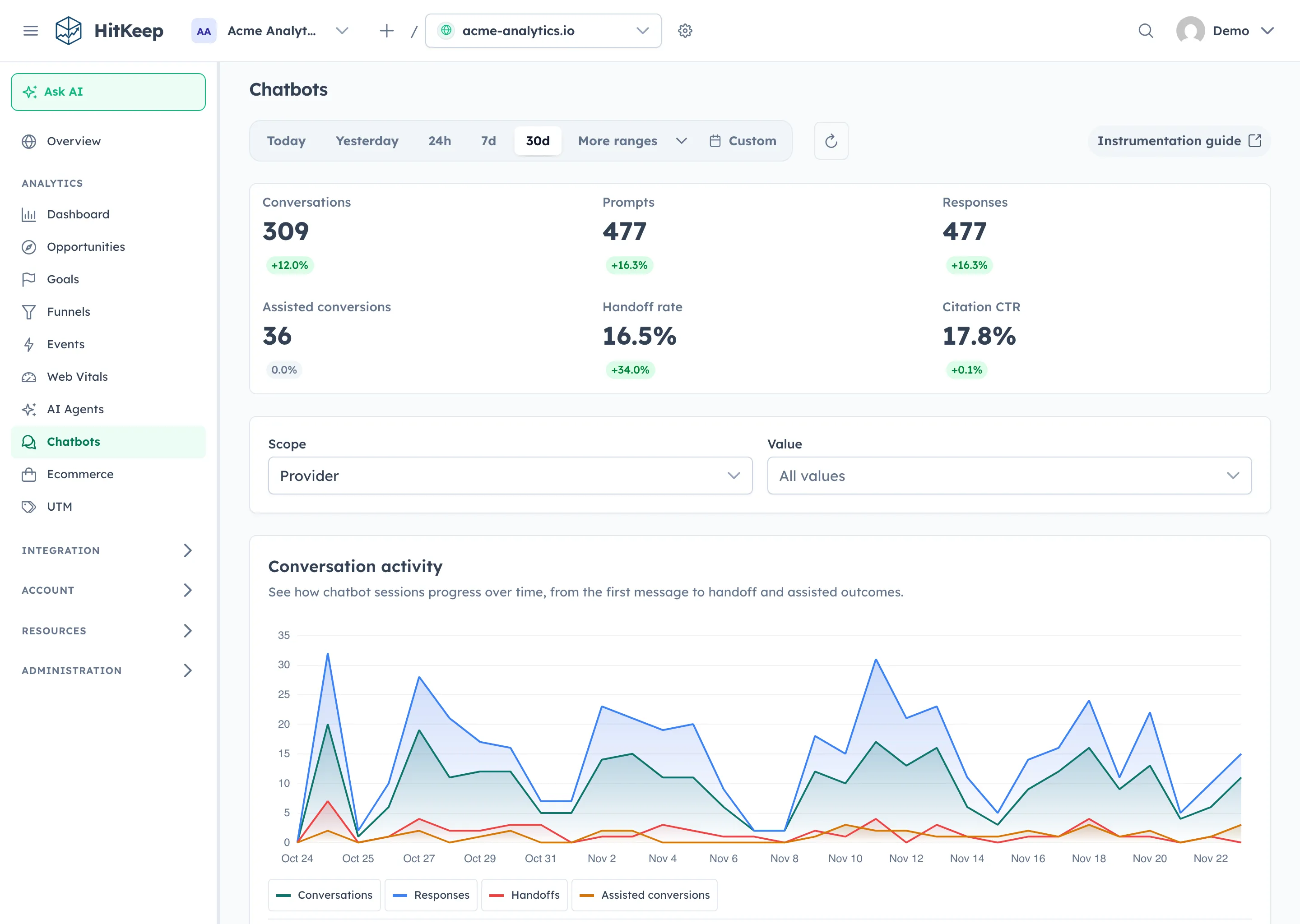
Open Chatbots to see how often visitors start a conversation on your site, click a source in an answer, or ask for a person. The report counts the assistant.* events your widget sends. Install the browser tracker and connect those events to the corresponding actions in your widget.
Looking for visitors who arrived from ChatGPT or Perplexity? The AI Agents dashboard shows visits with a recognizable AI referrer and pages requested by AI crawlers.
What this report measures
Section titled “What this report measures”Select a site and date range in Chatbots. The cards use event counts, so one person can contribute several prompts, clicks, or conversations.
Conversations, prompts, responses. Count conversation starts, submitted messages, and answers shown to visitors. If prompts rise while responses fall, check whether the widget displays each answer and sends its render event.
Handoff rate. Divide handoff requests by conversation starts. For example, 8 requests across 100 starts give a handoff rate of 8%. A request records an escalation. To check whether someone resolved it, consult your support system.
Citation CTR. Divide citation clicks by all rendered responses, including answers without a citation. Ten clicks across 200 responses gives 5%, even if only 40 answers contained a link.
Assisted conversions. Count the assistant.goal_assisted events your application sends. Decide which completed action qualifies, such as a booking confirmed after a chat, and emit one event for that outcome.
Recommended event schema
Section titled “Recommended event schema”Use these event names consistently:
| Event name | When to send it | Recommended properties |
|---|---|---|
assistant.chat_started |
User opens or starts a chatbot session | bot_id, provider, model, surface |
assistant.message_sent |
User submits a prompt | conversation_id, message_index, intent |
assistant.response_rendered |
A model response is shown to the user | conversation_id, message_index, response_ms, tool_count, citation_count |
assistant.citation_clicked |
User clicks a cited source or linked answer | conversation_id, citation_url, citation_index |
assistant.handoff_requested |
User asks for a human or the bot escalates | conversation_id, message_index, reason |
assistant.goal_assisted |
A conversion happens during or after the chatbot flow | conversation_id, goal_name, goal_value |
Property guidance
Section titled “Property guidance”Keep the payload metadata-focused.
- Use stable identifiers such as
bot_idandconversation_id. - Prefer short categorical values like
provider=openaiorsurface=support-widget. - Store performance and usage metrics like
response_ms,tool_count, andcitation_count. - Do not send raw prompt or response bodies by default. Structured metadata is usually enough and is much safer from a privacy perspective.
Browser example
Section titled “Browser example”In your widget’s message handler, record the prompt once when the visitor submits it. This example records a predefined topic and where the widget appears. The text of the message stays out of the analytics payload.
window.hk?.event?.('assistant.message_sent', { bot_id: 'support-bot', surface: 'help-center', intent: 'billing'});If you filter by bot_id or surface, include that property on each event you want the filter to count, including starts, responses, and handoffs.
What the dashboard shows
Section titled “What the dashboard shows”The Chatbots page groups these events into a dedicated workflow:
- KPI cards for conversation volume, prompts, responses, assisted conversions, handoff rate, and citation CTR
- timeseries chart for conversation starts, responses, handoffs, and assisted conversions
- breakdown panels for intents, providers, and surfaces
- audience context such as top pages, sources, devices, countries, city, provider, and ASN
You can also scope the report by provider, bot_id, surface, or model.
Verify a test conversation
Section titled “Verify a test conversation”- Start a test conversation, send one prompt, and wait until the widget displays the answer.
- In Events, check for one start, one message, and one rendered response. A missing render event will also change the denominator for citation CTR.
- In Chatbots, select the same site and date range. Apply your bot filter and check that all three actions still count.
- Click a source or request a handoff to check those events separately. Test an assisted conversion only after the qualifying action succeeds.