
Read-only MCP Server for Web Analytics
Section titled “Read-only MCP Server for Web Analytics”HitKeep is a read-only MCP server for web analytics when an assistant needs aggregate traffic, events, goals, ecommerce, Search Console, Web Vitals, and AI crawler visibility without dashboard cookies or raw hit exports. Connect an MCP client to HitKeep’s /mcp endpoint with a scoped API client bearer token.
Use this page when you are evaluating an analytics MCP server, adding HitKeep to an MCP directory, or deciding whether an assistant should query analytics through MCP instead of the dashboard or REST API.
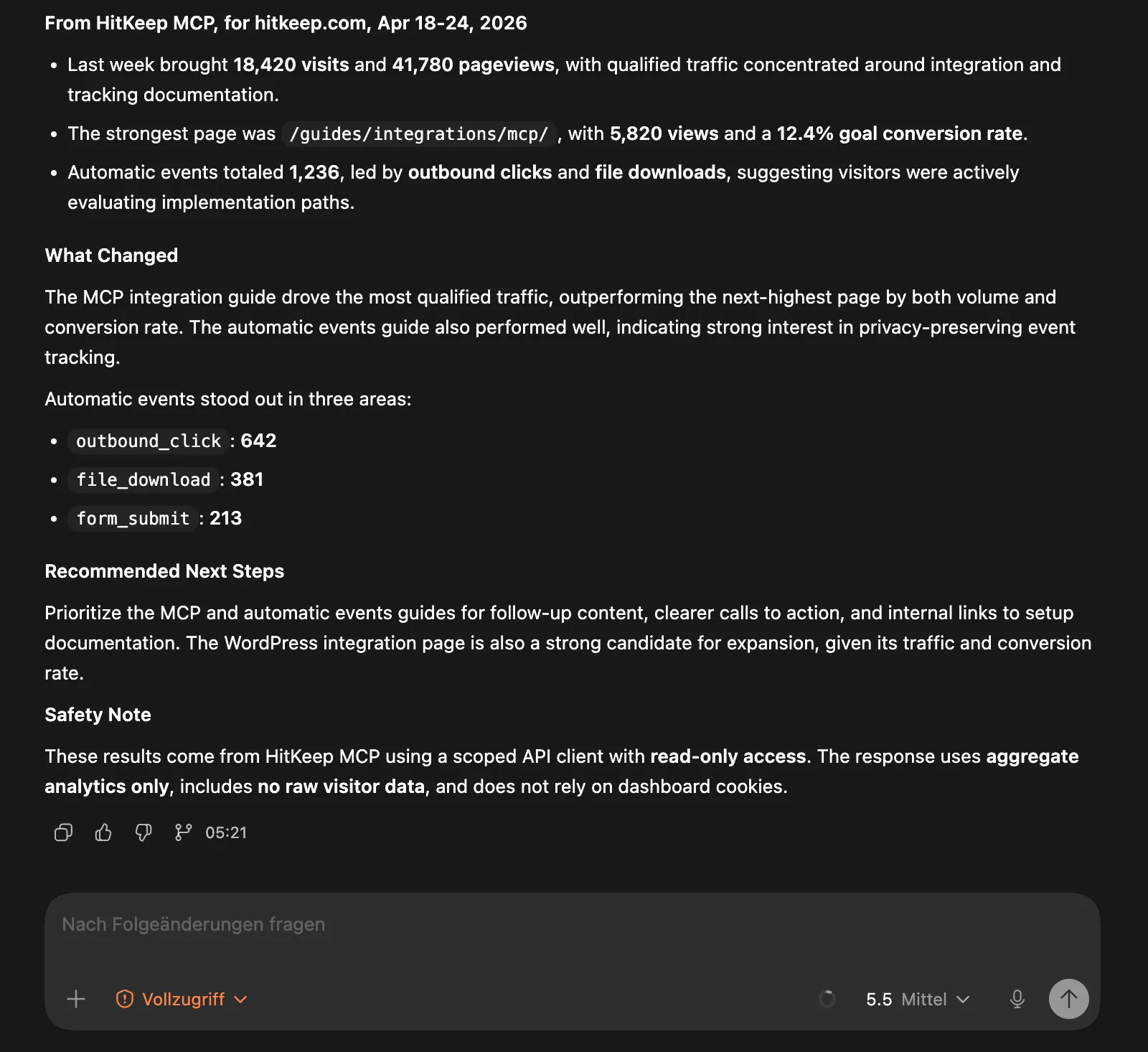
Best Fit
Section titled “Best Fit”Use this path when you want:
- Claude, Cursor, or another MCP client to answer analytics questions from approved HitKeep data
- internal reporting tools that can query aggregate site metrics without dashboard access
- scoped assistant access by site through API client tokens
- traffic, event, ecommerce, Web Vitals, AI visibility, Search Console, Opportunities, and docs lookup through one governed interface
- a clear boundary that keeps raw exports, write workflows, admin actions, and dashboard sessions outside MCP
If your assistant supports Agent Skills, pair MCP with the official HitKeep Agent Skills. The skills teach the assistant which MCP tools to use for traffic diagnosis, AI visibility, ecommerce analysis, Search Console checks, and tracking verification.
Quick Connect
Section titled “Quick Connect”For self-hosted HitKeep, enable MCP on the leader:
hitkeep \ -mcp-enabled \ -mcp-path /mcpEquivalent environment variables:
HITKEEP_MCP_ENABLED=trueHITKEEP_MCP_PATH=/mcpIf HitKeep is served at https://analytics.example.com, the MCP endpoint is:
https://analytics.example.com/mcpSend the API client token as a bearer header:
Authorization: Bearer <hitkeep-api-client-token>MCP client configuration formats differ, but the connection shape is always the same:
{ "mcpServers": { "hitkeep": { "type": "streamable-http", "url": "https://analytics.example.com/mcp", "headers": { "Authorization": "Bearer ${HITKEEP_MCP_TOKEN}" } } }}For reverse proxy details, leader-only behavior, host validation, date-range limits, and audit commands, use the official MCP server guide.
Create A Scoped Token
Section titled “Create A Scoped Token”Use a personal or team API client token rather than a dashboard session:
- Open Settings -> API Clients for a personal token, or Administration -> Team -> Settings for a team token.
- Grant only the sites the MCP client should query.
- Copy the token into the MCP client’s secret store.
- Rotate or revoke the token when the assistant no longer needs access.
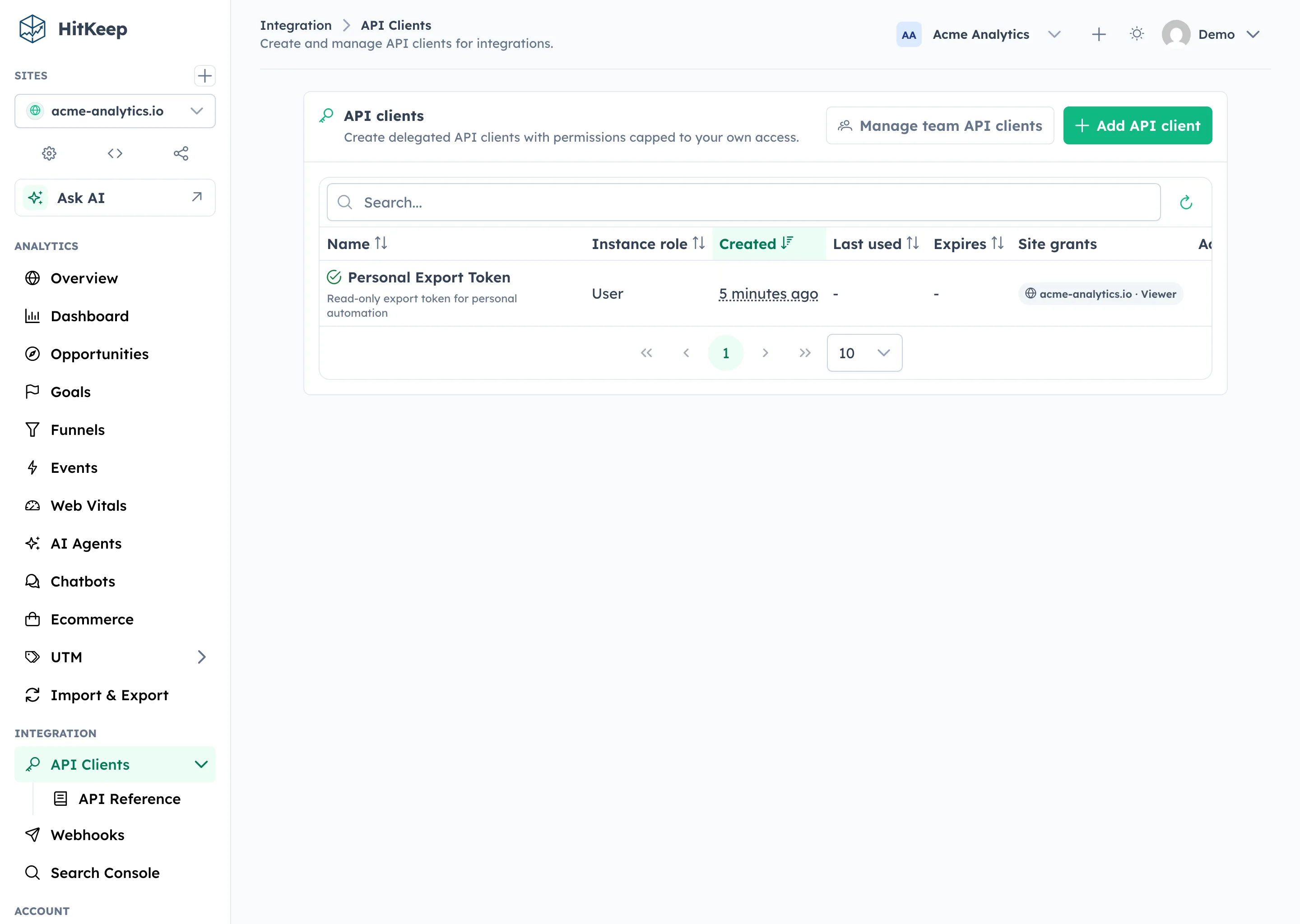
Team API clients are the better default for shared assistants because the token is owned by the team and can be revoked without touching a person’s dashboard account.
Exact MCP Tools
Section titled “Exact MCP Tools”HitKeep MCP exposes read-only tools for aggregate analytics, imported Search Console rows, official docs lookup, and local MCP help.
| Tool | What it returns |
|---|---|
hitkeep_list_sites | Sites visible to the API client. |
hitkeep_get_site_overview | KPI totals, chart data, top dimensions, goals, and optional period comparison. |
hitkeep_get_event_names | Event names for a site and date range. |
hitkeep_get_event_breakdown | Capped property breakdowns for one event. |
hitkeep_get_ecommerce | Ecommerce summary, products, source stats, and city, provider, and ASN aggregates. |
hitkeep_get_web_vitals | Aggregate Web Vitals p75 values, sample counts, rating counts, optional page rows, and optional visitor-context breakdowns. |
hitkeep_get_ai_visibility | AI crawler fetch overview and timeseries, with optional correlation context. |
hitkeep_get_opportunities | Saved Opportunity recommendation records for a visible site. |
hitkeep_get_search_console_status | Search Console mapping, sync status, imported date range, data availability, and safe attention reason. |
hitkeep_get_search_console | Imported Search Console overview and series, plus requested query, page, country, or device dimensions. |
hitkeep_search_docs | Search the cached HitKeep docs catalog and fetched markdown snippets. |
hitkeep_get_doc | Fetch one official HitKeep docs page as markdown. |
hitkeep_get_api_reference | Fetch REST API reference markdown for a path or operation slug. |
hitkeep_get_mcp_help | Return local MCP setup, date range, filter, and privacy guidance. |
Resources exposed to clients:
| Resource | What it is for |
|---|---|
hitkeep://help/mcp | Token, date range, filter, and privacy guidance. |
hitkeep://help/metrics | Definitions for core metrics returned by MCP tools. |
hitkeep://docs/llms | Cached official docs catalog. |
hitkeep://docs/{path} | Markdown for a specific official docs page. |
Permission Boundary
Section titled “Permission Boundary”HitKeep MCP is designed for assistant reads, not assistant administration.
| Boundary | HitKeep behavior |
|---|---|
| Default state | MCP is disabled until enabled by the operator. |
| Transport | Streamable HTTP on the existing HitKeep server, usually /mcp. |
| Auth | API client bearer tokens only. |
| Cookies | Dashboard cookies are not accepted. |
| Site access | The token must have a site grant and pass normal site.view checks. |
| Data access | Aggregate analytics, imported aggregate Search Console rows, saved Opportunities, and docs tools. |
| Excluded | Raw hit exports, raw visitor rows, dashboard sessions, billing, token management, site administration, goal mutation, funnel mutation, exclusions, and alert creation. |
Analytics tools default to the last 30 days when no date range is supplied. Date ranges and result limits are capped by the MCP configuration. Filters support common aggregate dimensions such as path, hostname, referrer, device, country, city, provider, ASN, browser, language, and UTM fields.
Use open exports and takeout when a person needs portable files or raw records that are available through export workflows. MCP intentionally stays narrower.
Google Search Console Analytics Through MCP
Section titled “Google Search Console Analytics Through MCP”HitKeep imports finalized, aggregate Search Analytics rows from Google Search Console. MCP can then expose those imported rows to approved assistants through hitkeep_get_search_console_status and hitkeep_get_search_console.
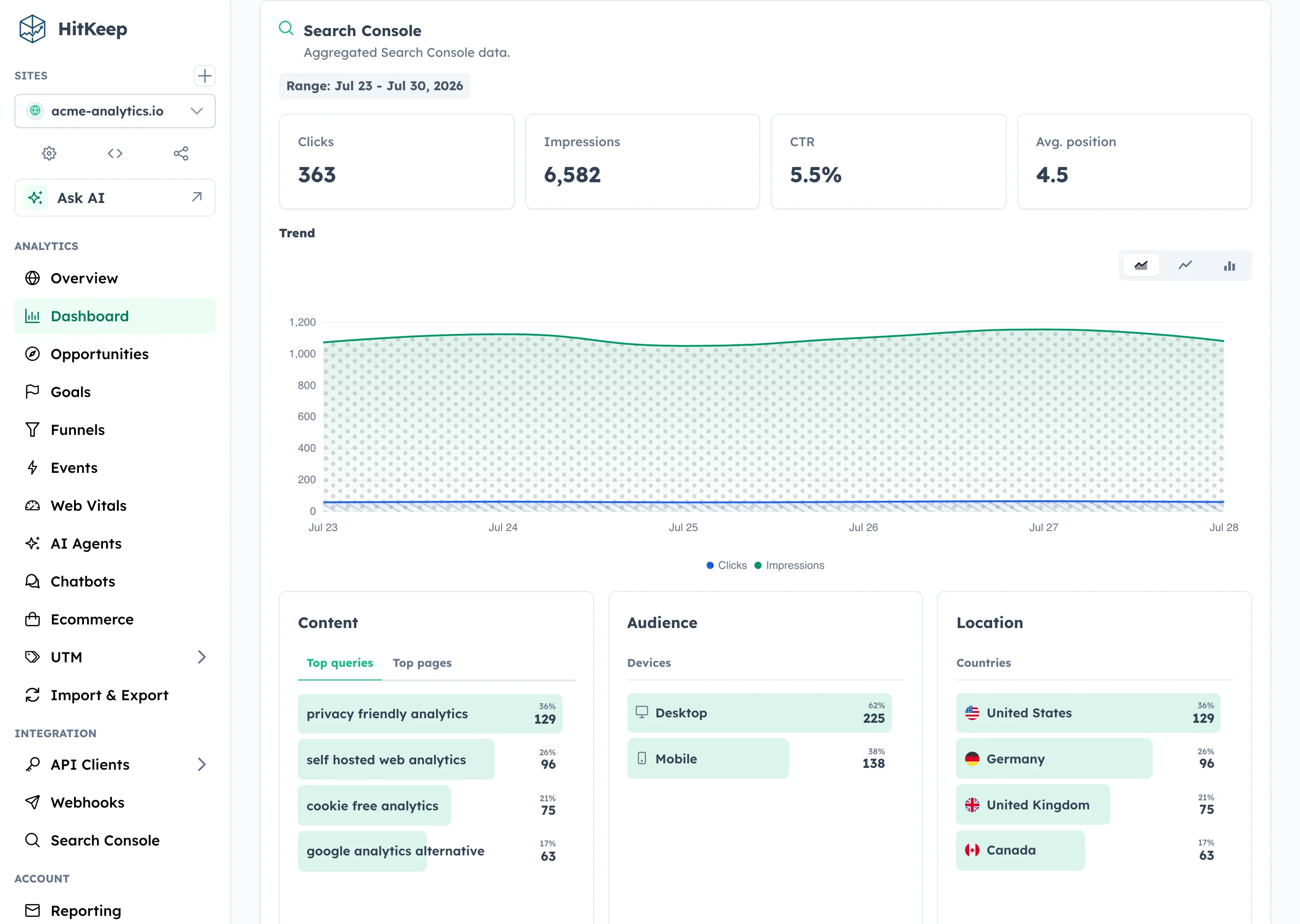
The Search Console MCP tools do not call Google live, refresh OAuth credentials, or trigger a sync. Empty reports should be checked with hitkeep_get_search_console_status before drawing conclusions, because a site can have HitKeep traffic while Search Console import is not mapped or not yet synced.
For setup and troubleshooting, read the Google Search Console integration guide.
AI Crawler Analytics Through MCP
Section titled “AI Crawler Analytics Through MCP”Use hitkeep_get_ai_visibility when an assistant needs aggregate AI crawler analytics: fetch volume, assistant families, top paths, failures, AI-referred visits, and optional fetch-to-visit correlation.
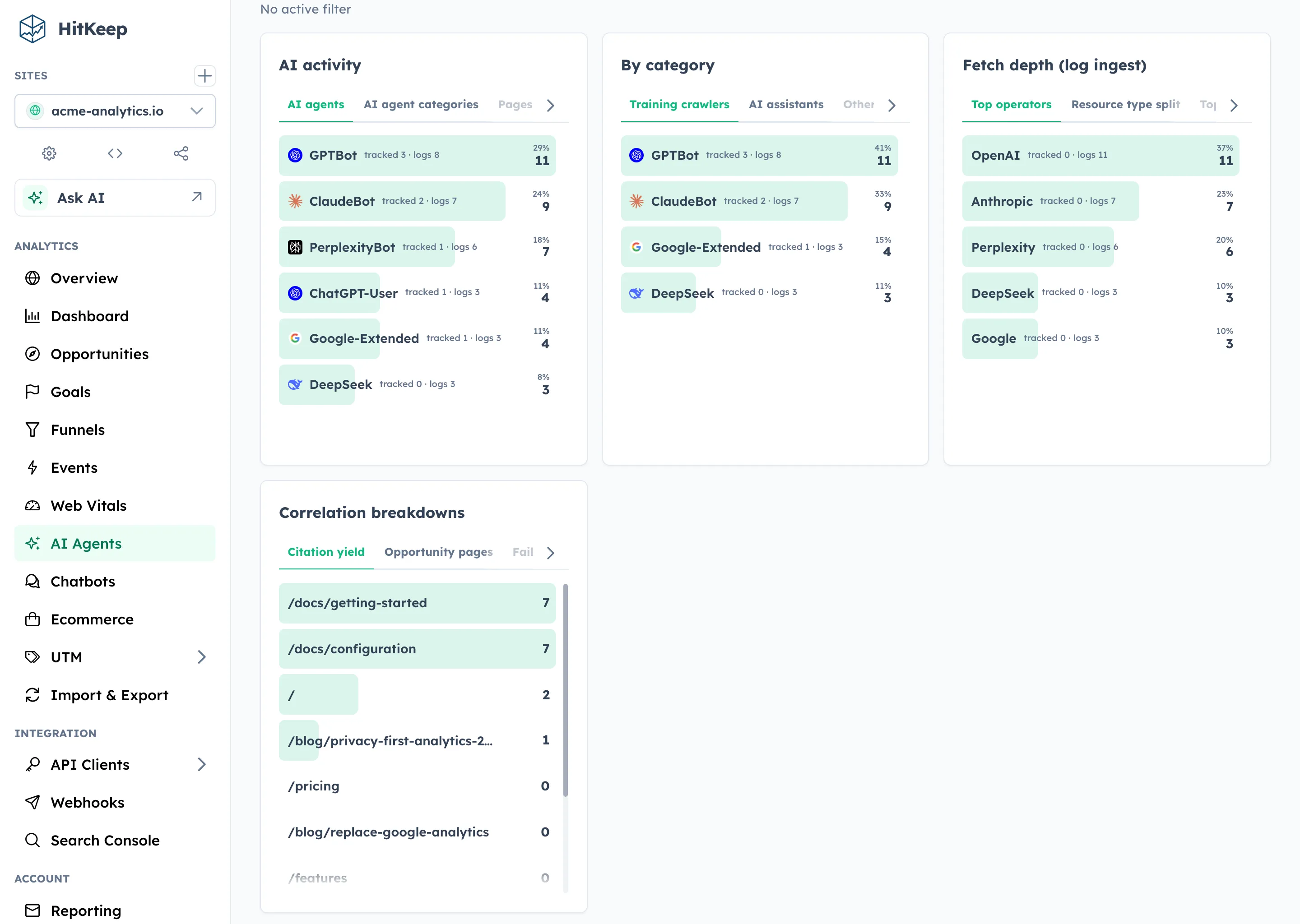
Browser tracking can capture many AI-referred human visits. AI crawler fetches usually require a server-side feed from logs, middleware, a CDN, or an edge worker because crawlers often do not run browser JavaScript.
HitKeep can show crawler interest and later AI-referred visits on the same paths. It cannot prove a specific answer, citation, or ranking unless that evidence exists in the data source.
When To Use Another Surface
Section titled “When To Use Another Surface”| Need | Better surface |
|---|---|
| Human setup or visual investigation | Dashboard |
| Normal product automation | REST API |
| Raw files, audit handoff, or account export | Open exports and takeout |
| Assistant analysis over approved aggregate reports | MCP plus HitKeep Agent Skills |
| Managed endpoint, backups, updates, and email delivery | HitKeep Cloud |
Is HitKeep MCP read-only?
Section titled “Is HitKeep MCP read-only?”Yes. HitKeep MCP exposes aggregate analytics and docs tools only. It does not expose write workflows, admin actions, billing actions, token management, dashboard sessions, or raw hit exports.
Can HitKeep MCP read Google Search Console analytics?
Section titled “Can HitKeep MCP read Google Search Console analytics?”Yes. HitKeep MCP can read imported aggregate Search Console rows for a site. It does not call Google live, refresh OAuth credentials, or trigger a sync.
Can HitKeep MCP analyze AI crawler traffic?
Section titled “Can HitKeep MCP analyze AI crawler traffic?”Yes. The AI visibility tool can return aggregate AI crawler fetches, AI-referred visits, and optional correlation context when the site has AI fetch data.
Does HitKeep MCP accept dashboard cookies?
Section titled “Does HitKeep MCP accept dashboard cookies?”No. HitKeep MCP accepts API client bearer tokens only. Tokens should be site-scoped and stored in the MCP client’s secret store.