
HitKeep 2.4.0 was published on May 6, 2026. It ships historical imports for Plausible and Simple Analytics, Google Search Console Search Analytics import, read-only Search Console reporting through MCP, authenticated server-side tracking with original timestamp and visitor IP context for derived country, region, city, provider, and ASN metadata, Dutch dashboard and email localization, and focused reliability and UX fixes from the 2.4.0 changelog.
The import system is aggregate-first. Plausible exports and Simple Analytics datapoints are migration history, not full-fidelity native HitKeep sessions. Imported data appears in compatible dashboard and event reports, while realtime, hourly, and relationship-heavy filtered views keep native data separate and explain when imported rows are excluded.
What shipped in 2.4.0
- Importables framework: a provider model for future importers, with Plausible and Simple Analytics as the first providers.
- Plausible ZIP and CSV input: upload one Plausible export ZIP or loose CSV files whose headers match supported Plausible schemas.
- Simple Analytics datapoints input: upload any CSV whose header matches the Simple Analytics All datapoints export.
- Mandatory validation: validation scans staged files row by row and returns a manifest before analytics rows are committed.
- Historical dashboard coverage: imported traffic, page, source, device, location, and provider-specific dimension aggregates appear in compatible daily and monthly reports.
- Imported event coverage: Plausible custom events and URL-style properties appear in compatible Events views.
- Google Search Console integration: connect a team to Google Search Console with read-only OAuth, map a site to a Search Console property, and import finalized Search Analytics aggregates.
- Search Console drilldown: authenticated site dashboards show clicks, impressions, CTR, average position, trends, top queries, top pages, and country/device breakdowns.
- Search Console MCP reporting: approved MCP clients can check Search Console mapping and sync status, then read imported overview, series, query, page, country, and device aggregates for scoped sites.
- CLI and REST API: the dashboard flow uses the same chunked upload, validation, start, status, list, and delete lifecycle as the CLI and API.
- Import history and deletion: completed imports can be inspected and deleted, including their imported aggregate rows.
- Server-side pageview and event ingest: scoped API clients can send trusted pageviews and custom events with an explicit RFC3339 timestamp and transient visitor IP context for derived IP metadata.
- Server-to-server request behavior: the server-side ingest endpoints do not require browser
OriginorRefererheaders, use the ingest rate limiter, and forward safely from follower nodes to the leader in clustered deployments. - Dutch dashboard and email localization: Dutch (
nl) becomes selectable in user preferences, auto-detects from Dutch browser and request languages, and covers the localized transactional and analytics report emails. - Reliability and UX fixes: 2.4.0 also optimizes the healthcheck endpoint, sets the Docker healthcheck interval to 30 seconds, consolidates frontend and auth bootstrap behavior, refreshes the May IP location data, clarifies server-side pageview copy, unifies copy actions for team, site, and user IDs, and consolidates import and export UI behavior.
Google Search Console Integration
Search Console import is for teams that want organic search query data beside HitKeep’s normal site analytics without exposing that data through public dashboards.
Team owners and admins connect Google Search Console through read-only OAuth. HitKeep stores the team connection, lists available Search Console properties, and lets an admin map one property to a HitKeep site. Viewers can see the mapping state, but they cannot connect, map, unmap, disconnect, or request syncs.
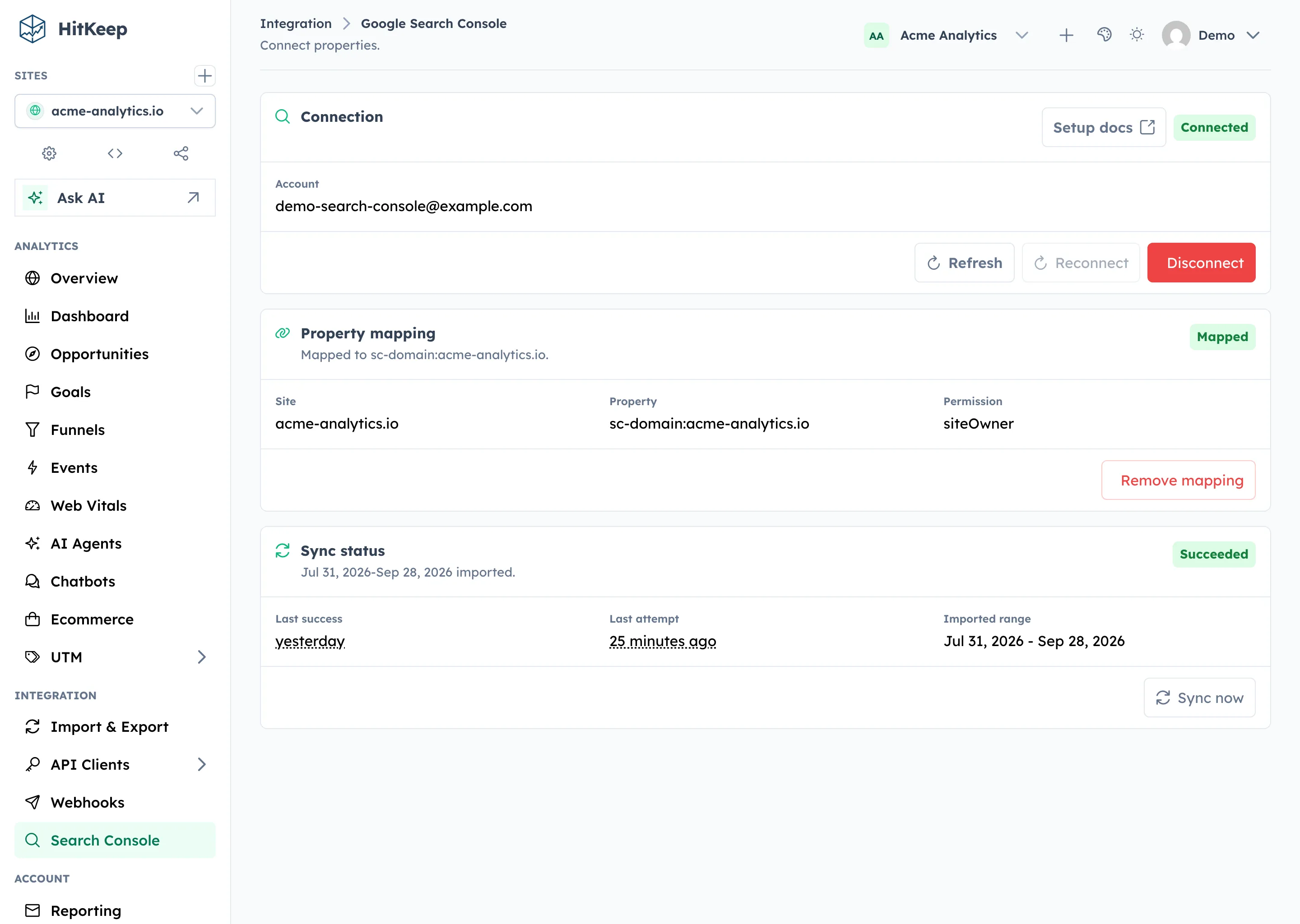
The import uses Google’s official generated Search Console client behind HitKeep’s own adapter. It requests the read-only Search Console scope and imports finalized aggregate Search Analytics rows. Tokens, OAuth codes, client secrets, and raw Google payloads stay out of API responses, logs, audits, seed data, exports, and public share surfaces.
Sync is tenant-scoped. A manual sync request should give immediate feedback in the dashboard, while the worker imports rows through the same in-process runtime used by self-hosted and cloud deployments. Recurring syncs recheck recent completed days because Search Console data can settle after initial availability.
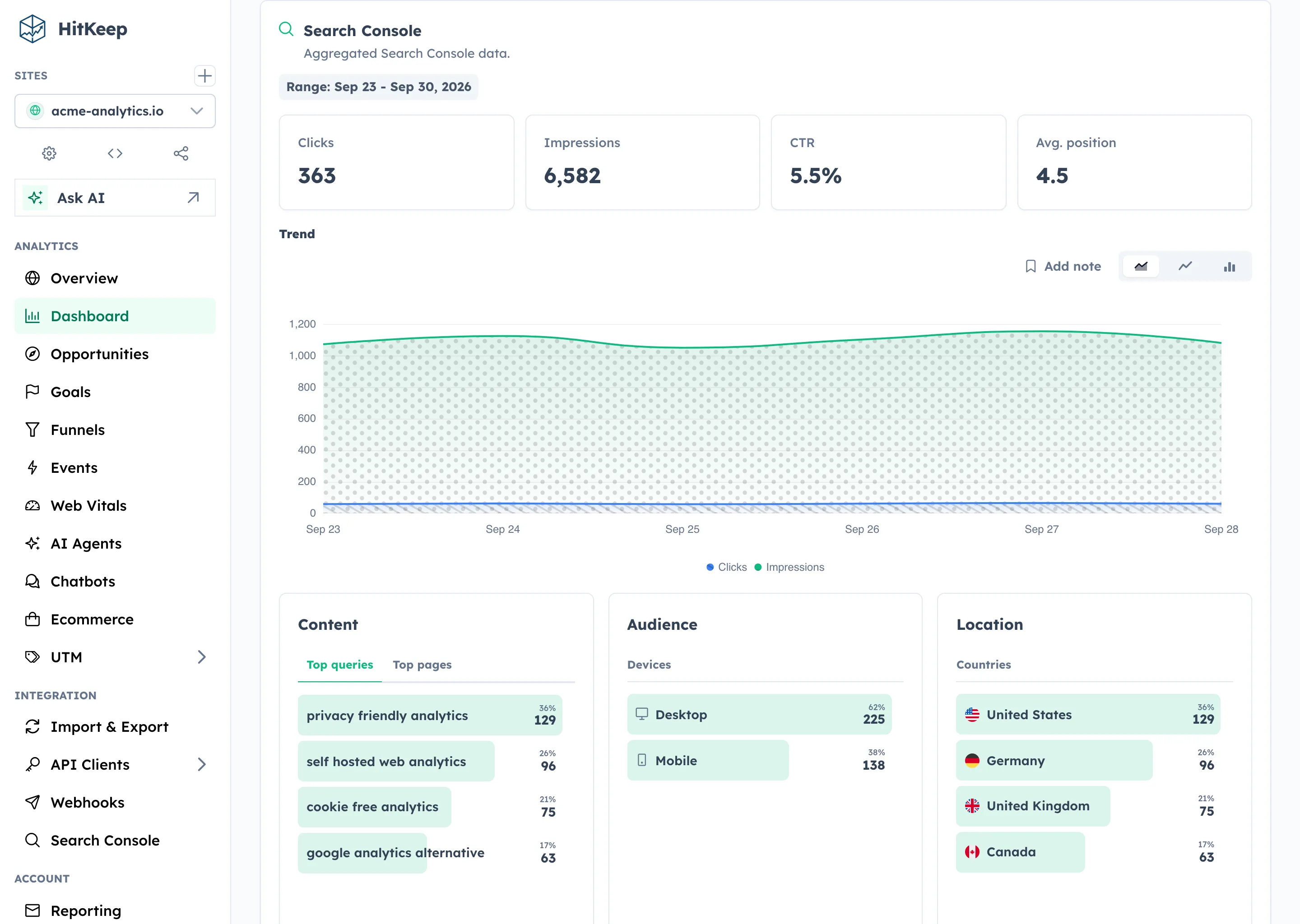
The report surface is aggregate-first: overview metrics, daily series, top queries, top pages, and country/device breakdowns. It does not claim query-to-session attribution because Search Console does not provide that relationship. Use GA4 or another attribution system if your workflow depends on connecting individual search queries to sessions or conversions.
The optional HitKeep MCP server also reads the imported Search Console rows for approved assistants and internal reporting tools. Two read-only tools cover the workflow: hitkeep_get_search_console_status reports mapping state, property URI, safe permission level, sync state, imported date range, and attention reason; hitkeep_get_search_console returns imported overview and daily series by default, with query, page, country, and device sections only when requested.
MCP does not call Google live, refresh OAuth credentials, or trigger Search Console syncs. If the last sync failed or needs attention, MCP can still return older imported rows with warnings such as search_console_sync_failed, search_console_sync_needs_attention, or requested-range warnings. Healthy reports return an empty warnings array.
Server-Side Tracking
2.4.0 makes server-side tracking a first-class ingest path for log replay, edge workers, backend services, and no-JavaScript collection. The API-client-only endpoints accept one pageview or custom event at a time:
POST /api/ingest/server/pageviewPOST /api/ingest/server/event
The submitted URL resolves the HitKeep site by hostname. The API client still needs site.manage_data for that site, so a token scoped to one site cannot write records for another domain.
Each record can carry the original RFC3339 timestamp from the log source. HitKeep stores that timestamp as the analytics time, which means replayed records land in the correct daily and monthly buckets instead of using the time the import worker happened to send the request.
The visitor_ip field is trusted transient context. HitKeep uses it for IP exclusions, spam filtering, and country, region, city, provider, and ASN lookup. It stores the derived analytics fields and does not store the raw visitor IP.
These endpoints are meant for server-to-server clients. They do not require browser Origin or Referer headers, and they use the ingest rate limiter instead of the normal dashboard API limiter because log forwarders and edge workers often send bursts from one IP. In clustered deployments, follower nodes forward these requests to the leader before authentication and persistence.
2.4.0 does not add a public batch request format. The HTTP contract stays one record per request for now, while the existing NSQ and DuckDB write path batches persistence internally.
Imports Page
The Imports page lives with the selected site’s analytics workflow. It is available to users with site.manage_data, which includes site owners, site admins, effective team owners and admins, instance owners, and instance admins.
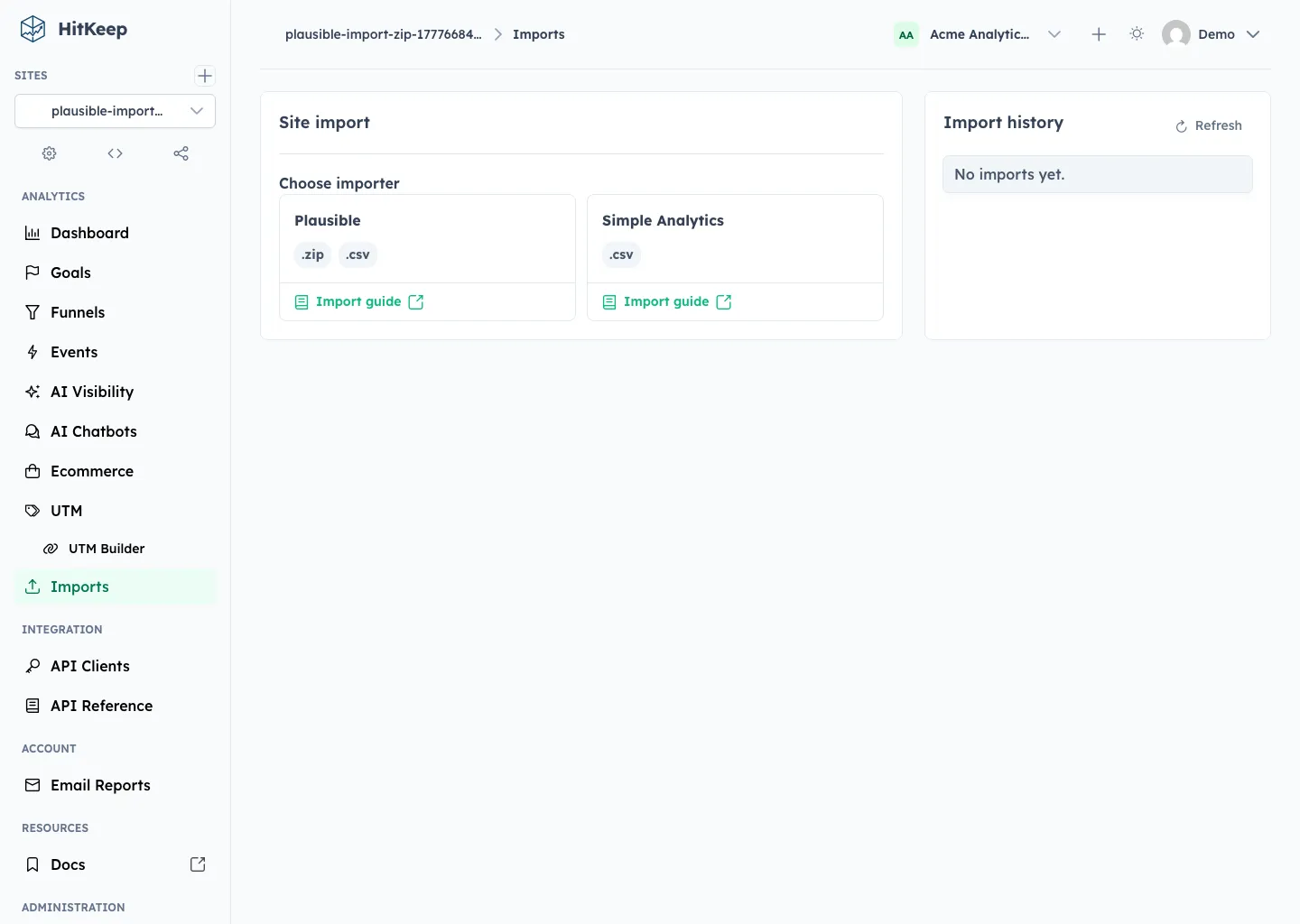
After choosing Plausible, HitKeep accepts the normal Plausible export ZIP directly. If a team already unpacked the archive, the same flow accepts loose CSV files whose headers match supported Plausible export schemas. Partial imports are allowed when at least one recognized dataset validates.
After choosing Simple Analytics, HitKeep expects a CSV with the All datapoints header from the Simple Analytics export page. Use the All export rather than a single report export so HitKeep can validate the pageview rows, dates, paths, referrers, devices, countries, and UTM source data together. HitKeep uses the selected site domain, not the filename, to suppress self-referrers from imported source reports.
Validation Before Commit
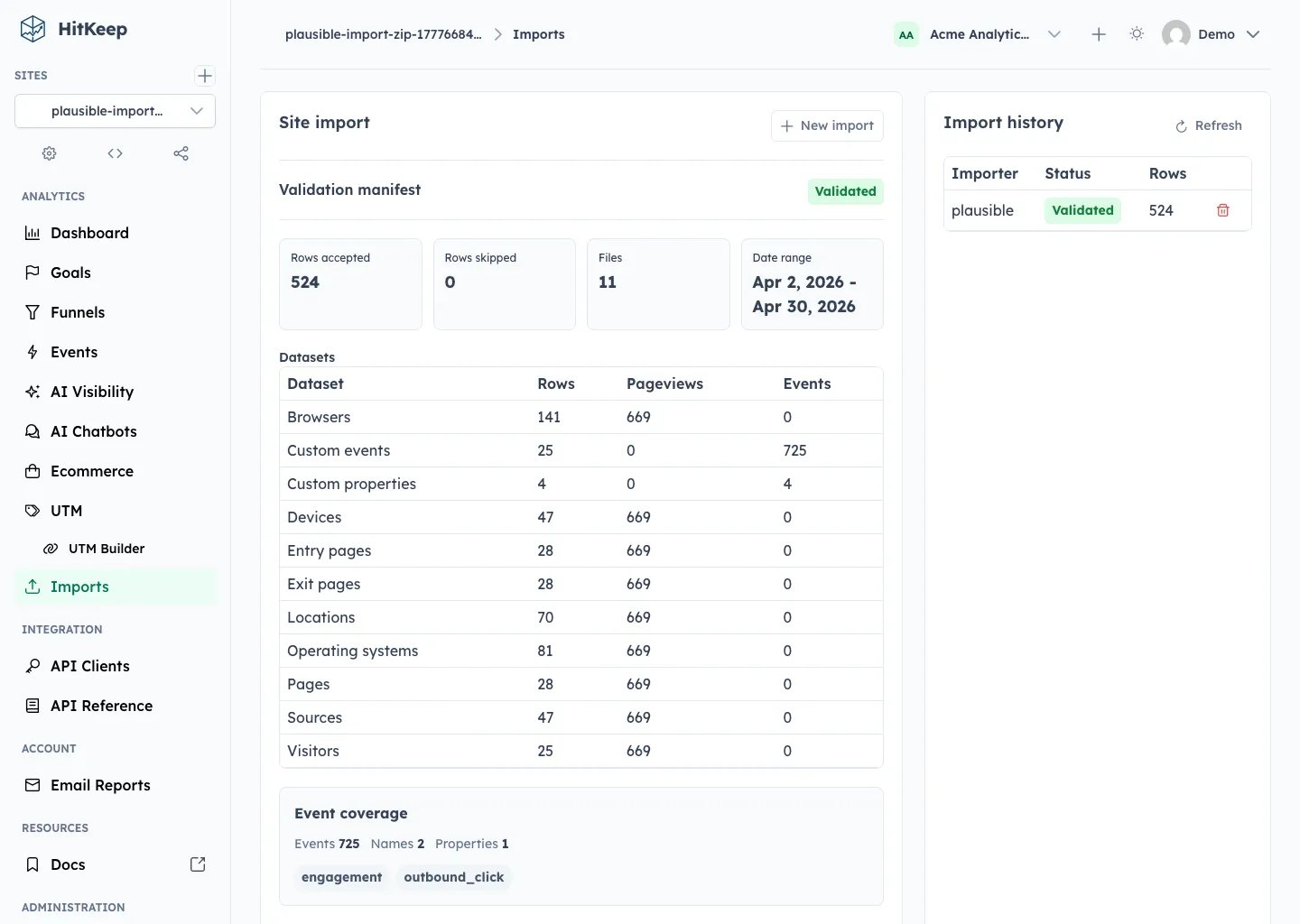
Validation is mandatory. It does not write final analytics rows. It stages the files, scans each CSV row, checks headers and values, computes the date range, records skipped rows, and produces a compact manifest for review.
The Plausible manifest shows accepted files, ignored files, missing optional files, dataset counts, rows accepted and skipped, estimated pageviews and events, event names, property keys, and warnings when Plausible aggregates cannot prove a relationship.
The Simple Analytics manifest shows the accepted datapoints CSV, the imported date range, accepted and skipped rows, estimated traffic metrics, and unsupported datapoint types. That review step is important because Simple Analytics exports do not contain every native HitKeep dimension.
Compatible Historical Reports
After confirmation, HitKeep imports the rows in small transactions and tags them with the import id, provider, source file, date, dimension or event key, and metrics. The UI updates import history as the job moves through validation, running, completed, failed, and deleted states.
Imported Plausible traffic is daily-grain aggregate data. It is included where the query can use it safely:
- visitors, visits, pageviews, bounces, visit duration, pages per session
- pages, entry pages, exit pages, sources, devices, browsers, operating systems, and countries
- daily and monthly chart buckets
Imported Simple Analytics traffic is built from the All datapoints CSV. It is included in compatible historical reports for:
- visitors, visits, pageviews, and visit duration totals
- pages, sources, devices, countries, browser names, language codes, and UTM source when those fields exist in the CSV
- daily and monthly chart buckets
Imported rows are excluded from realtime and hourly views because the migration exports do not contain native HitKeep event streams. If a filter requires raw session relationships the source export cannot prove, HitKeep returns native data and an imported_excluded reason instead of fabricating precision.
Validation also checks for native HitKeep data already present in the imported date range. The default policy is skip_native_day: overlapping traffic days and matching event/day pairs are reported in the manifest and skipped during import so historical rows do not double count data HitKeep has already tracked.
Events And Source Limits
Plausible custom events are imported into compatible Events reports. Event names, event totals, event visitors, and property breakdowns are available when the CSV data proves the relationship. Plausible system events that match HitKeep automatic events, such as Outbound Link: Click, are normalized to HitKeep names like outbound_click.
Simple Analytics imports focus on pageview history. HitKeep imports browser and language breakdowns when the datapoints CSV includes browser_name and lang_language, but it does not invent bounce counts, native HitKeep events, goals, funnels, ecommerce activity, or conversion relationships from the export. Unsupported datapoint types are reported during validation so the site admin sees the coverage before importing.
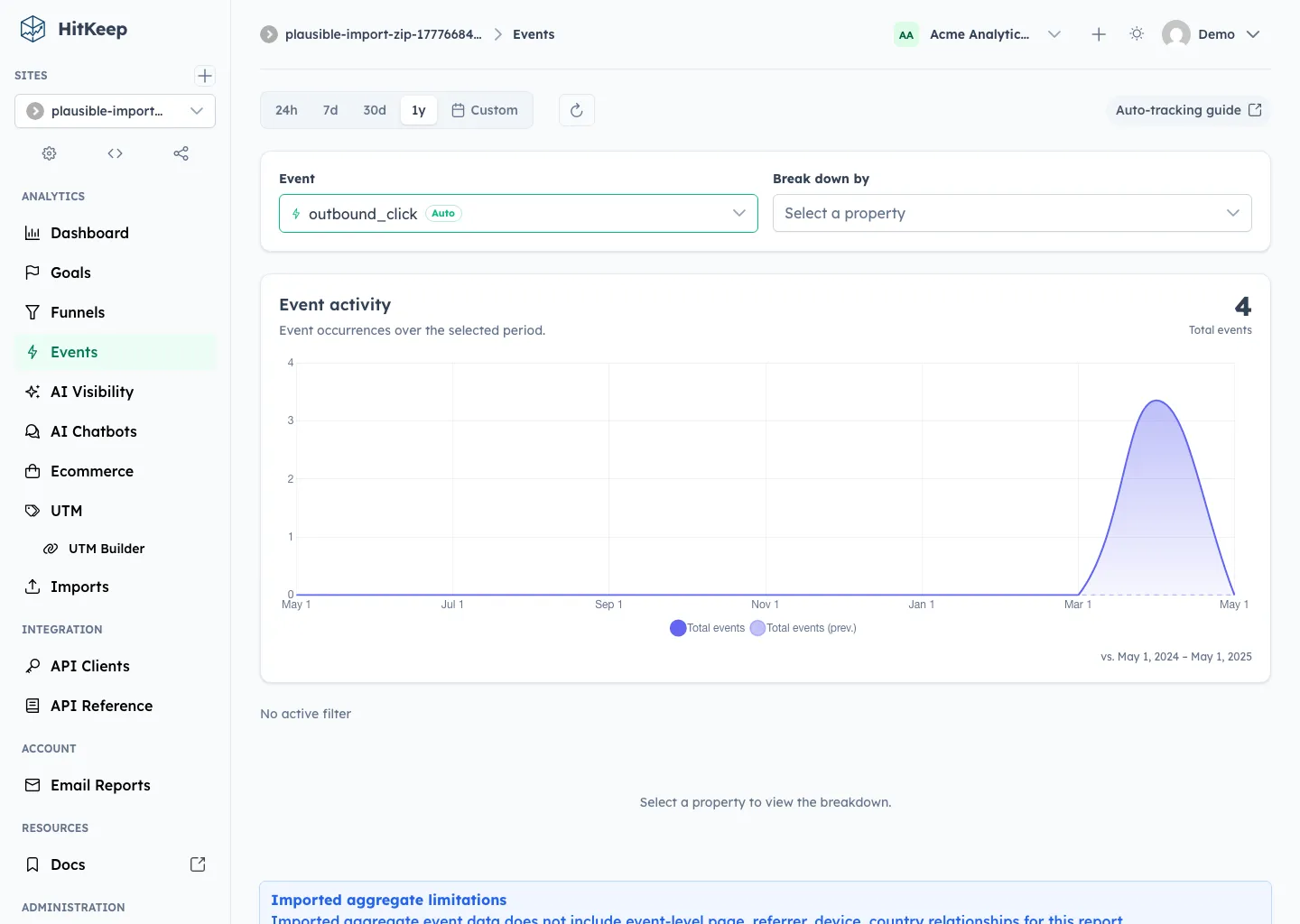
For Plausible property files that do not include an event name, HitKeep imports the property aggregate as unattributed coverage and shows a warning in the validation manifest. Those rows no longer inflate queryable event totals. The review step separates queryable custom events from preserved custom property aggregates, and the Events dashboard explains that Plausible exports do not contain event-level source, browser, device, country, or language relationships.
Event goals with matching imported Plausible custom events include imported visitors as historical conversions where aggregate math is safe. Filtered, comparison, hourly, and audience-dimension views continue to show explicit imported-data limitation reasons instead of synthesizing relationships the export cannot prove.
CLI And API
The dashboard uses the same resumable upload protocol as the CLI and REST API. That matters for large exports and repeatable operations, especially self-hosted instances with long-lived historical data. Imports now run through a restart-recoverable in-process runner: queued or interrupted jobs with staged files are picked back up on startup, while jobs whose staged files are missing fail with a clear error.
The CLI reuses HITKEEP_PUBLIC_URL when it is already set, and otherwise talks to http://localhost:8080. Use --url only when importing into a remote instance from another machine.
For Plausible, validate and import the export ZIP:
export HITKEEP_API_TOKEN="hk_api_..."
hitkeep import validate plausible \  --site <site-id> \  --file plausible-export.zip
hitkeep import plausible \  --site <site-id> \  --file plausible-export.zip \  --wait
Loose Plausible CSV files and export directories work from the CLI too:
hitkeep import validate plausible \  --site <site-id> \  --file imported_visitors.csv \  --file imported_custom_events.csv
hitkeep import plausible \  --site <site-id> \  --dir ./plausible-export \  --yes \  --wait
For Simple Analytics, validate and import the All datapoints CSV:
hitkeep import validate simpleanalytics \  --site <site-id> \  --file simple-analytics-export.csv
hitkeep import simpleanalytics \  --site <site-id> \  --file simple-analytics-export.csv \  --wait
The lifecycle commands are:
hitkeep import start --site <site-id> --import-id <import-id> --waithitkeep import status --site <site-id> --import-id <import-id>hitkeep import list --site <site-id>hitkeep import delete --site <site-id> --import-id <import-id>The REST API exposes the same flow: list importers, create upload, upload file chunks, validate, start, fetch status, list history, and delete. See the Imports API reference for the endpoint list.
Built For Large Sources
The Plausible and Simple Analytics importers stream work row by row. They do not call ParseMultipartForm, do not hold full CSV files in memory, and do not build an in-memory manifest of every row. Plausible ZIP files are staged on disk, recognized entries are scanned sequentially, and loose CSV files are scanned sequentially.
The default staged import limit is 100 GiB and can be changed with HITKEEP_IMPORT_MAX_STAGE_BYTES. Import upload requests use the normal API rate limiter, so operators only have one authenticated API budget to tune.
Read More
- Plausible comparison
- Simple Analytics comparison
- Google Search Console integration guide
- Official MCP Server
- Plausible import guide
- Simple Analytics import guide
- Server-side tracking and historical replay
- Event Analytics
- Configuration Reference
- Imports API reference
- GitHub Releases
- GitHub Release v2.4.0