
Period-over-Period Analytics Comparison in HitKeep
Dieser Inhalt ist noch nicht in deiner Sprache verfügbar.
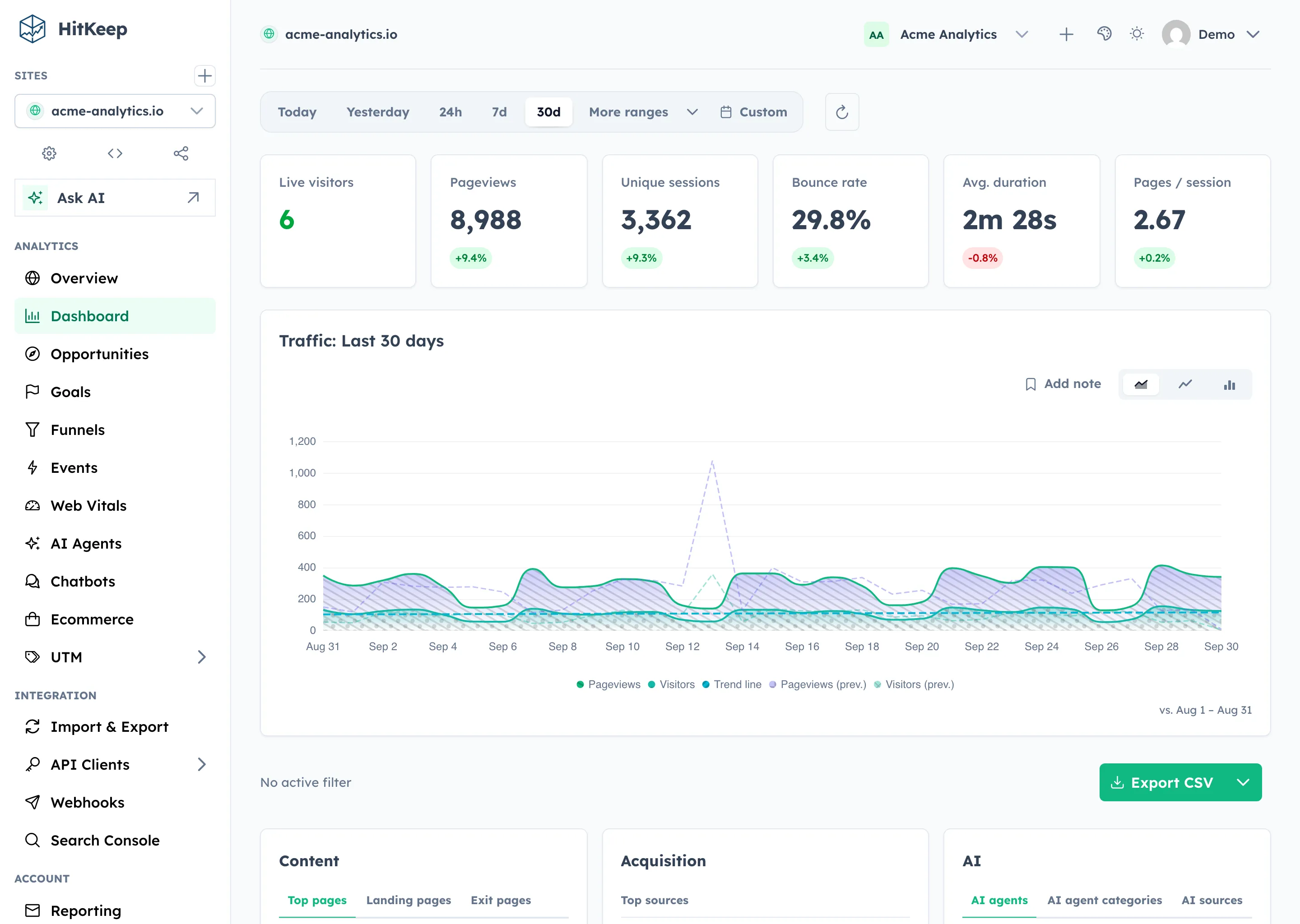
HitKeep automatically compares your current date range against the equivalent prior period on every analytics page. Delta badges appear on all KPI cards and a dashed overlay series appears on every timeseries chart — no toggle required.
How it works
Section titled “How it works”Comparison is always active. Whenever you load or change the date range:
- HitKeep computes the previous period — a window of the same duration ending the millisecond before your current range begins.
- KPI cards show a
+X.X%or-X.X%badge against the prior period. - Timeseries charts gain dashed overlay series for the previous period.
- A “vs. Jan 24 – Feb 22” label appears near the range selector so you always know what you are comparing against.
Comparison range formula
Section titled “Comparison range formula”HitKeep shifts the selected window backwards by its own duration:
| Current range | Comparison range |
|---|---|
| Today | Same elapsed length immediately before today began |
| Yesterday | The calendar day before yesterday |
| Last 30 minutes | 30 minutes before that |
| Last hour | 1 hour before that |
| Last 6 hours | 6 hours before that |
| Last 24 hours | 24 hours before that |
| Last 3 days | The 3 days before that |
| Last 7 days | The 7 days before that |
| Last 14 days | The 14 days before that |
| Last 30 days | The 30 days before that |
| Last 60 days | The 60 days before that |
| Last 90 days | The 90 days before that |
| Last 180 days | The 180 days before that |
| This week | Equivalent length before this week began |
| Last week | The calendar week before last week |
| This month | Equivalent length before this month began |
| Last month | The calendar month before last month |
| This year | Equivalent length before this year began |
| Last year | The year before that |
| Custom (Jan 25 – Feb 23) | Equivalent length ending Jan 24 |
Pages with comparison
Section titled “Pages with comparison”Prior-period deltas are shown on KPI cards and timeseries charts. City/provider/ASN lists remain current-range aggregates, so they can explain the selected period without implying that a specific city, network provider, or ASN changed by a computed percentage.
Comparison data is shown on:
- Dashboard — traffic KPI cards, traffic chart overlay, and current-range top countries, cities, providers, and ASNs
- Goals — Conversions, Conversion Rate, Unique Sessions + chart overlay
- Funnels — Entries, Completions, Completion Rate + chart overlay
- UTM — UTM hit-count cards for Campaign, Content, Medium, Source, and Term
The Events page does not show comparison — event property breakdowns are snapshots rather than trends.
How to use comparison
Section titled “How to use comparison”Period comparison is most useful after a real change:
| Change | What to check |
|---|---|
| New landing page | Pageviews, landing pages, goal conversion, and source mix |
| Pricing page rewrite | Pricing path goal and signup funnel completion |
| Campaign launch | UTM source, medium, campaign, and goal deltas |
| Checkout change | Ecommerce revenue, orders, checkout funnel, and device mix |
| AI content update | AI-referred visits and downstream goals, while AI crawler fetches stay in AI Visibility |
Treat a positive delta as a prompt to inspect the source, campaign, and audience panels. Treat a negative delta as a prompt to check whether traffic volume changed, conversion rate changed, or tracking changed.
The comparison object is always present in the stats endpoint response. The previous period is computed server-side from the from / to parameters you supply:
curl "https://your-hitkeep.example/api/sites/{id}/stats?\from=2025-02-01T00:00:00Z&to=2025-02-28T23:59:59Z" \ -b "hk_token=YOUR_SESSION_COOKIE"The response includes a comparison object covering the equivalent prior period:
{ "total_pageviews": 4200, "unique_sessions": 1800, "comparison": { "total_pageviews": 3500, "unique_sessions": 1500, "utm_campaign_hits": 210, "utm_content_hits": 80, "utm_medium_hits": 310, "utm_source_hits": 420, "utm_term_hits": 55, "goals": [ { "goal_id": "...", "name": "Signup", "conversions": 140, "conversion_rate": 9.3 } ], "total_conversions": 140, "chart_data": [...] }}You may also pass explicit comparison bounds using compare_from / compare_to if you need a custom window:
curl "https://your-hitkeep.example/api/sites/{id}/stats?\from=2025-02-01T00:00:00Z&to=2025-02-28T23:59:59Z&\compare_from=2025-01-01T00:00:00Z&compare_to=2025-01-31T23:59:59Z" \ -b "hk_token=YOUR_SESSION_COOKIE"