
HitKeep WordPress Analytics Integration Guide
Dieser Inhalt ist noch nicht in deiner Sprache verfügbar.
The HitKeep WordPress plugin adds privacy-first analytics to WordPress without editing your theme, using a tag manager, or adding a second analytics backend. Choose EU Cloud, US Cloud, or a self-hosted HitKeep URL, then the plugin loads the normal cookie-free hk.js tracker for that site.
What the plugin does
Section titled “What the plugin does”The plugin is a thin WordPress adapter around HitKeep’s existing tracker:
WordPress page -> hk.js -> HitKeep /ingest and /ingest/event -> DuckDBIt does not create WordPress analytics tables, set analytics cookies, or send traffic to a third-party CDN. The configured HitKeep instance receives the same pageview and automatic event payloads as the manual snippet: outbound_click, file_download, and form_submit. Optional redirect tracking can also send server-side outbound_click events after WordPress resolves supported short-link or affiliate redirects.
For AI visibility on a WordPress site, treat the plugin as the browser side only. It can record AI-referred human visits, but AI crawler fetches still need server-side forwarding from CloudFront, nginx, Caddy, an app server, or another log source.
Install the plugin
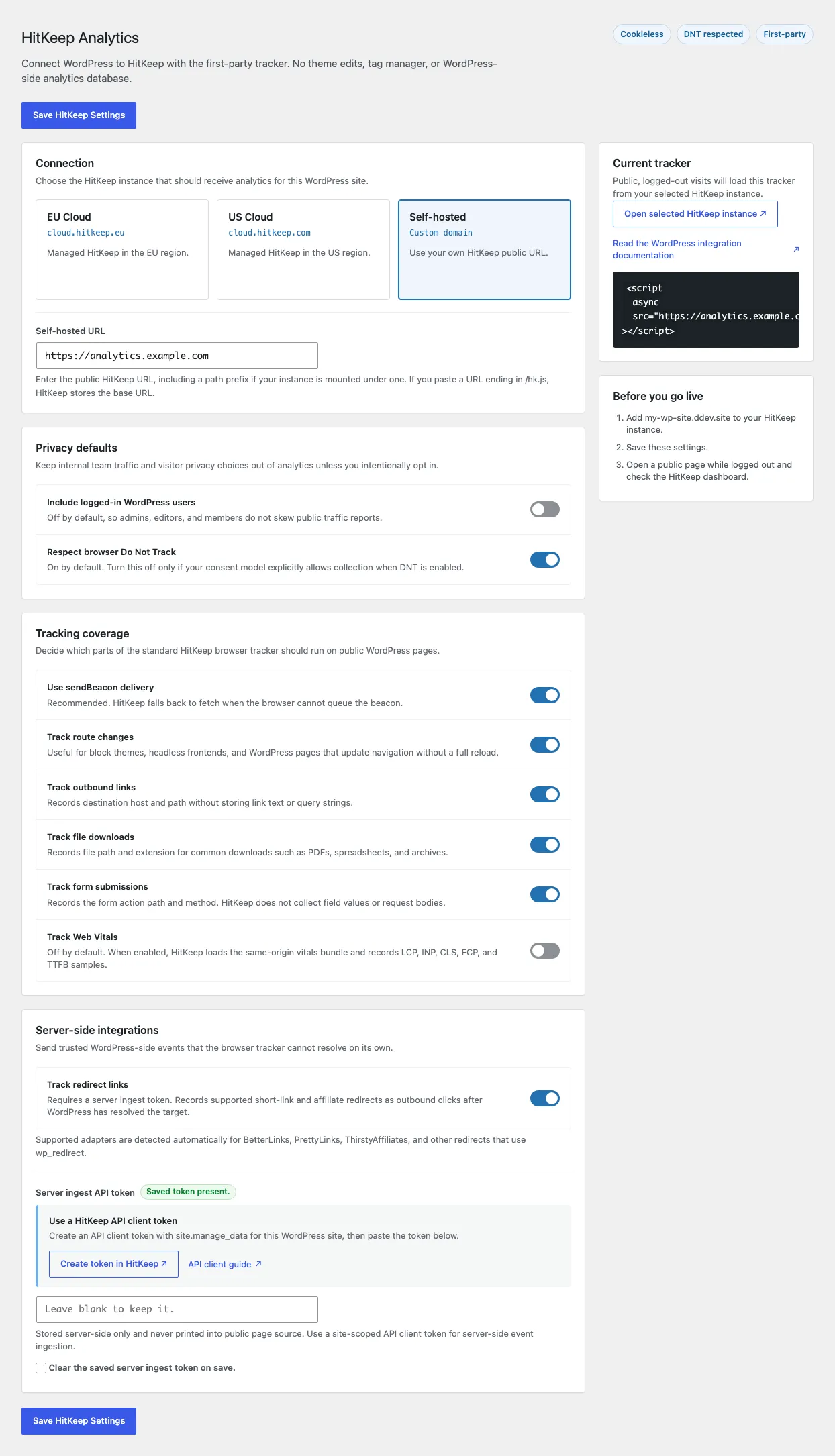
Section titled “Install the plugin”Install HitKeep Analytics from WordPress.org in WordPress:
- Open Plugins -> Add New Plugin.
- Search for HitKeep Analytics.
- Install and activate HitKeep Analytics.
- Open Settings -> HitKeep.
Configure HitKeep
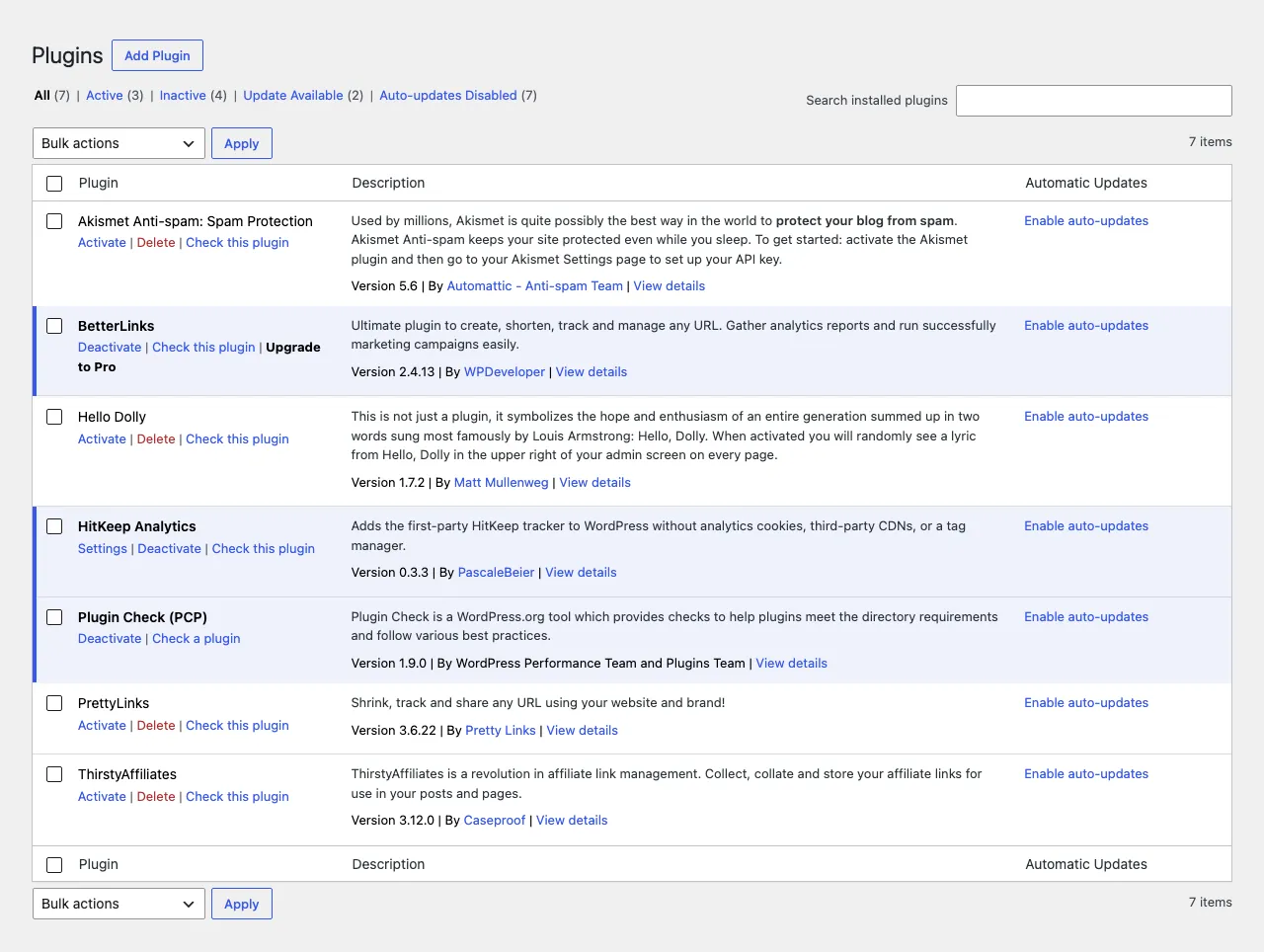
Section titled “Configure HitKeep”Choose where your analytics should be sent:
- EU Cloud: loads
https://cloud.hitkeep.eu/hk.js - US Cloud: loads
https://cloud.hitkeep.com/hk.js - Self-hosted or custom domain: loads
hk.jsfrom the URL you enter
Use HitKeep Cloud when you want WordPress analytics without managing TLS, upgrades, backups, SMTP, or the HitKeep data directory. Use self-hosted HitKeep when the deployment requirement is to run the single Go binary and keep the embedded DuckDB data under your own infrastructure boundary.
For self-hosted installs, enter the public HitKeep URL:
https://analytics.example.comIf HitKeep is mounted below an existing site, include the path prefix:
https://www.example.net/hitkeepDo not include /hk.js. The plugin appends that path automatically. If you paste a URL ending in /hk.js, the plugin normalizes it back to the base URL while preserving any path prefix, so https://www.example.net/hitkeep/hk.js becomes https://www.example.net/hitkeep.
For subdirectory installs, the HitKeep instance and reverse proxy must serve hk.js, hk-vitals.js, /ingest, and /ingest/web-vitals under the same prefix. See Public URL path prefixes for the matching HitKeep server configuration.
Use Open configured HitKeep instance from the current tracker card when you want to jump from WordPress to the selected EU Cloud, US Cloud, or self-hosted HitKeep instance.
Add your WordPress domain to your HitKeep instance without a leading www.. HitKeep matches public tracker requests by the browser Origin hostname.
Defaults
Section titled “Defaults”The plugin starts with conservative defaults:
| Setting | Default |
|---|---|
| Logged-in WordPress users | Not tracked |
| Do Not Track | Respected |
| Pageviews | Tracked |
| SPA route changes | Tracked |
| Outbound link events | Tracked |
| File download events | Tracked |
| Form submit events | Tracked |
| Web Vitals | Not tracked |
| Redirect link events | Not tracked |
Enable Track logged-in WordPress users only if you want editors, admins, or members to appear in analytics.
Tracker options
Section titled “Tracker options”The WordPress settings map directly to hk.js data attributes:
| WordPress setting | Tracker attribute |
|---|---|
| Collect when the browser sends Do Not Track | data-collect-dnt="true" |
| Disable sendBeacon delivery | data-disable-beacon="true" |
| Disable SPA route tracking | data-disable-spa-tracking="true" |
| Disable outbound link events | data-disable-outbound-tracking="true" |
| Disable file download events | data-disable-download-tracking="true" |
| Disable form submit events | data-disable-form-tracking="true" |
| Enable Web Vitals | data-enable-web-vitals="true" |
Use these options when a WordPress site needs a narrower tracking surface than the default HitKeep browser tracker.
Automatic event payloads use the same privacy-safe properties as the manual snippet. HitKeep strips query strings and hashes and does not capture link text, form field values, or request bodies.
Web Vitals are opt-in. When enabled, the tracker loads same-origin hk-vitals.js and reports LCP, INP, CLS, FCP, and TTFB without attribution/debug fields.
Redirect and affiliate links
Section titled “Redirect and affiliate links”Browser tracking can only see the link the visitor clicked. It cannot know the final affiliate or short-link destination after WordPress resolves a redirect. Enable Track redirect links when you want HitKeep to record supported redirect clicks as outbound links after the target is known.
The current WordPress plugin detects BetterLinks, PrettyLinks, ThirstyAffiliates, and other redirects that call wp_redirect. Same-site redirects are ignored. HitKeep stores the short path and resolved target host/path, with source, referrer, and target query strings stripped before delivery.
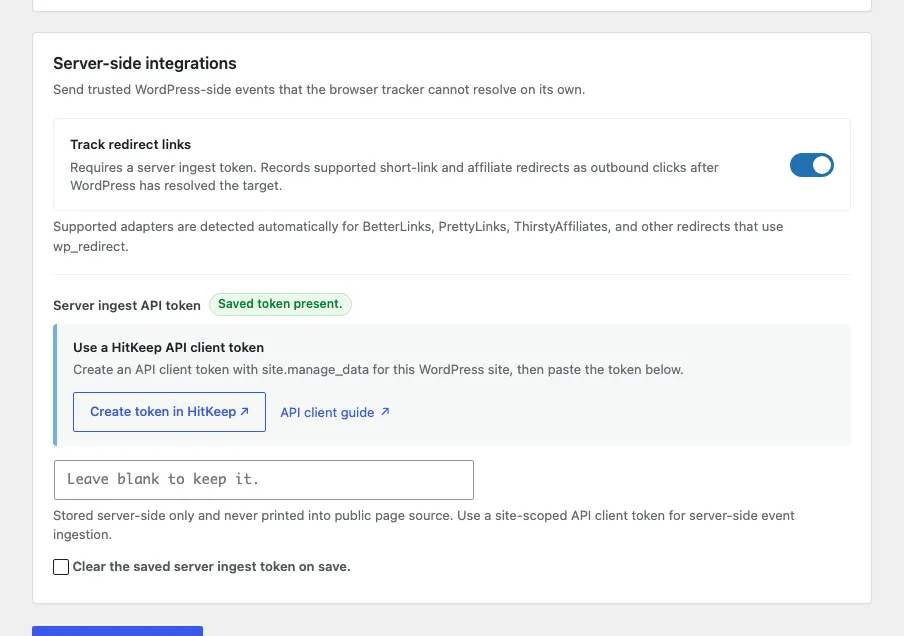
Redirect tracking uses HitKeep’s trusted server-side event ingest endpoint, so WordPress needs an API client token with site.manage_data for the site. In the token field, use Create token in HitKeep to open the selected instance’s API client screen, or read the API Clients guide for the permission model. Paste the token into WordPress and save. The token stays server-side and is not printed into public page source.
site.manage_data.Related
Section titled “Related”- API Clients
- Server-Side Tracking
- Google Analytics Alternative for WordPress
- WordPress Privacy Analytics
- Privacy-First Web Analytics
- Cookieless Event Tracking
- Tracker Architecture
- Automatic Events
- Web Vitals Analytics
- Custom Events
- AI Visibility Analytics
- AI Fetch Ingest
- AI Fetch on AWS
- PECR and ePrivacy