
Ecommerce Analytics
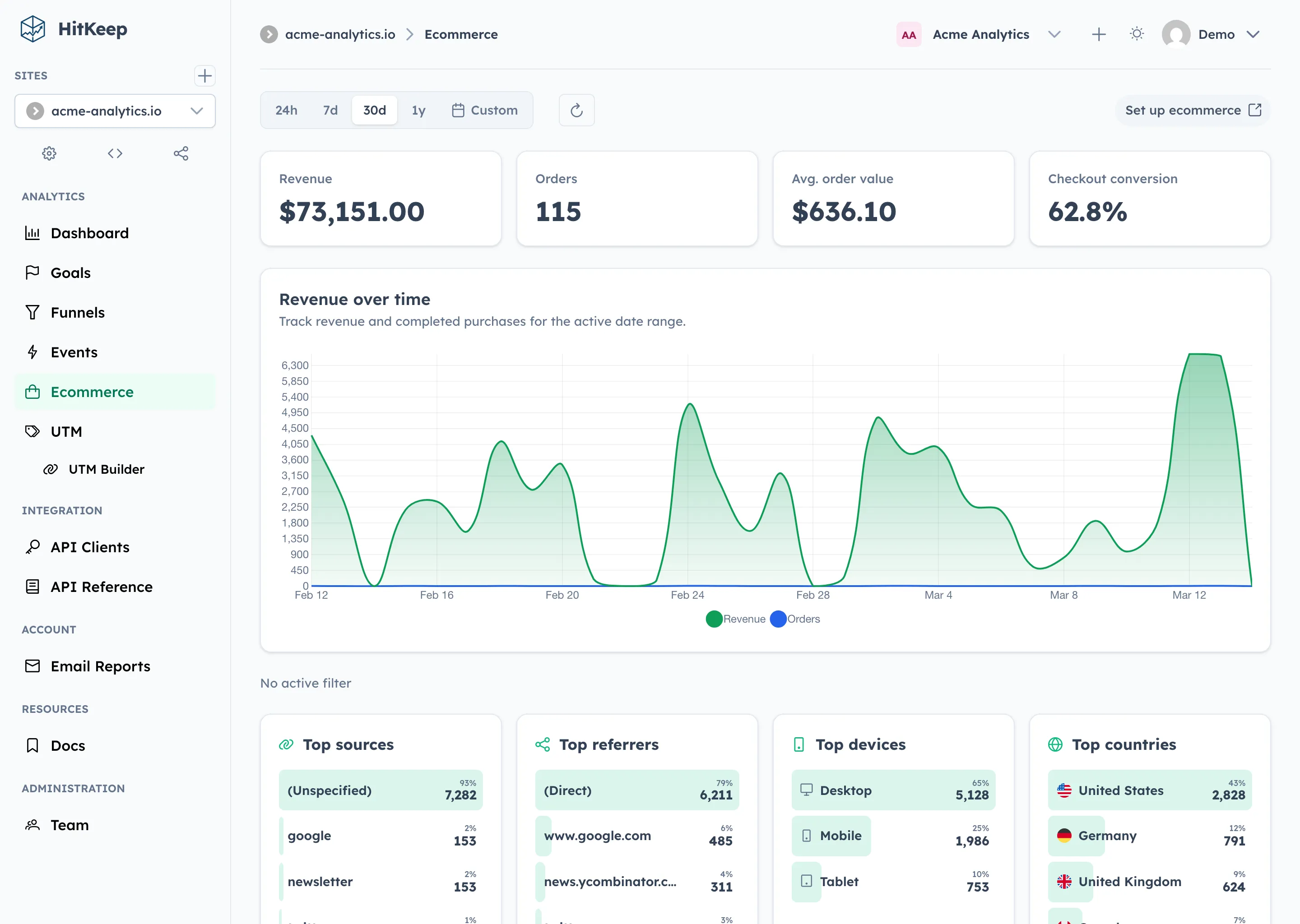
HitKeep’s ecommerce analytics page is designed to feel familiar to teams coming from GA4 without importing GA4’s complexity wholesale. You track a small canonical set of ecommerce events, HitKeep stores them in the same tenant-isolated analytics database as the rest of your traffic data, and the dashboard turns them into revenue, order, product, and source reporting.
What HitKeep Ecommerce Tracking Is
Section titled “What HitKeep Ecommerce Tracking Is”HitKeep ecommerce is:
- GA4-inspired: the canonical event names are
view_item,add_to_cart,begin_checkout, andpurchase - event-based: no separate orders table or catalog service is required
- self-hosted: ecommerce data lives in the same per-team analytics storage as the rest of your site analytics
- filterable: the Ecommerce page respects the same date range and audience filters you already use across HitKeep
HitKeep ecommerce is not:
- a shopping cart
- an inventory backend
- a payment processor
- full GA4 ecommerce parity
For 2.0.0, the focus is clean reporting for web revenue events: revenue, orders, average order value, checkout conversion, top products, and revenue by source or campaign.
Canonical Event Model
Section titled “Canonical Event Model”Use these event names going forward:
view_itemadd_to_cartbegin_checkoutpurchase
view_item
Section titled “view_item”Use this when a visitor views a product detail page, pricing modal, or other product-specific surface.
window.hk?.event?.('view_item', { item_id: 'pro-plan', item_name: 'Pro Plan', category: 'subscription', price: 79, currency: 'USD',});add_to_cart
Section titled “add_to_cart”Use this when a visitor explicitly adds an item, plan, or add-on to a cart or draft order.
window.hk?.event?.('add_to_cart', { item_id: 'team-seat-pack', item_name: 'Team Seat Pack', category: 'add-on', quantity: 2, price: 49, currency: 'USD',});begin_checkout
Section titled “begin_checkout”Use this when the checkout step actually begins, not when a visitor merely lands on a pricing page.
window.hk?.event?.('begin_checkout', { checkout_id: 'chk_01js8c9z4m', value: 177, currency: 'USD', items_count: 3, coupon: 'SPRING25', items: [ { item_id: 'pro-plan', item_name: 'Pro Plan', quantity: 1, price: 79 }, { item_id: 'team-seat-pack', item_name: 'Team Seat Pack', quantity: 2, price: 49 }, ],});purchase
Section titled “purchase”This is the event that powers revenue reporting.
Required fields:
| Field | Type | Required | Notes |
|---|---|---|---|
transaction_id | string | Yes | Unique order or invoice identifier |
value | number | Yes | Gross order value in the selected currency |
currency | string | Yes | ISO currency code such as USD, EUR, GBP |
Recommended fields:
| Field | Type | Why it matters |
|---|---|---|
items | array | powers top-products reporting |
items_count | number | improves summary reporting |
coupon | string | allows coupon analysis later |
tax | number | helpful for finance sanity checks |
shipping | number | useful if you sell physical goods |
Example:
window.hk?.event?.('purchase', { transaction_id: 'ord_01js8ca7j4', value: 177, currency: 'USD', items_count: 3, coupon: 'SPRING25', tax: 0, shipping: 0, items: [ { item_id: 'pro-plan', item_name: 'Pro Plan', quantity: 1, price: 79 }, { item_id: 'team-seat-pack', item_name: 'Team Seat Pack', quantity: 2, price: 49 }, ],});Recommended items Shape
Section titled “Recommended items Shape”Each entry in items should use this shape:
{ "item_id": "pro-plan", "item_name": "Pro Plan", "quantity": 1, "price": 79}Supported optional item fields:
item_categorycategory
HitKeep uses the items array for product aggregation. If items is missing, HitKeep falls back to top-level item fields such as item_id and item_name, but items is the recommended and future-proof format.
Migration Compatibility
Section titled “Migration Compatibility”HitKeep accepts a small compatibility layer during ingestion and reporting so migrations are less brittle.
Accepted event aliases:
product_viewed→view_itemcheckout_started→begin_checkoutorder_completed→purchase
Accepted property aliases:
order_id→transaction_idamount→valueproduct_id→item_idproduct_name→item_name
These aliases are supported to make migrations easier. The canonical contract remains the four GA4-inspired event names above.
Browser Tracking Example
Section titled “Browser Tracking Example”<script async src="https://analytics.example.com/hk.js"></script><script> function trackCheckoutStart(cart) { window.hk?.event?.('begin_checkout', { checkout_id: cart.id, value: cart.total, currency: cart.currency, items_count: cart.items.reduce((sum, item) => sum + item.quantity, 0), coupon: cart.coupon ?? undefined, items: cart.items.map((item) => ({ item_id: item.id, item_name: item.name, quantity: item.quantity, price: item.price, })), }); }<\/script>Server-Side Tracking Example
Section titled “Server-Side Tracking Example”Use the ingest API if you only trust confirmed orders from the server:
curl -X POST https://analytics.example.com/ingest/event \ -H "Content-Type: application/json" \ -d '{ "site_id": "YOUR_SITE_ID", "name": "purchase", "url": "https://shop.example.com/checkout/success", "props": { "transaction_id": "ord_01js8ca7j4", "value": 177, "currency": "USD", "items_count": 3, "items": [ { "item_id": "pro-plan", "item_name": "Pro Plan", "quantity": 1, "price": 79 }, { "item_id": "team-seat-pack", "item_name": "Team Seat Pack", "quantity": 2, "price": 49 } ] } }'The url field should reflect the page where the event logically happened. HitKeep uses the surrounding session and hit data for attribution and filters.
What the Ecommerce Page Shows
Section titled “What the Ecommerce Page Shows”For the selected site and time range, HitKeep currently reports:
- Revenue
- Orders
- Average order value
- Checkout conversion
- Revenue over time
- Top products
- Revenue sources
The page is intentionally opinionated. It is meant to answer practical operational questions quickly:
- Which products are driving revenue?
- Which sources and campaigns are producing orders?
- How many checkouts become purchases?
- Is revenue growing or falling over time?
Filters
Section titled “Filters”The Ecommerce page respects the same site-level filters you already use elsewhere:
- date range
- UTM source
- UTM medium
- UTM campaign
- country
- device
- referrer
It also adds a product-level filter:
item_iditem_name
This lets you answer questions like:
- revenue from
google / cpc - purchases from Germany
- checkout conversion on mobile
- revenue for one specific product
Multi-Tenant Behavior
Section titled “Multi-Tenant Behavior”No special setup is required for teams.
Ecommerce events are stored in the same tenant-local analytics store as the rest of your team analytics:
- shared control-plane metadata stays in
hitkeep.db - ecommerce events, purchases, and rollups live in the tenant analytics database
That means team isolation, transfer rules, and backup behavior match the rest of the analytics system automatically.
Common Mistakes
Section titled “Common Mistakes”Missing currency
Section titled “Missing currency”purchase requires currency. Without it, the event cannot be interpreted as valid revenue.
Missing transaction_id
Section titled “Missing transaction_id”If you do not send a real order identifier, purchase deduplication and debugging become much harder.
Sending a string instead of a number for value
Section titled “Sending a string instead of a number for value”Use a numeric JSON value, not "177" as a string.
Forgetting items
Section titled “Forgetting items”Revenue summary still works without items, but your product reporting becomes much weaker.
Double-firing purchase
Section titled “Double-firing purchase”Do not send purchase on both client-side confirmation and server-side webhook completion unless you explicitly deduplicate upstream.
All ecommerce endpoints are site-scoped and require Site Viewer access or stronger.
# Summary KPIsGET /api/sites/{id}/ecommerce?from=2026-03-01T00:00:00Z&to=2026-03-31T23:59:59Z
# Revenue and orders over timeGET /api/sites/{id}/ecommerce/timeseries?from=...&to=...
# Top productsGET /api/sites/{id}/ecommerce/products?from=...&to=...&limit=10
# Revenue sourcesGET /api/sites/{id}/ecommerce/sources?from=...&to=...&limit=10
All endpoints also support:
- repeated
filter=type:valuequery parameters item_iditem_name
Example:
GET /api/sites/{id}/ecommerce?from=...&to=...&filter=utm_source:google&filter=device:desktopGET /api/sites/{id}/ecommerce/products?from=...&to=...&item_id=pro-planSee the REST API reference for the full schema.
Seed Data
Section titled “Seed Data”./hitkeep seed now generates a realistic ecommerce funnel automatically:
view_itemadd_to_cartbegin_checkoutpurchase
plus a compatibility purchase_completed event so Goals, Funnels, and Events views remain fully demoable out of the box.
Is this fully compatible with GA4 ecommerce?
Section titled “Is this fully compatible with GA4 ecommerce?”No. It is intentionally GA4-inspired, not a full GA4 clone. The event names are familiar, but the reporting surface is intentionally smaller and easier to operate.
Does HitKeep support refunds yet?
Section titled “Does HitKeep support refunds yet?”Not in 2.0.0.
Does HitKeep support subscriptions, MRR, or churn reporting?
Section titled “Does HitKeep support subscriptions, MRR, or churn reporting?”Not in 2.0.0.
Do I need a separate ecommerce database?
Section titled “Do I need a separate ecommerce database?”No. Ecommerce analytics uses the existing HitKeep analytics storage.