
HitKeep vs Cloudflare Web Analytics
Ce contenu n’est pas encore disponible dans votre langue.
If you are looking for a Cloudflare Web Analytics alternative, the comparison is simpler than most analytics head-to-heads.
Cloudflare Web Analytics is designed to be:
- easy to turn on
- privacy-oriented
- lightweight
HitKeep is designed to be:
- privacy-first
- much deeper as an analytics product
- either self-hosted or managed cloud
That makes HitKeep a strong Cloudflare Web Analytics alternative for teams that outgrow “basic site metrics” but still want a privacy-friendly product.
Best Fit
Section titled “Best Fit”Choose HitKeep if Cloudflare Web Analytics has become too shallow and you need automatic events, Search Console aggregates, goals, funnels, ecommerce reporting, email reports, share links, and scoped API clients.
Choose Cloudflare Web Analytics if all you need is a free traffic panel inside Cloudflare with Core Web Vitals and almost no setup.
Fast validation path: start in HitKeep Cloud, install hk.js next to Cloudflare Web Analytics, and compare the reports for two weeks. Operator path: use the self-hosted installation guide when you want the analytics database under your own server policy.
When Cloudflare Web Analytics Is Too Shallow
Section titled “When Cloudflare Web Analytics Is Too Shallow”HitKeep belongs on the shortlist when the search is narrower than “Cloudflare Web Analytics alternative”:
- a Cloudflare Web Analytics alternative with goals, funnels, ecommerce reports, UTM reports, and scheduled stakeholder email reports
- a WordPress analytics product with automatic outbound click, file download, and form tracking
- a privacy-conscious analytics product with Search Console aggregates, AI visibility analytics, AI chatbot analytics, and read-only MCP reporting
- a self-hosted analytics database without PostgreSQL, ClickHouse, Redis, or Kafka
- managed EU or US cloud analytics when Cloudflare’s free traffic panel is useful but not enough for conversion reporting
Quick-Scan Feature Matrix
Section titled “Quick-Scan Feature Matrix”| Feature | HitKeep | Cloudflare Web Analytics |
|---|---|---|
| Self-hosted | Single binary (about 100 MB) | No |
| Managed cloud | EU / US | Cloudflare-managed |
| External dependencies | None (embedded DuckDB + NSQ) | n/a (SaaS) |
| Cloud memory | About 205-769 MiB in recent HitKeep Cloud checks | n/a |
| Minimum cost to self-host | ~$6/month VPS | n/a (free) |
| Cookie-less analytics | Yes | Yes |
| Dashboard languages | 7 (EN, DE, ES, FR, IT, NL, PT) | English |
| Custom events | Yes | No |
Automatic events (outbound_click, file_download, form_submit) |
Yes | No |
| Goals | Yes | No |
| Funnels | Yes | No |
| Landing pages and exit pages | Yes | Limited |
| Ecommerce (purchase, begin_checkout, add_to_cart, view_item) | Yes | No |
| Period-over-period comparison | Yes | No |
| Scheduled email reports | Yes | No |
| Shareable dashboards | Yes | No |
| AI visibility analytics | Yes | No |
| On-site AI chatbot analytics | Yes | No |
| Built-in OSS spam filtering (pageviews + events) | Yes (Matomo + Spamhaus DROP / DROPv6) |
Not documented |
| Team roles and permissions | Yes | Cloudflare account model |
| UTM reporting | Yes | Limited |
| QR campaigns | Yes | Not documented in reviewed sources |
| Google Search Console Search Analytics import | Yes, aggregate rows only | Not documented |
| WebAuthn passkeys + TOTP MFA | Yes | Cloudflare account auth |
| Recovery codes for MFA | Yes | Cloudflare account |
| Team-owned API clients | Yes | Cloudflare API |
| Read-only MCP analytics server | Optional read-only MCP over API client tokens | Not documented |
| Data takeout (JSON, CSV, Parquet) | Yes | Limited |
| Clustering / HA | HashiCorp Memberlist | n/a |
| Web Vitals analytics | Yes, opt-in | Yes, Core Web Vitals |
| First-party WordPress plugin | Yes | Not documented |
| Region-specific managed hosting | EU / US | Cloudflare network |
Quick Answer
Section titled “Quick Answer”HitKeep is the better Cloudflare Web Analytics alternative if you want:
- goals, funnels, custom events, and focused ecommerce
- landing pages and exit pages analysis
- period-over-period comparison with delta badges
- scheduled email reports
- shareable dashboards
- roles and permissions
- data takeout in JSON, CSV, and Parquet
- self-hosting or managed cloud in the EU or US
Cloudflare Web Analytics is better if you want:
- the lightest possible analytics layer
- almost zero setup if you are already on Cloudflare
- a quick pageview/referrer/Core Web Vitals view without a broader analytics product
- free analytics
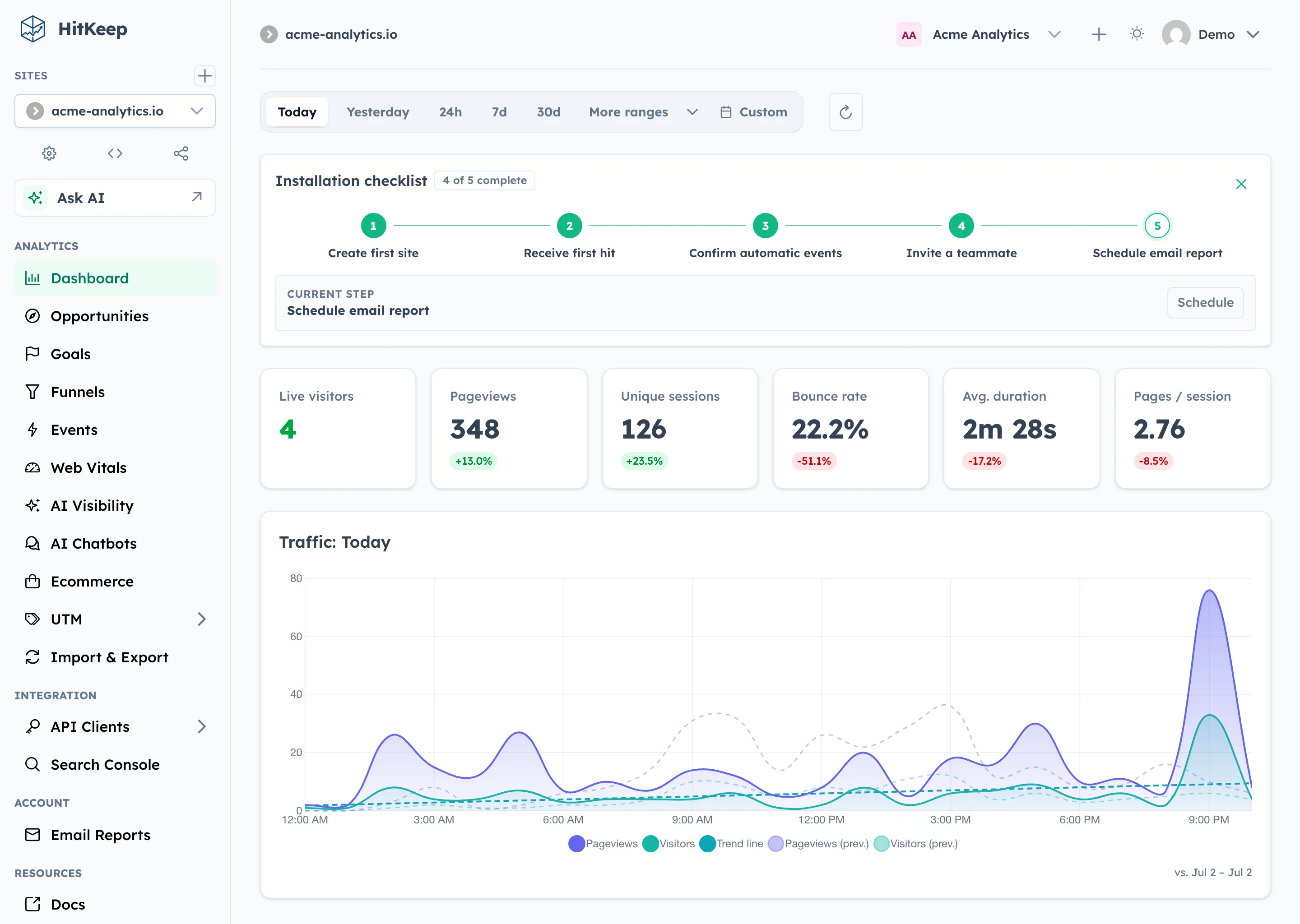
HitKeep’s edge in this comparison is simple: once you need more than a traffic pane, the product already has the deeper dashboard surface in one place.
Compliance Note
Section titled “Compliance Note”If your shortlist is driven by privacy law, read the Compliance Overview. The core difference is that HitKeep can be self-hosted or region-pinned, which helps with ownership and transfer questions, but PECR / ePrivacy analysis still depends on the current tracker behavior and your consent approach.
Why Teams Look for a Cloudflare Web Analytics Alternative
Section titled “Why Teams Look for a Cloudflare Web Analytics Alternative”Cloudflare Web Analytics is attractive because it is so easy to start with. But teams usually start looking for an alternative when they want:
- custom events instead of just traffic metrics
- funnels or conversion analysis
- ecommerce visibility
- reports they can share or email
- more control over data ownership and product workflow
That is exactly where HitKeep fits.
Where HitKeep Is Better
Section titled “Where HitKeep Is Better”1. It is a real analytics product, not just a lightweight traffic pane
Section titled “1. It is a real analytics product, not just a lightweight traffic pane”HitKeep gives you:
- traffic overview with landing pages and exit pages
- raw hits
- custom events
- goals
- funnels
- focused ecommerce with GA4-inspired events (purchase, begin_checkout, add_to_cart, view_item)
- period-over-period comparison with delta badges
- UTM reporting and a UTM builder
- email reports
- share links
That is a much deeper product than Cloudflare Web Analytics.
2. You can self-host it or use managed cloud
Section titled “2. You can self-host it or use managed cloud”Cloudflare Web Analytics is a Cloudflare service.
HitKeep lets you choose:
- self-hosted OSS using one about-100 MB Linux binary with memory use covered in Facts and Limits
- managed cloud in EU Frankfurt
- managed cloud in US Virginia
The single binary deployment has no external dependencies: embedded DuckDB with a batch appender for high-throughput ingest, embedded NSQ, and LRU caching for auth and rate limiters.
That matters if data ownership, region choice, or infrastructure control matter to you.
3. Better internal reporting and collaboration workflows
Section titled “3. Better internal reporting and collaboration workflows”HitKeep already includes:
- scheduled email reports
- shareable dashboards
- roles and permissions
- team-owned and personal API clients
- WebAuthn passkeys + TOTP MFA with recovery codes
- dashboard in 7 languages (EN, DE, ES, FR, IT, NL, PT)
That makes it much easier to use as a real internal reporting tool.
4. Better portability story
Section titled “4. Better portability story”HitKeep leans into ownership:
- takeout exports in JSON, CSV, and Parquet
- retention and Parquet archiving
- local-first storage design when self-hosted
That is much closer to “analytics we control” than “analytics as part of our CDN account.”
5. Scales with your needs
Section titled “5. Scales with your needs”For high-availability deployments, HitKeep supports clustering via HashiCorp Memberlist. For teams, it includes multi-team administration with site transfers and team-owned API clients.
Where Cloudflare Web Analytics Is Better
Section titled “Where Cloudflare Web Analytics Is Better”1. Setup is extremely easy for Cloudflare users
Section titled “1. Setup is extremely easy for Cloudflare users”Cloudflare positions Web Analytics as a lightweight product that can be enabled quickly.
Official docs:
If your only need is a simple traffic layer on top of an existing Cloudflare setup, that convenience is real.
2. Core Web Vitals and performance-adjacent metrics are a stronger part of the story
Section titled “2. Core Web Vitals and performance-adjacent metrics are a stronger part of the story”Official docs:
If your main goal is “give me lightweight traffic plus Core Web Vitals,” Cloudflare is a neat fit.
3. It is free
Section titled “3. It is free”Cloudflare Web Analytics is available at no cost. HitKeep is free to self-host, but the managed cloud has pricing.
4. It stays intentionally simple
Section titled “4. It stays intentionally simple”That is a strength for teams that do not want a broader analytics product.
Facts To Check Before Switching
Section titled “Facts To Check Before Switching”Use Facts and Limits before citing HitKeep runtime or privacy claims from this comparison.
| Check | HitKeep fact |
|---|---|
| Deployment model | Self-hosted single Linux binary or managed EU/US cloud |
| External services | Embedded DuckDB and NSQ; no PostgreSQL, Redis, Kafka, ClickHouse, separate queue, cache, or database service for core analytics |
| Binary size and memory | Current Linux release binaries are about 100 MB; recent HitKeep Cloud checks showed about 205-769 MiB of memory use |
| Storage and backups | DuckDB files live under the configured data directory; multiteam deployments include tenants/*/hitkeep.db |
| Privacy behavior | hk.js sets no analytics cookies, uses sessionStorage for session continuity, and respects DNT unless configured otherwise |
| Automatic events | outbound_click, file_download, and form_submit |
| Exports and non-replacements | JSON, CSV, Parquet, NDJSON, and XLSX where supported; HitKeep does not replace enterprise attribution, CMP, SIEM, CRM, warehouse, feature flag, or experimentation workflows |
What HitKeep Still Does Not Replace
Section titled “What HitKeep Still Does Not Replace”Compared specifically to Cloudflare Web Analytics, there are fewer “missing features” than in the GA4 or Matomo comparisons. The main trade-off is not missing capability. It is simplicity versus depth.
Cloudflare still wins if you want:
- a very lightweight built-in analytics layer
- Core Web Vitals reporting
- the fewest decisions possible
- something tightly attached to the broader Cloudflare platform
When To Choose HitKeep Instead of Cloudflare Web Analytics
Section titled “When To Choose HitKeep Instead of Cloudflare Web Analytics”Choose HitKeep when:
- you want a serious Cloudflare Web Analytics alternative
- you need events, funnels, ecommerce, reports, and sharing
- you want self-hosting or explicit EU/US managed hosting
- you want analytics that can grow past pageviews without moving to GA4
When To Choose Cloudflare Web Analytics Instead of HitKeep
Section titled “When To Choose Cloudflare Web Analytics Instead of HitKeep”Choose Cloudflare Web Analytics when:
- you mainly want simple traffic metrics and Core Web Vitals
- you are already deep in Cloudflare and want the lightest possible setup
- you do not need custom events, funnels, reports, or collaboration features
- free is a hard requirement
Migration Notes
Section titled “Migration Notes”You can run HitKeep and Cloudflare Web Analytics side by side. Add the HitKeep hk.js snippet, keep Cloudflare enabled, and compare whether automatic events, goals, funnels, and email reports answer questions Cloudflare does not cover.
Use HitKeep Cloud when you want a hosted evaluation with no server work. Use self-hosted HitKeep when you want the analytics database and exports under your own infrastructure policy.
Try HitKeep Cloud First
Section titled “Try HitKeep Cloud First”Cloudflare users often prefer hosted tools. Start with HitKeep Cloud, add one site, and keep Cloudflare Web Analytics in place until you know whether the deeper reporting is worth switching.
Frequently Asked Questions
Section titled “Frequently Asked Questions”Is HitKeep a good alternative to Cloudflare Web Analytics?
Section titled “Is HitKeep a good alternative to Cloudflare Web Analytics?”Yes, if you have outgrown basic traffic metrics. HitKeep adds goals, funnels, ecommerce tracking, email reports, shareable dashboards, and team roles. It can be self-hosted on a $6/month VPS or used as managed cloud. Cloudflare Web Analytics is better if all you need is a lightweight free traffic view with Core Web Vitals.
Can I use HitKeep alongside Cloudflare Web Analytics?
Section titled “Can I use HitKeep alongside Cloudflare Web Analytics?”Yes. Many teams keep Cloudflare Web Analytics for Core Web Vitals monitoring and use HitKeep for goals, funnels, ecommerce, and internal reporting. The two scripts are lightweight and do not conflict.
Is HitKeep GDPR compliant?
Section titled “Is HitKeep GDPR compliant?”HitKeep is designed to simplify GDPR compliance: cookie-less by default, self-hosting or EU-hosted cloud, and fewer third-party analytics transfers. Compliance depends on your deployment and legal analysis. Read the Compliance Overview.
Does HitKeep work without cookies?
Section titled “Does HitKeep work without cookies?”Yes. HitKeep uses cookie-less tracking by default. The tracker uses sessionStorage for session continuity, which is not a cookie. PECR / ePrivacy rules may still apply depending on jurisdiction.
Can I try HitKeep Cloud before replacing Cloudflare Web Analytics?
Section titled “Can I try HitKeep Cloud before replacing Cloudflare Web Analytics?”Yes. Start with one site in HitKeep Cloud, keep Cloudflare Web Analytics enabled, and compare whether HitKeep’s event, goal, funnel, and email reporting adds enough value.
Sources
Section titled “Sources”- Cloudflare Web Analytics
- Cloudflare Web Analytics: Get started
- Cloudflare Web Analytics: Data and metrics
- Cloudflare Web Analytics: Core Web Vitals