
Screenshots show the current HitKeep interface. Feature descriptions refer to this release.
If your team sends analytics to clients or stakeholders, HitKeep 2.13.0 replaces a handful of email-frequency switches with reports you can name, scope, schedule, preview, and audit. Each report has an owner, preset, sites, recipients, local delivery time, next run, and delivery history. External recipients can confirm delivery without receiving dashboard access.
The same release adds Google, GitHub, and Microsoft sign-in, publishes the typed @hitkeep/tracker package for framework applications, and prevents speculative prerenders from sending analytics before activation. Traffic exclusions now span instance, team, and site scopes, while default-tenant analytics move out of the shared control database and into an isolated tenant file.
DuckDB operation also gains serialized checkpoints and narrow, evidence-preserving recovery paths. Country, city, provider, and ASN lookups move to block-addressable embedded assets so the runtime can decode bounded portions on demand. The dashboard moves to the MIT-licensed OptimusUI component stack so HitKeep’s UI foundation remains inspectable, modifiable, and redistributable as open source.
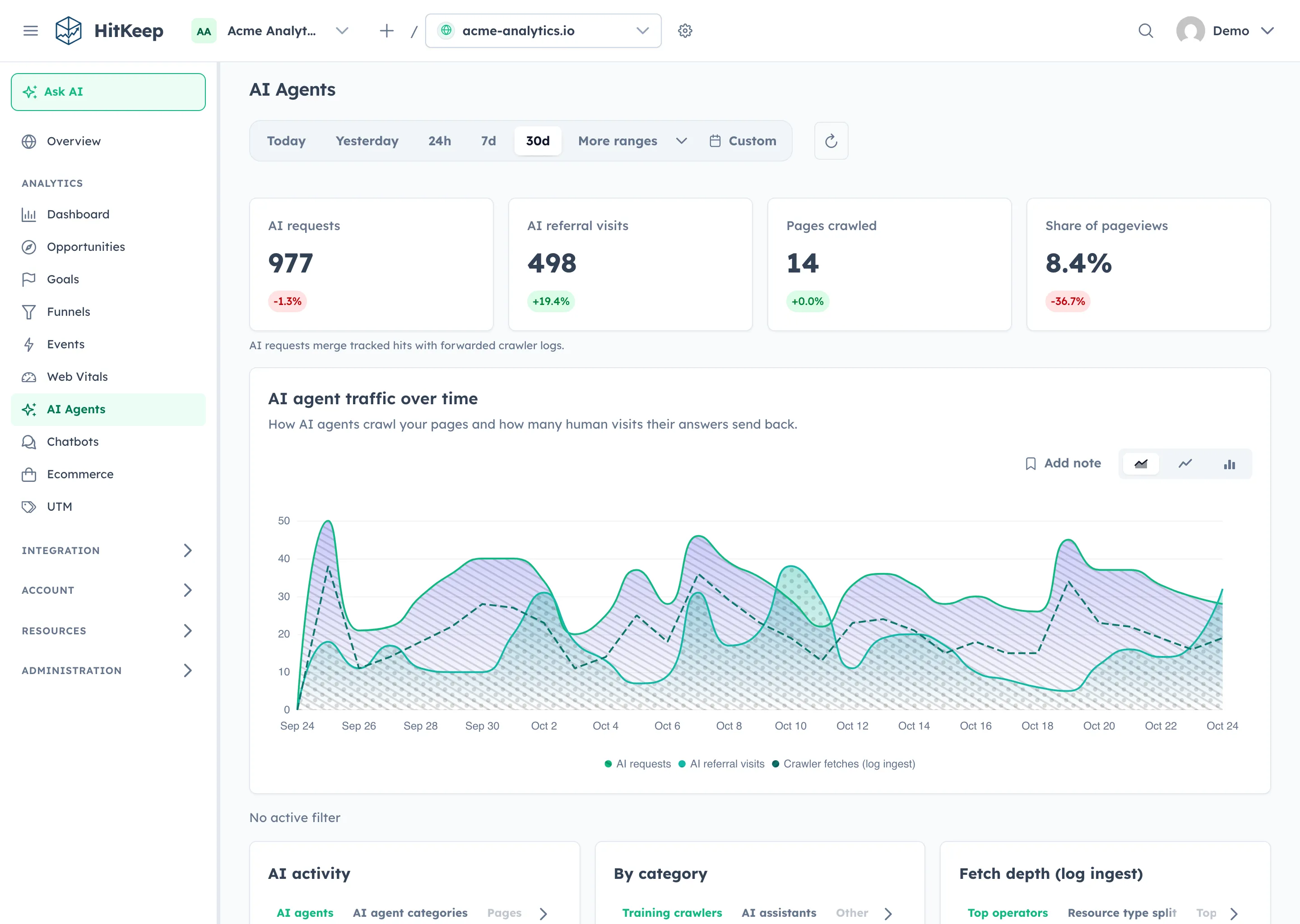
The dashboard also brings AI crawler, AI-referred, and assistant activity into one AI Agents view. The release improves the edges around that experience too: route-critical startup failures now have a reloadable recovery page, and the login screen explains whether access ended because you signed out or because the session expired.
What ships in HitKeep 2.13.0
- Configurable scheduled reports: create personal or team reports with a named preset, selected or accessible sites, an IANA timezone, a local delivery time, and daily, weekly, or monthly cadence.
- Stakeholder delivery without dashboard access: team owners and admins can add confirmed external recipients. Consent is report-specific, expires, can be withdrawn, and does not create an account or grant site access.
- Durable delivery operations: preview content, send a test to yourself, inspect runs and recipient deliveries, retry failures, and distinguish SMTP acceptance from inbox delivery.
- Google, GitHub, and Microsoft sign-in: enable only completely configured providers, use them for login or signup, link them to an existing account, and preserve invitations and MFA handoff.
- Typed browser SDK: install
@hitkeep/trackerfrom npm to initialize tracking, send custom and ecommerce events, manage component cleanup, and configure browser behavior without injecting a script tag. - Prerender-safe collection: defer pageviews, custom events, attribution, and Web Vitals until a speculative page activates, then use the activated URL and discard work for prerenders that never become visible.
- Layered traffic controls: apply CIDR, country, user-agent, or path exclusions at instance, team, or site scope, with inherited rules visible through effective API reads.
- Safer DuckDB lifecycle: serialize periodic, migration, backup, and shutdown checkpoints; retain recovery bundles before narrow repairs; and keep application WAL bypass behind explicit operator approval.
- Separate default-tenant data plane: migrate default analytics into its own tenant file, keep the control database metadata-only, and run all tenant catalogs through one attached DuckDB data-plane instance.
- Lower-overhead IP metadata: decode validated country, city, provider, and ASN blocks on demand under bounded caches instead of inflating every embedded lookup table at startup.
- Open-source dashboard foundation: replace PrimeNG and PrimeIcons with OptimusUI, OptimusUI Themes, and OpenNG Icons under the MIT license.
- AI Agents dashboard: combine AI requests, AI-referred visits, crawl depth, and pageview context with assistant activity and filterable evidence panels.
- Conversion cohorts: selecting a goal or funnel now filters dashboard KPIs, charts, dimensions, raw traffic, and exports; event-based goals can therefore measure a chosen custom event consistently across reports.
- Recoverable application states: setup, dashboard bootstrap, and other route-critical failures show a safe error page with reload guidance, while ordinary component API errors remain local to their feature.
- Accessible session-end feedback: intentional sign-out and ended sessions return to login with distinct, announced status messages and safe return-URL handling.
- Security and dependency maintenance: move Spamhaus refreshes to its JSON feeds, refresh the embedded denylist data, update Go and dashboard dependencies, fix high-severity frontend audit findings, and pin current GitHub Actions revisions.
- One contributor workflow: route setup, development sessions, screenshots, builds, smoke tests, and canonical QA through the repository-owned
hkplatform and its developer MCP surface. - Release metadata that follows the artifact: publish a checksummed configuration catalog with stable releases, then synchronize the public configuration reference and current-version facts only after release binaries and the Helm chart succeed.
Important platform updates
HitKeep 2.13.0 also refreshes the foundations underneath the product features:
- OptimusUI 1.0.0-rc.1: the dashboard moves to OptimusUI, OpenNG’s community fork of the final MIT-licensed PrimeNG codebase. HitKeep now consumes the MIT-licensed OptimusUI components, themes, and OpenNG icon packages, keeping the shipped UI code open to inspection, modification, and redistribution.
- Angular 22.0.8: Angular framework and build packages move from 22.0.5 to 22.0.8, with Angular CDK moving to 22.0.6 and Angular ESLint to 22.1.0.
- duckdb-go v2.10505.0: the embedded DuckDB driver moves from v2.10504.0 to v2.10505.0, with native bindings moving from v0.10504.0 to v0.10505.0. This sits alongside the serialized checkpoints and guarded recovery changes described below; HitKeep still embeds DuckDB in the single application binary.
- Frontend runtime updates: Web Vitals moves to 6.0, Tailwind CSS to 4.3.3, Scalar API Reference to 1.63.0, and the dashboard’s Node 24.18.0 and npm 12.0.1 requirements are pinned for reproducible installs.
- Backend maintenance: compression, Stripe, mail, AI, cryptography, Google API, AWS SDK, gRPC, and related Go modules receive bounded dependency updates without adding a required external service.
These are implementation upgrades rather than new deployment dependencies. Self-hosted HitKeep remains one Go binary with the Angular dashboard, DuckDB, and NSQ embedded.
A typed tracker for framework applications
@hitkeep/tracker packages the same tracker core as hk.js as a typed JavaScript module. It works with React, Next.js, Vue, Nuxt, Angular, Astro, and other bundler-based applications, with ESM and CommonJS entry points, included TypeScript declarations, and no runtime dependencies.
Install the package and initialize it with the public URL or custom tracking domain that should receive browser ingest:
npm install @hitkeep/trackerimport { init, track } from '@hitkeep/tracker';
init({ host: 'https://analytics.example.com' });
track('signup_clicked', { plan: 'pro' });Initialization captures the first pageview and history-based SPA navigation by default. The same configuration can enable Web Vitals, disable individual automatic events, respect Do Not Track, or turn off automatic pageviews when an application wants to call trackPageview() itself. Events called before init() are kept in a bounded queue for the first initialization.
Framework integrations can clean up listeners when their owning component unmounts. For React and the Next.js App Router, keep initialization in a client component:
'use client';
import { useEffect } from 'react';import { cleanup, init } from '@hitkeep/tracker';
export function Analytics() {  useEffect(() => {    init({ host: 'https://analytics.example.com' });    return cleanup;  }, []);
  return null;}
Typed ecommerce helpers keep the event name and required purchase fields explicit:
import { trackPurchase } from '@hitkeep/tracker';
trackPurchase({  transaction_id: 'order-1042',  value: 49.9,  currency: 'EUR',  items: [    { item_id: 'starter', item_name: 'Starter plan', quantity: 1, price: 49.9 },  ],});
The package also exports visitor opt-out controls and typed helpers for view_item, add_to_cart, and begin_checkout. It is versioned with HitKeep, so keep its major version aligned with the receiving instance. Site Settings now offers script-tag and npm installation methods with copyable examples.
The package does not create a separate privacy model. It remains cookie-free by default, follows the same session storage, retry, Do Not Track, and payload behavior as hk.js, and still requires a deployment-specific consent and ePrivacy assessment. See the @hitkeep/tracker package and Tracker Architecture for the current boundary.
Speculative pages wait for activation
Browsers can prerender a likely next page before the visitor actually opens it. HitKeep now recognizes both the current prerendering API and the legacy prerender visibility state. While a page is speculative, the tracker sends no pageview, custom event, or Web Vitals request.
If the page activates, HitKeep sends the pageview first, reads campaign and QR attribution from the activated URL, and rebinds buffered events and Web Vitals to the activated path and page ID. The activation buffer is bounded, and cleanup discards it when a prerender never becomes visible. Because hk.js and @hitkeep/tracker share the same core, the fix applies to both installation methods.
Reports become first-class definitions
The Reporting hub replaces separate digest and per-site switches with saved report definitions. Each row answers the questions an operator needs before trusting scheduled delivery: who owns the report, what it covers, who receives it, when it runs next, and how the last run ended.
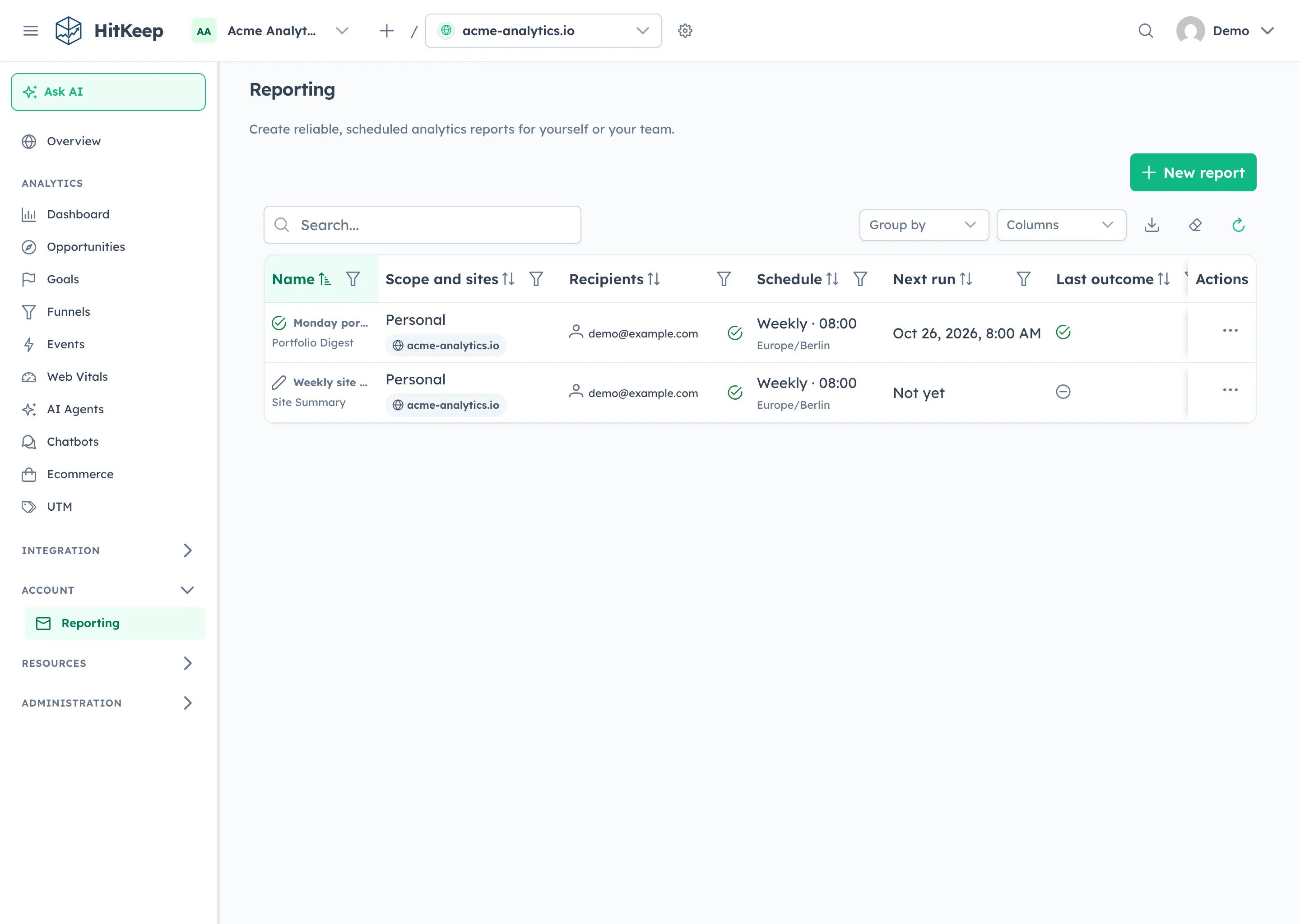
Three presets cover different jobs:
| Preset | Cadence | Main content |
|---|---|---|
| Site Summary | Daily, weekly, or monthly | Visitors, pageviews, bounce rate, session duration, goals, comparison, trend, top pages, and referrers for one site |
| Portfolio Digest | Daily, weekly, or monthly | Pageviews, visitors, goals, deltas, and site links across selected sites or every site accessible to a personal report owner |
| Opportunity Brief | Daily or weekly | Saved, validated Opportunity Recommendations and their cited evidence |
Opportunity Brief does not start a model run. It reads already saved recommendations and suppresses an empty report when none passes the deterministic quality rules.
Schedules use the report’s timezone rather than a server-local assumption. New reports default to 08:00 in the browser-detected timezone, allow 15-minute delivery increments, and recalculate the UTC run after schedule changes and daylight-saving transitions. Weekly reports choose a weekday. Monthly reports choose a day from 1 through 28.
Personal reports belong to one user and send only to that user. Team reports use explicitly selected sites and can include members plus up to 25 external addresses. On HitKeep Cloud, external recipients are available with Pro and Business; self-hosted HitKeep does not apply that plan gate.
An external address receives a seven-day, single-use confirmation that names the team, cadence, and selected domains. HitKeep stores a SHA-256 hash of the confirmation token, not the token itself. Changing the preset, sites, or frequency requires renewed consent. Renaming a report or changing only its delivery time does not. External mail contains the report content but omits dashboard and site links.
The delivery worker records report runs and per-recipient outcomes before mail is attempted. SMTP failures retry after 5 minutes, 30 minutes, and 2 hours with the same Message-ID. A restart catches up at most one missed occurrence inside bounded daily, weekly, or monthly windows. Delivery records retain status, attempt count, timestamps, and safe error codes, but not rendered email bodies, remote tracking images, click tracking, or a snapshot of an external email address.
Migrate report API clients before upgrading
The database migration converts existing enabled report settings into report definitions at 08:00 UTC so their previous delivery time remains unchanged. Disabled settings remain disabled and are not materialized. After that migration, the old handlers and old subscription storage are gone; requests to the removed routes return 404.
Use this mapping when updating a session-authenticated client:
| HitKeep 2.12 operation | HitKeep 2.13 replacement |
|---|---|
GET /api/user/report-subscriptions | GET /api/reports |
PUT /api/user/report-subscriptions/digest | POST /api/reports to create, then PATCH /api/reports/{report_id} to update a personal Portfolio Digest |
PUT /api/user/report-subscriptions/sites/{site_id} | POST /api/reports to create, then PATCH /api/reports/{report_id} to update a personal Site Summary |
DigestSubscription | ReportSchedule inside ReportDefinitionInput or ReportDefinitionUpdate |
SiteReportSubscription and ReportSubscriptions | ReportDefinition, ReportRecipient, ReportRun, and ReportDelivery |
The replacement surface also adds operations for preview, test send, run history, failed-run retry, external-recipient confirmation, unsubscribe, and resubscribe. Generated clients should refresh from the 2.13 OpenAPI document because the removed schemas will no longer be present.
Other API changes in this release are additive. Social-authentication paths, team traffic-exclusion paths, database-status operations, and the report-definition paths are new. Existing instance and site exclusion creation payloads remain valid, including the legacy CIDR form that omits type. Exclusion responses retain their existing value fields and add scope, optional owner IDs, and inherited.
Social sign-in without replacing existing login methods
Self-hosted operators can configure OAuth client pairs for Google, GitHub, Microsoft, or any subset of the three. HitKeep lists only providers with a complete configuration. On managed Cloud, open social signup has its own switch, so a provider can remain available for existing accounts and invitations without allowing uninvited account creation. On self-hosted HitKeep, configuring HITKEEP_SOCIAL_SIGNUP_ENABLED does not create open public signup.
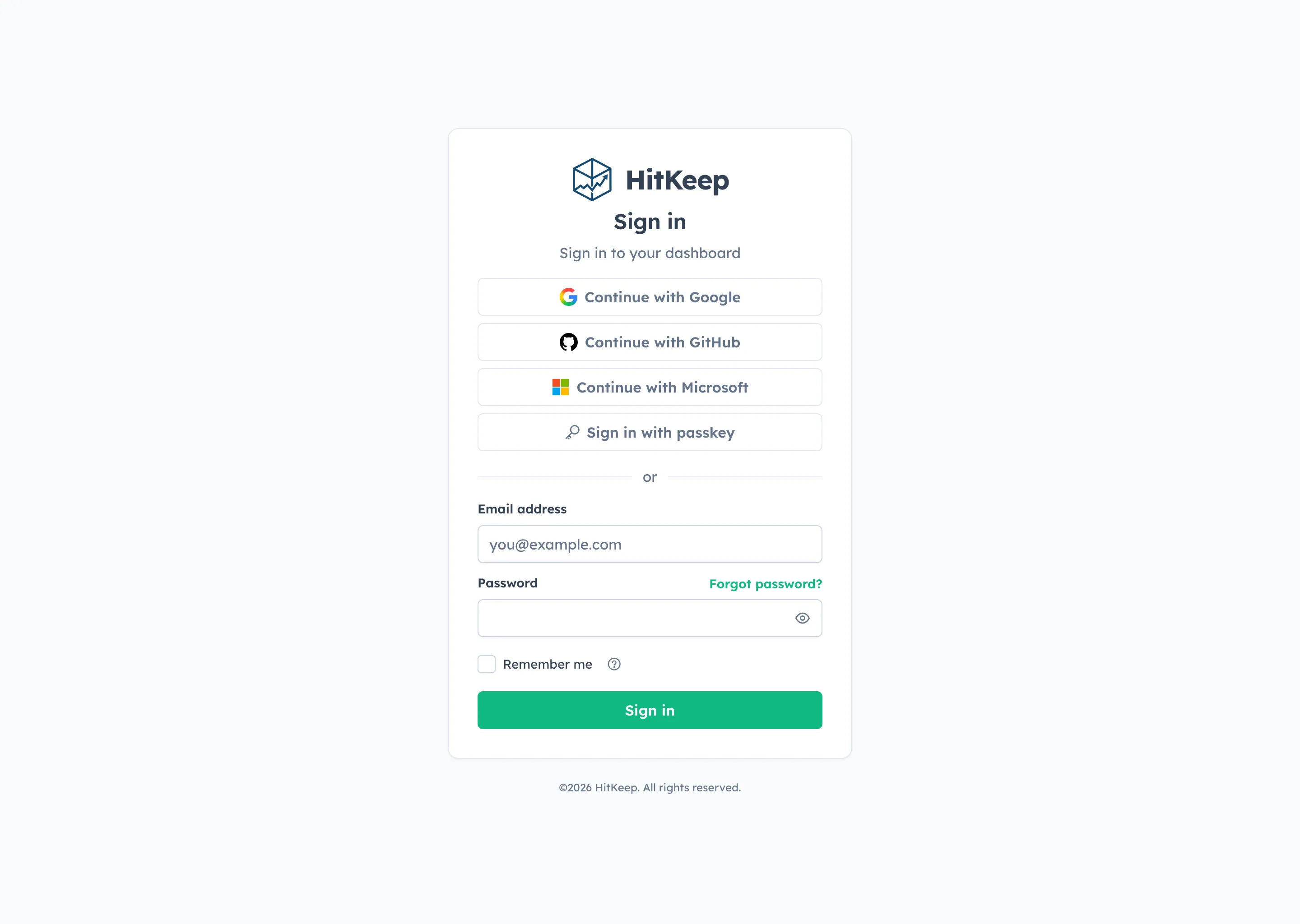
The browser flow uses short-lived, one-time state, PKCE S256, and an OIDC nonce where the provider supports OIDC. Return URLs stay inside the application. HitKeep resolves an account through the provider’s immutable identity, discards provider tokens after the exchange, and never treats an editable email address as the long-term identity key.
Google and GitHub verified-email flows can complete a normal signup without another email verification step. Microsoft identities do not provide the same verified-email guarantee, so the first unauthenticated Microsoft link or signup sends a HitKeep confirmation unless an authenticated session or matching invitation already proves the account boundary.
An authenticated user can link or unlink a social provider from security settings. Unlinking is refused when it would remove the last usable primary login method, and password-only fallback requires current-password confirmation. Team OIDC SSO and recovery factors do not count as primary alternatives for that guard.
The Social Sign-In guide provides the exact callback URLs, tabbed Google, GitHub, and Microsoft setup, Docker Compose variables, verified-email rules, invitations, MFA handoff, account linking, rollout checks, and troubleshooting.
Traffic controls follow ownership
Traffic exclusions now use the same ownership structure as the rest of HitKeep. Instance rules apply everywhere. Team rules follow every site currently owned by that team. Site rules stay attached to one site. Effective reads make inherited rules visible, but a team or site route cannot modify a rule owned by a parent scope.
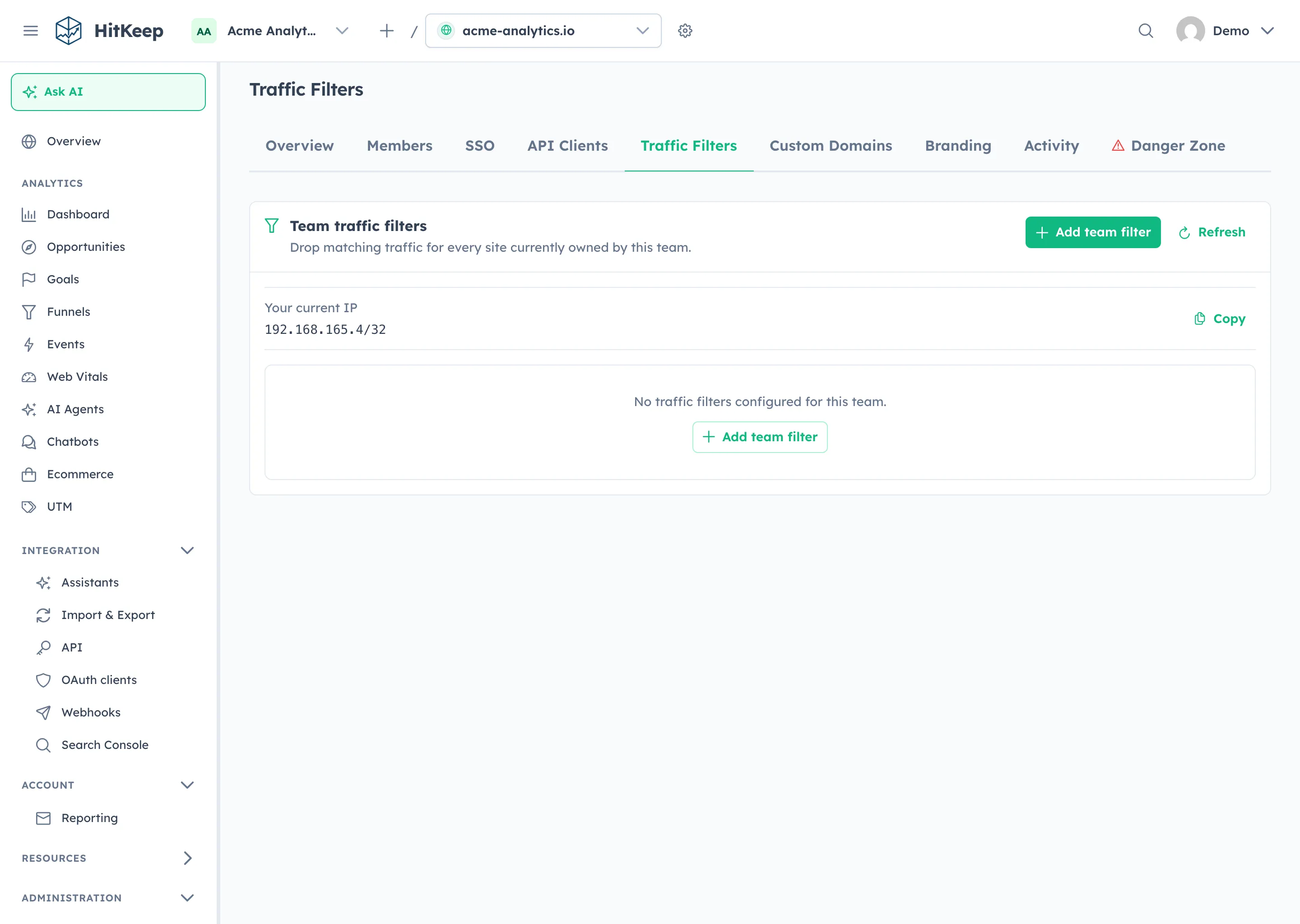
Rules are additive and forward-only. HitKeep evaluates instance, current-team, and site rules, then drops a record when any rule matches. There are no allow overrides, and changing a rule does not rewrite historical analytics.
The two new match types cover traffic that network and country rules cannot express cleanly:
- User agent: case-insensitive substring matching for monitors, known clients, or other identifiable traffic.
- Path: case-sensitive segment-boundary matching after query strings, fragments, duplicate slashes, trailing slashes, and dot segments are normalized.
/adminmatches/admin/users, but not/administrator.
User-agent and path values are used transiently during filtering and do not add stored visitor fields. Filtering covers browser pageviews and events, Web Vitals, trusted server ingest, AI-fetch records, and dynamic QR opens. Matching ingest keeps its normal accepted response so the API does not reveal which filter matched.
Analytics leaves the shared control plane
Version 2.13.0 completes the database boundary for the original default tenant. The shared hitkeep.db keeps users, sessions, teams, memberships, sites, preferences, API clients, share links, and other ownership metadata. Analytics rows for every tenant, including the default tenant, live in tenant-local DuckDB files under {data-path}/tenants/{tenant-id}/hitkeep.db.
The control plane resolves who can access a site and which tenant owns it. Analytics reads and writes then use the resolved tenant data plane; they do not join analytics tables back into the control database. Tenant catalogs run through the attached DuckDB data-plane layer while the control database remains metadata-only.
On the first 2.13 startup, HitKeep creates the default tenant file, verifies the migrated analytics data, records durable split markers, and rewrites the shared file. Keep the complete data path available throughout the operation. Copying only hitkeep.db after the upgrade produces an incomplete backup because it omits every tenant’s analytics database. The built-in backup and S3 restore paths cover the control snapshot and the tenant files derived from it.
Most upgrades need only the normal process replacement. The extra restart is required only when guarded automatic recovery ran first: HitKeep exits rather than combining recovery and the mandatory split in one process. If a service manager or container policy does not restart it automatically, start the same 2.13 release again, watch the migration logs, and wait for /readyz before returning traffic. Once the split markers are committed, use the complete pre-upgrade backup for rollback instead of starting 2.12 against the new layout.
Recovery preserves evidence before repair
DuckDB is embedded, but it still has a write-ahead log, checkpoint behavior, indexes, and failure modes that need explicit operating rules. Version 2.13.0 serializes periodic checkpoints and requires checkpoints around migrations, before backups, and during clean shutdown. An instance operator can inspect the sanitized database state and request an immediate checkpoint from System Status or the new admin API.
Automatic repair remains intentionally narrow. For the recognized non-unique-index invalidation, HitKeep first creates a permission-restricted, checksummed recovery bundle, then removes only implicated non-unique secondary indexes. Primary-key and unique indexes stay intact. A repair that finds no eligible index fails closed instead of reporting a false success.
The known migration WAL failure has a separate guard. Startup migrations run before the store is published to workers, commit and checkpoint independently, and record a durable checksum for the closed base database while a migration WAL remains authoritative. HitKeep can complete migration-only WAL recovery automatically only when that checksum matches. Bypassing an application WAL remains disabled by default because committed changes may exist only in that WAL; HITKEEP_DB_AUTO_RECOVER_WAL=true is an explicit availability-versus-data-loss decision.
While a shared or open tenant database is recovering, /healthz continues to report process liveness, while /readyz and database-dependent API or ingest routes return 503 with a stable reason and Retry-After: 5. If recovery cannot preserve evidence, verify disk space, or drain open connections, HitKeep stops instead of serving partial data.
Recovery bundles are local incident artifacts, not backup rotation. They can contain the same sensitive data as the live database and are never deleted automatically. Keep backing up the complete data path, including tenant databases, and keep recovery-bundle retention in the operator runbook.
Smaller, bounded IP metadata work
HitKeep still derives country, region, city, provider, ASN, and ASN organization from embedded IP metadata without storing the raw visitor IP. The implementation now stores validated address directories and compressed blocks instead of inflating the full country, city, and network datasets at startup.
Lookup decodes only the block needed for an address, validates length, ordering, metadata references, and checksums, and keeps decoded data under separate bounded country, city, and ASN caches. The result keeps the same analytics dimensions while reducing embedded asset size and putting an upper bound on decoded range-block memory.
The bundled spam filter also moves from legacy Spamhaus feed handling to the provider’s JSON data, with schema validation and a refreshed default snapshot. Production filtering remains embedded and deterministic; a release does not need a runtime download token to start protecting ingest.
Contributor and release workflows become reproducible
For contributors, the new ./hk launcher is the source of truth for toolchain diagnosis, isolated workspace state, container-only development, screenshots, builds, smokes, and QA. A central developer MCP adapter exposes those operations to supported coding clients without giving them arbitrary shell execution or source-rewrite access.
Development is now one workspace session with status and event cursors. Finite setup, QA, build, and smoke operations use durable run IDs and bounded logs. That distinction lets a slow e2e or image gate continue even if one client disconnects, and lets contributors resume the exact run instead of starting a duplicate.
Release preparation receives the same treatment. Release Please owns the version manifest, changelog, dashboard package versions, MCP registry version, and Helm chart version. After a stable release is created, the release workflow builds and uploads binaries, checksums, the Helm chart, and hitkeep-configuration.json. Only after those artifacts succeed does it synchronize the docs repository’s machine-owned current-version and configuration files, validate the site, deploy that exact revision, and trigger the managed-cloud rollout.
Upgrade checklist
- Back up the complete HitKeep data path and verify at least one recent restore before changing the running binary.
- Update any client that calls the three removed report-subscription routes, then regenerate typed clients from the 2.13 OpenAPI schema.
- Ensure the data path has enough free space for one source-database-sized tenant copy plus 512 MiB, and confirm the service manager or container policy can restart the same 2.13 release if recovery exits first.
- Upgrade HitKeep and let migrations finish before accepting traffic. If HitKeep reports that automatic recovery completed and a restart is required, start the same 2.13 binary or container again and wait for
/readyz; do not downgrade. Existing enabled report subscriptions become reports at 08:00 UTC. - Open Settings → Reporting, verify converted reports, choose a local timezone and time where needed, and send a test through the configured SMTP transport.
- If you add external recipients, confirm the consent invitation in a separate browser and verify that the delivery omits dashboard links.
- If you enable social sign-in, register the exact callback derived from
HITKEEP_PUBLIC_URL, configure only the providers you intend to expose, and test login, invitation, MFA, linking, and last-login-method protection. - Review instance, team, and site traffic filters with
effective=trueor the dashboard scope labels, especially after site transfers. - Confirm
HITKEEP_DB_RECOVERY_PATHhas suitable free space, keep application WAL bypass disabled unless incident policy explicitly accepts its loss boundary, and monitor readiness during the first restart.
What does not change
HitKeep 2.13.0 keeps the same product boundary:
- one Go binary with the Angular dashboard embedded;
- DuckDB for storage and NSQ running in process;
- no required PostgreSQL, Redis, Kafka, ClickHouse, or separate report worker;
- cookie-free browser tracking by default;
- no raw visitor IP stored in analytics;
- open exports and complete account takeout; and
- the same open-source product foundation for self-hosted and managed cloud.
Scheduled reports add durable outbound mail delivery. Social sign-in adds optional provider connections. Recovery and traffic controls harden operation. None of them add a required external database, queue, cache, or identity service.
Read more
- Scheduled Email Reports
- REST API Reference
- Configure Social Sign-In
@hitkeep/trackeron npm- Tracker Architecture
- Traffic Exclusions and IP Filtering
- Teams and Data Isolation
- Disaster Recovery Runbook
- Backups and Restore
- Architecture and data lifecycle
- Runtime facts and limits
- Contributing to HitKeep
Self-hosted HitKeep includes scheduled reports, social sign-in, the typed tracker SDK, isolated tenant analytics, layered traffic controls, and guarded recovery in the same binary. If you want managed email delivery, backups, upgrades, and regional hosting, start a managed HitKeep Cloud deployment.