
AI browser tracking is not one new analytics channel. Some AI browsers read a page already open in a person’s browser. Some navigate across tabs and click through a workflow. Others retrieve content remotely without rendering your JavaScript at all.
That distinction matters more than the browser brand. A normal pageview, an AI-referred visit, a server-side crawler fetch, and a completed signup answer four different questions. Combining them into one “AI traffic” number creates a neat chart and a poor measurement system.
This guide explains how AI browsers affect pageviews, attribution, events, bot filtering, and privacy-first analytics. It also gives you a practical measurement plan that works even while the products and their names keep changing.
What AI browser tracking can and cannot see
The short answer depends on how the page or outcome was reached:
| AI-mediated activity | Observable evidence |
|---|---|
| A person opens a rendered page | Browser: usually visible when the tracker runs. Server: visible as a normal request. Backend: visible only if an outcome occurs. |
| A person clicks an AI assistant referral | Browser: usually visible, sometimes with a recognizable referrer. Server: visible as a normal request. Backend: visible only if an outcome occurs. |
| A remote agent or crawler fetches a page | Browser: usually invisible because JavaScript does not run. Server: often visible. Backend: usually absent. |
| An assistant answers without visiting | Browser: invisible. Server: invisible for that answer. Backend: absent. |
| A person or agent completes a signup or purchase | Browser: supporting events may be visible. Server: partially visible. Backend: the best source of truth. |
No single row identifies an “AI browser session” with certainty. Reliable AI browser analytics keeps browser pageviews, AI referrals, server-side crawler records, and confirmed outcomes separate.
Use this guide to:
- Understand the four modes of AI-mediated browsing
- See what happens to pageviews and attribution
- Compare GA4, browser tracking, and server-side evidence
- Build a privacy-first measurement plan
- Run a repeatable browser test
Separate four kinds of AI-mediated activity
Start by identifying how the content reached the model or the person. The collection path changes with it.
On-page assistance
- What happened: A person opened your page, then asked the browser to summarize or explain it.
- What analytics can observe: The rendered pageview and any normal browser events. The follow-up questions usually remain inside the browser or assistant.
Agent navigation
- What happened: An assistant opened pages, clicked controls, or filled fields in a visible browser session.
- What analytics can observe: Pageviews and DOM-based events may run. Your site may not have a reliable signal that an agent performed the action.
Remote retrieval
- What happened: A crawler or remote service fetched the page without running the browser tracker.
- What analytics can observe: Edge, CDN, proxy, or origin logs. Client-side analytics usually sees nothing.
Answer without a visit
- What happened: The assistant answered from an index, memory, or previously retrieved content and never opened your site.
- What analytics can observe: No direct pageview. Search reporting, later referrals, and business outcomes provide indirect context, not proof of exposure.
These modes can occur within one user task. A browser might summarize an open page, fetch another source remotely, and then navigate to a third site to complete an action. The analytics records will not necessarily share one identifier or attribution chain.
Which AI browsers matter in 2026?
The dedicated alternatives are now familiar. Perplexity describes Comet as a Chromium-based browser with built-in AI capabilities. Dia focuses on working across tabs and connected services to prepare briefs, synthesize information, and answer questions from a user’s wider context.
The established browsers are moving in the same direction:
- Gemini in Chrome can summarize pages, use context from multiple tabs, and work with Google services.
- Browse with Copilot can select, type, and navigate inside an Edge tab while the user watches or takes control.
- Firefox AI controls let people disable all supported AI features or manage them individually.
- Brave’s agentic browsing test uses a separate profile and explicit action cues, while Brave also warns that browser agents introduce privacy and security risks.
Product availability can change faster than an analytics implementation. OpenAI launched Atlas in October 2025, but its current support guidance says Atlas will stop working on August 9, 2026 as browser-based agentic work moves into other OpenAI surfaces.
The durable trend is not a particular browser. It is the addition of an assistant that can read page context, combine information across tabs, and sometimes act inside a rendered browsing session.
Compare context, control, and data flow before choosing
Feature lists make AI browsers look more similar than they are. For individuals and teams, the important differences sit underneath the summary button.
Ask five questions before standardizing on one:
- What context can the assistant read? Distinguish the current page from other tabs, history, connected email or calendar accounts, cookies, saved credentials, local files, and form input.
- What can it do? Summarizing a page has a different risk boundary from selecting, typing, navigating, submitting a form, or approving an irreversible action.
- Where is the context processed and retained? Check what stays on the device, what goes to the provider or its model partners, whether content can be used for product improvement, and how deletion works.
- What controls exist? Look for opt-in behavior, site blocks, isolated profiles, action previews, interruption, administrator policies, and a way to disable the assistant.
- Who can use the feature today? Platform, region, account, rollout cohort, and subscription requirements can matter as much as the product name.
The current products show why this review matters:
- Comet’s privacy guidance says browsing history, the full tab list, cookies, passwords, local files, and typed input stay on the device by default. Requests can send the context needed for a summary or task, and some assistant context can be retained for up to 30 days. Users can disable the assistant or block it on specific sites.
- Dia’s privacy and security documentation explains that relevant request context can pass through Dia’s servers and model providers. Content sharing for product improvement can be disabled, and write actions require review before they proceed.
- Gemini in Chrome can use open-tab context and offers an agentic auto-browse mode, but current availability depends on account, subscription, and region.
- Browse with Copilot can select, type, and navigate in a visible Edge tab. Microsoft documents current rollout limits, access to open tabs and signed-in cookies, and warnings for sensitive workflows.
- Firefox AI controls let people block all supported generative AI features or manage them individually.
- Brave’s agentic browsing test is opt-in and uses an isolated browsing profile so the agent does not inherit the normal profile’s cookies and logged-in state.
For analytics teams, these differences affect test coverage and traffic quality, but they do not create a standard “AI browser” flag that a website can trust. Measure the observable request or outcome instead of inferring the assistant from the browser brand.
Pageviews still work, but they mean less on their own
A pageview remains a useful statement: the page rendered and the tracking code ran. AI browsers do not make that false.
What changes is the relationship between the pageview and the amount of content consumed. One rendered page may support several summaries, comparisons, or questions without another navigation. At the other extreme, an assistant may extract enough information remotely that no pageview occurs.
Use pageviews for reach and navigation analysis, but do not treat them as a complete measure of attention. Pair them with:
- landing pages and referrers for acquisition context;
- custom events for meaningful interactions;
- goals and funnels for business progress;
- server-confirmed events for outcomes that must be accurate; and
- AI crawler fetch records for non-rendered retrieval.
This is also why a sudden drop in pageviews does not prove that AI browsers took the traffic. Check search impressions, click-through rate, rankings, campaign changes, tracker delivery, consent behavior, and affected landing pages before assigning a cause.
Attribution needs conservative labels
An AI assistant referral is not the same thing as an AI browser session.
If someone clicks a link from ChatGPT, Perplexity, Claude, or another assistant, the destination may receive a recognizable referrer. That belongs in AI referral reporting. If someone types your URL in Comet or opens a bookmark in Dia, the visit may look like any other direct or browser visit. If an assistant opens a page inside a normal tab, the referrer depends on the navigation path and browser policy.
Do not manufacture certainty by labelling every visit from an AI-capable browser as “AI traffic.” Record the evidence you have:
- referrer host;
- campaign parameters;
- landing page;
- timestamp;
- user agent where your privacy policy and collection design allow it; and
- downstream goal or revenue outcome.
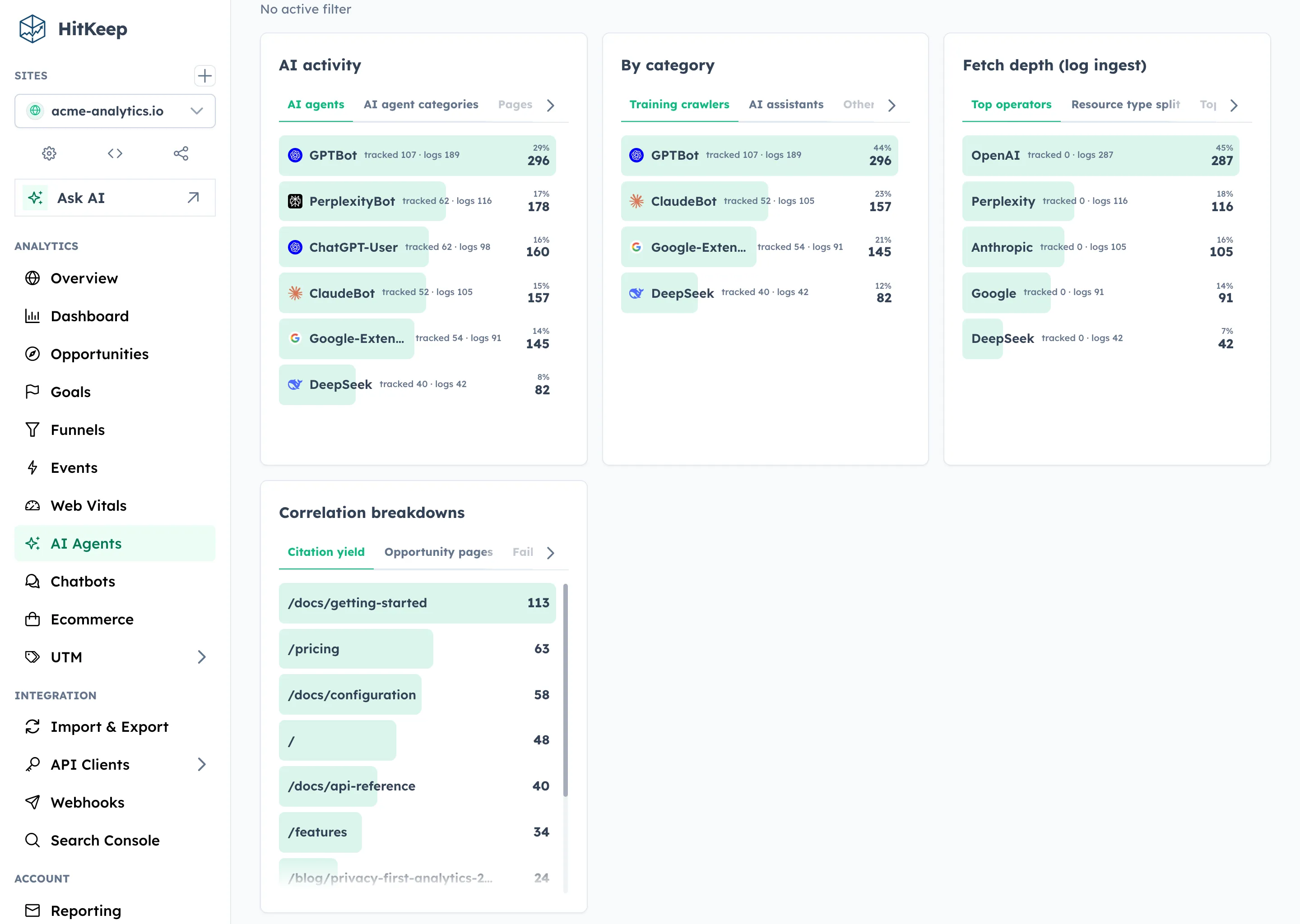
Then classify conservatively. HitKeep’s AI Visibility report keeps AI-referred human visits separate from AI crawler fetches for this reason. A fetch shows that an identified crawler requested a path. A referral shows that a person later arrived from an assistant. Neither signal proves that the assistant cited the page or that the fetch caused the visit.
Can GA4 track AI browser traffic?
GA4 can record an AI browser visit when the page renders, the Google tag runs, and the request is not blocked. It can also attribute some visits from ChatGPT, Perplexity, Claude, and similar services when the destination receives a recognizable referrer or campaign parameter.
That does not make every visit in Comet, Dia, Chrome, Edge, Firefox, or Brave identifiable as AI-mediated traffic. A direct visit can still look direct, an agent action inside a rendered tab can resemble an ordinary interaction, and remote retrieval usually does not execute the Google tag.
Use GA4 or another client-side analytics tool for rendered sessions and visible referrals. Use edge or origin records for crawler fetches, and use backend events for confirmed outcomes. The AI traffic analytics alternative to GA4 comparison shows where HitKeep adds server-side AI crawler reporting and fetch-to-visit correlation without replacing GA4’s Google Ads, app analytics, or exploration workflows.
Critical events should be confirmed on the server
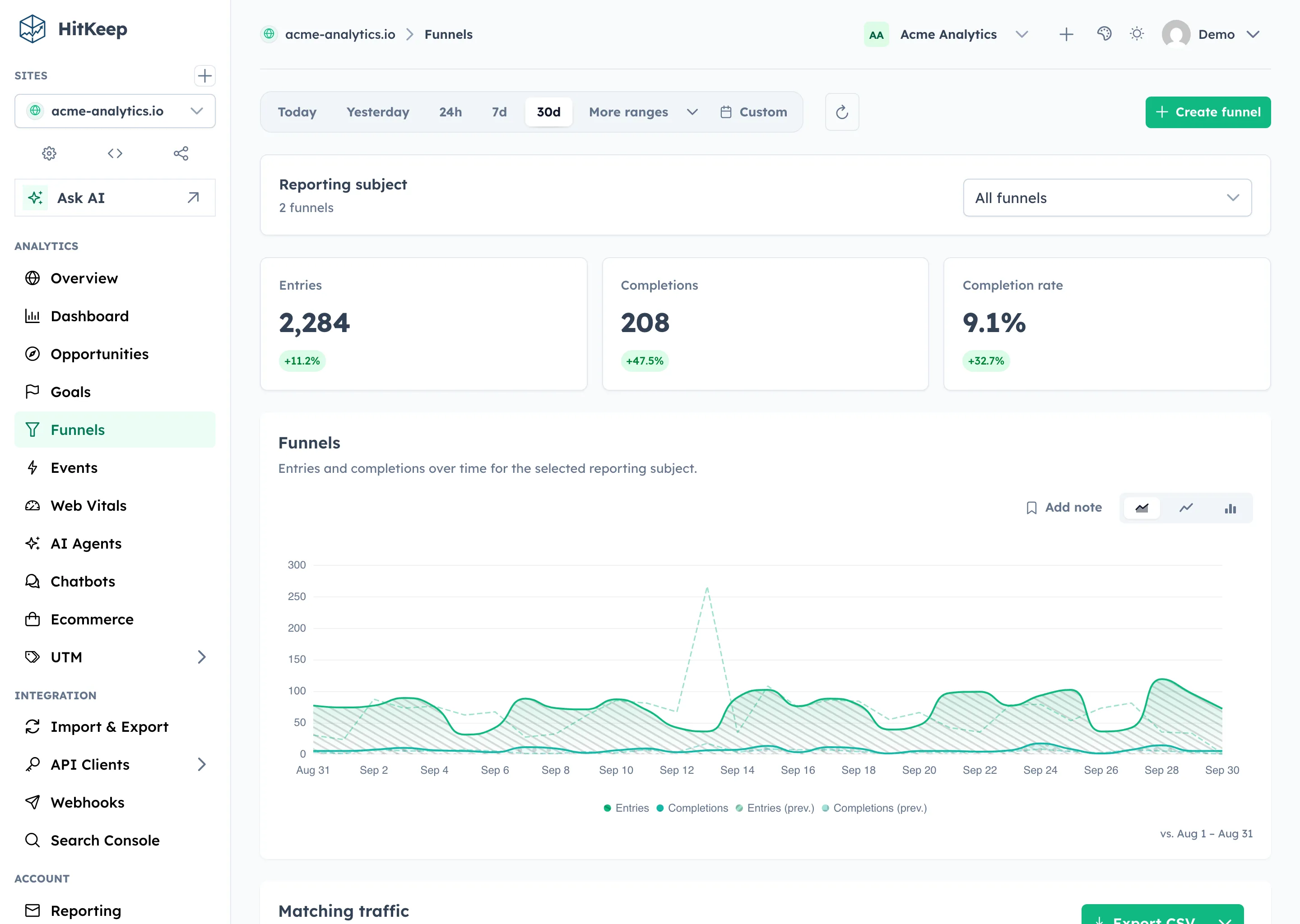
Browser agents can click buttons, fill forms, and move through checkout steps. Automatic browser events may record those interactions if the page and tracker run normally. They are useful for understanding the path.
The final business outcome should come from the system that accepted it:
- emit a signup-complete event after the account exists;
- emit a purchase event after the order or payment is confirmed;
- record a subscription change after the billing system accepts it;
- record a lead after the backend accepts the form, not only when the submit button is clicked; and
- use idempotent event handling where retries could create duplicates.
Server-side tracking gives these events a collection path that does not depend on the agent, browser extension, content blocker, page lifecycle, or client connection finishing a beacon request.
This does not mean moving every interaction to the backend. Keep low-risk navigation and engagement events in the browser. Move the outcomes used for revenue, activation, provisioning, or operational decisions to the server.
Do not turn every assisted session into a bot
An AI-capable browser may still represent a person making decisions. Blocking or discarding the session because an assistant helped with the workflow can remove valid visits and conversions.
Known crawler requests are different. They usually arrive through identifiable user-agent families, do not execute your browser tracker, and should be measured at the edge or origin. HitKeep’s AI fetch ingest accepts matching crawler records separately from normal pageviews.
Use a narrow classification policy:
- Treat a rendered visit as a visit unless you have strong evidence that it is invalid traffic.
- Keep known AI crawler fetches in a separate server-side dataset.
- Apply spam filtering to known abusive networks and impossible behavior.
- Avoid browser fingerprinting added only to guess whether an assistant was involved.
- Preserve an “unknown” category when the evidence does not support a stronger label.
That approach produces less certainty on individual sessions and more trustworthy totals.
A privacy-first measurement plan for AI browsers
You do not need a larger tracking surface. You need a clearer mapping from business questions to evidence.
- Did a page render for a visitor? Use a pageview from the cookie-less browser tracker.
- Did an assistant send a person to the site? Use the referrer and landing page from browser tracking and AI referral reporting.
- Did an AI crawler request the content? Record the path, crawler family, status, and timestamp from edge, CDN, proxy, or origin logs.
- Did the person or agent complete an important outcome? Emit a confirmed conversion event from the application or commerce backend.
- Did the workflow progress before completion? Use custom events and funnel steps, with server events for critical stages.
- Can we recheck the classification later? Keep portable event records through open exports and takeout.
Collect the minimum fields needed for those questions. A privacy-first setup should resist the temptation to add persistent identifiers or fingerprinting because browser behavior became harder to classify.
HitKeep uses cookie-less event tracking by default, supports browser and server-side events, and keeps AI referrals and crawler fetches as separate reports. Consent and legal requirements still depend on your full deployment, purpose, configuration, and jurisdiction.
Managed cloud or self-hosted analytics?
The browser measurement model does not change with the deployment model. Both managed and self-hosted analytics still need browser tracking for rendered visits, server-confirmed events for critical outcomes, and edge or origin records for non-rendered crawler fetches.
The choice changes which operating and governance responsibilities your team owns.
Choose HitKeep Cloud when you want:
- a faster pilot without operating the analytics runtime;
- managed upgrades, backups, SMTP, and day-two operations;
- a region-pinned deployment in Frankfurt or Virginia; and
- the same self-service export paths without managing the storage and backup infrastructure yourself.
Choose self-hosted HitKeep when you want:
- direct control over the runtime, data directory, network boundary, backup targets, and upgrade schedule;
- analytics data to remain inside infrastructure you operate;
- a single Go binary with DuckDB and NSQ embedded instead of separate database and queue services; and
- the responsibility to configure retention, backups, email, TLS, monitoring, and recovery.
Neither option recovers an interaction that never reached your site. Deployment is an operating decision; the collection paths described in this article are the measurement decision.
Test the browsers instead of assuming
Run a small repeatable test whenever a browser or assistant becomes important to your audience.
- Open a tagged test landing page manually.
- Ask the assistant to summarize the page without navigating away.
- Ask it to open a second tagged page.
- Let it complete a harmless test workflow, such as a sandbox signup.
- Check the browser pageviews, custom events, backend confirmation, referrer, and server logs.
- Repeat with privacy protections or content blocking enabled.
Record the result in a dated worksheet:
| Test field | What to record |
|---|---|
| Product and version | Browser, assistant feature, build, platform, account type, and region |
| Page rendered | Whether the tagged page visibly opened |
| Browser tracker | Whether the pageview and expected browser events arrived |
| Referrer and campaign | The referrer value, campaign parameters, or absence of both |
| Server request | Whether the edge, proxy, CDN, or origin recorded a request |
| Backend outcome | Whether the application confirmed the test signup, lead, or purchase |
| Controls | Content blocking, privacy mode, isolated profile, and assistant permissions |
Document what you observed, including the browser version and date. Do not turn one result into a permanent product assumption. AI browser features are frequently gated by platform, region, account type, rollout cohort, and user settings. This article therefore describes durable measurement boundaries instead of claiming one permanent result for every Comet, Dia, or incumbent-browser release.
For crawler tests, use server logs instead of the visible browser. The AI crawler logs versus AI referral traffic guide explains why those datasets answer different questions.
What to watch over the next 6 to 12 months
Treat these as instrumentation watchpoints, not predictions:
- The gap between discovery and visits. Compare search impressions, AI crawler fetches, AI referrals, pageviews, and conversions separately. A growing gap can justify investigation, but no single series proves that an assistant summarized the page.
- Agent identification standards. Watch for stable, documented request headers, crawler identities, or opt-in browser signals. Do not build production classification around an experiment until its semantics and privacy boundary are clear.
- Feature availability. Record browser version, platform, region, account type, and test date. Agentic modes frequently move between experiments, subscriptions, and general availability.
- Security and privacy controls. Isolated profiles, per-site blocks, administrator policies, and model-context choices can change which events or authenticated states appear in a test.
- Your ability to re-run the analysis. Preserve baselines and export samples so a new classification rule can be tested against historical records instead of only future traffic.
Small, repeatable checks are more useful than a large one-time instrumentation rewrite.
A practical 30-day checklist
If AI-mediated browsing is relevant to your acquisition or product flow, use this sequence:
- List the metrics that drive decisions. Remove events that nobody uses.
- Record a baseline by referrer, landing page, goal, and funnel before changing the tracking setup.
- Move signup, purchase, and other critical outcomes to server-confirmed events.
- Forward known AI crawler requests from the edge or origin if content discovery matters.
- Test the AI browsers and incumbent AI features your audience actually uses.
- Review false bot classifications and keep ambiguous rendered visits out of crawler totals.
- Export a sample dataset and confirm that the team can re-run the analysis outside the dashboard.
The aim is not to identify every model interaction. It is to preserve reliable answers about reach, acquisition, conversion, and content retrieval while the browser layer changes.
Where HitKeep fits
HitKeep provides the measurement paths covered in this article:
- cookie-less browser pageviews and automatic outbound, download, and form events;
- custom browser and server-side events;
- goals, funnels, ecommerce, and UTM reporting;
- AI-referred visit reporting;
- server-side AI crawler fetch ingest and correlation views; and
- exports through takeout in CSV, Parquet, JSON, NDJSON, and XLSX where supported.
You can self-host the same open-source foundation as one Go binary with embedded DuckDB and NSQ, or use HitKeep Cloud in the EU or US when managed upgrades, backups, and day-two operations are the better fit.